Custom API Gateway
이 콘텐츠는 아직 번역되지 않았습니다.
The Custom API Gateway allows you to register custom HTTP routes that are reverse-proxied through the platform’s gateway infrastructure. Each route maps a public-facing URL path to an internal target service, with support for environment-scoped isolation.
Environment Scoping
Section titled “Environment Scoping”Custom API routes are scoped per environment. When you create a route, it is associated with the currently selected environment. Routes in one environment are completely independent from routes in another.
When branching a new environment with the Gateway routes copy option enabled, all routes from the source environment are duplicated into the new one. Each copied route receives a new unique identifier while preserving the path, target URL, methods, and middleware configuration.
Route Management (UI)
Section titled “Route Management (UI)”Manage your custom routes through the Backend Console. The configuration is organized into specific tabs to handle security, performance, and reliability.
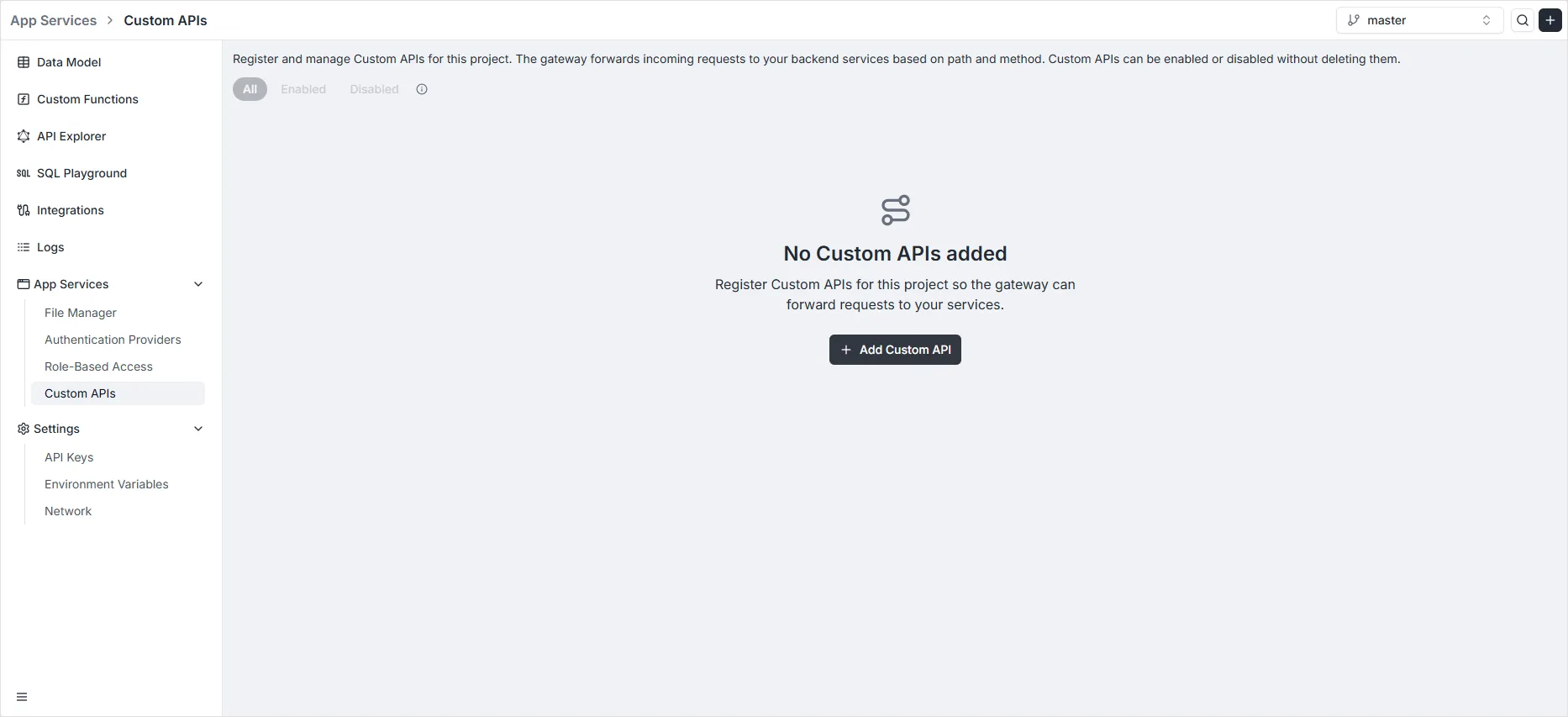
1. Dashboard & Route Registration
Section titled “1. Dashboard & Route Registration”The main Custom APIs dashboard displays all registered routes for the current environment. Click the Add Custom API button to define a new entry point.
2. General Tab
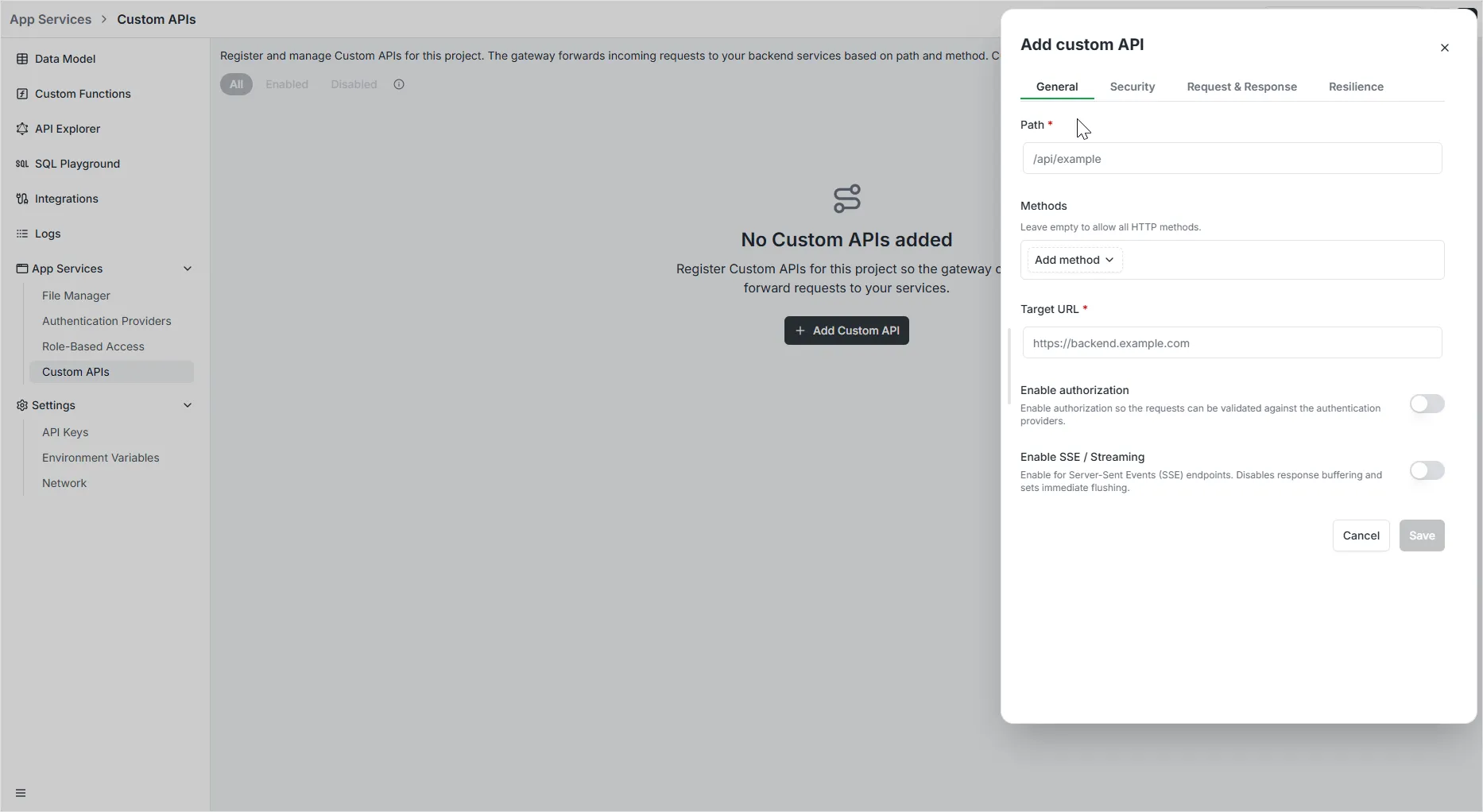
Section titled “2. General Tab”The General tab is where you define the core routing logic. These settings determine which incoming requests are captured and where they are sent.
- Path: Specify the public-facing URI path (e.g.,
/api/v1/users). This is the endpoint that clients will call. - Target URL: Provide the internal destination address where the gateway will forward the requests.
- Methods: Select one or more HTTP verbs (
GET,POST,PUT,PATCH,DELETE) that this route should respond to. - Enabled: A toggle to activate or deactivate the route rule. Useful for maintenance or testing without deleting the configuration.
3. Security Tab
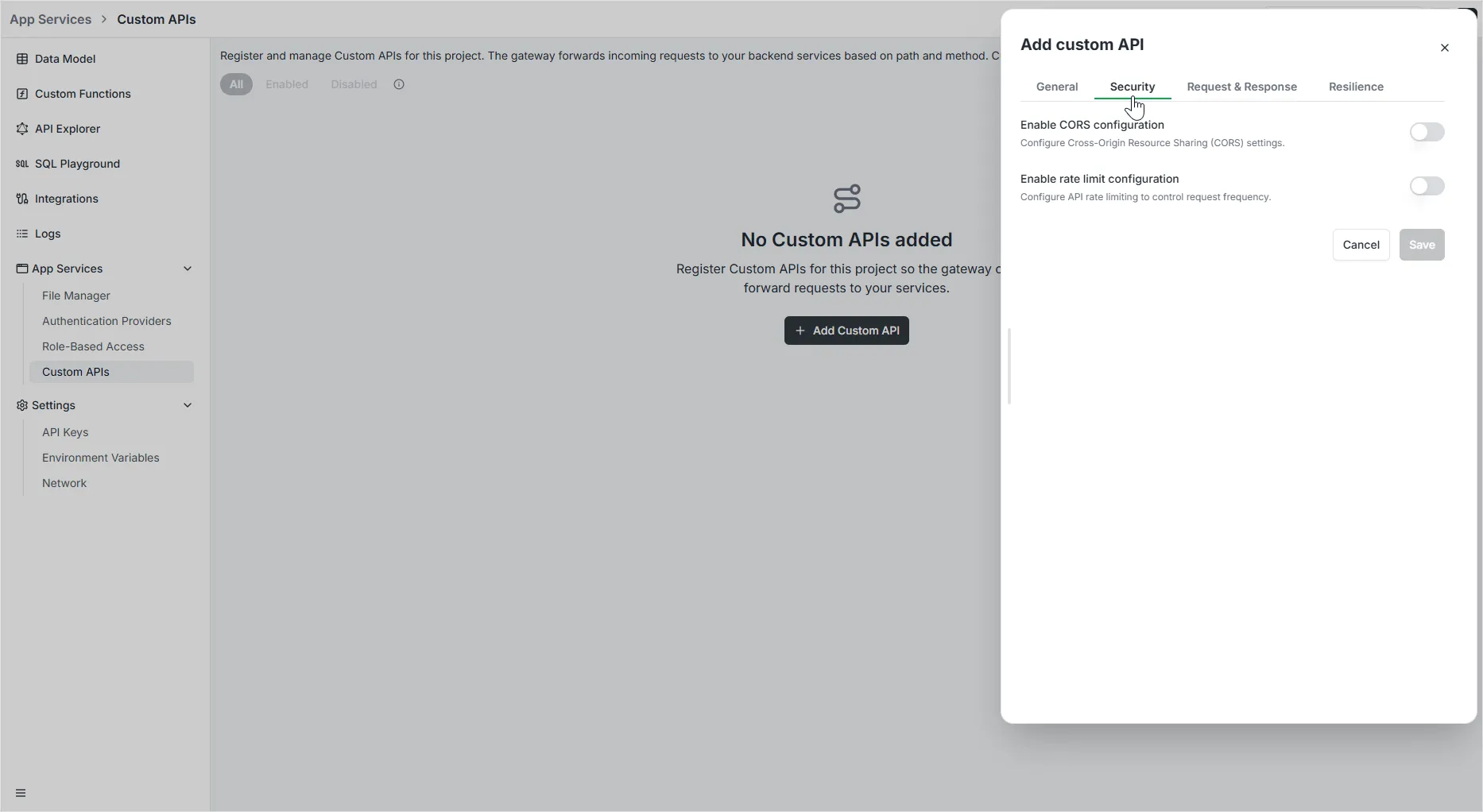
Section titled “3. Security Tab”The Security tab centers on protecting your API and managing cross-origin traffic through two primary configurations:
CORS Configuration
Section titled “CORS Configuration”Enable Cross-Origin Resource Sharing (CORS) to allow your API to be called from different domains. Available settings include:
- Allow All Origins: Toggle to accept requests from any domain, or disable it to specify a whitelist.
- Allowed Origins: A list of specific domains permitted to access the API (e.g.,
https://example.com). - Allowed Methods & Headers: Define which HTTP verbs and custom headers the gateway should accept.
- Allow Credentials: Toggle whether the browser should include cookies or authentication headers in the request.
- Preflight Cache Duration: Set how long browsers should cache the CORS preflight response to improve performance.
- Expose Headers: Specify which headers in the response are safe to expose to the client-side application.
Rate Limit Configuration
Section titled “Rate Limit Configuration”Enable Rate Limiting to protect your service from abuse and ensure fair usage:
- Average: Define the baseline number of requests allowed per chosen time unit.
- Burst Allowance: Specify how many additional requests can be handled in short spikes above the average.
- Time Window: Set the counting period (e.g., “Per second”).
- Rate Limit by: Define how to identify unique users, such as by IP Address.
4. Request & Response Tab
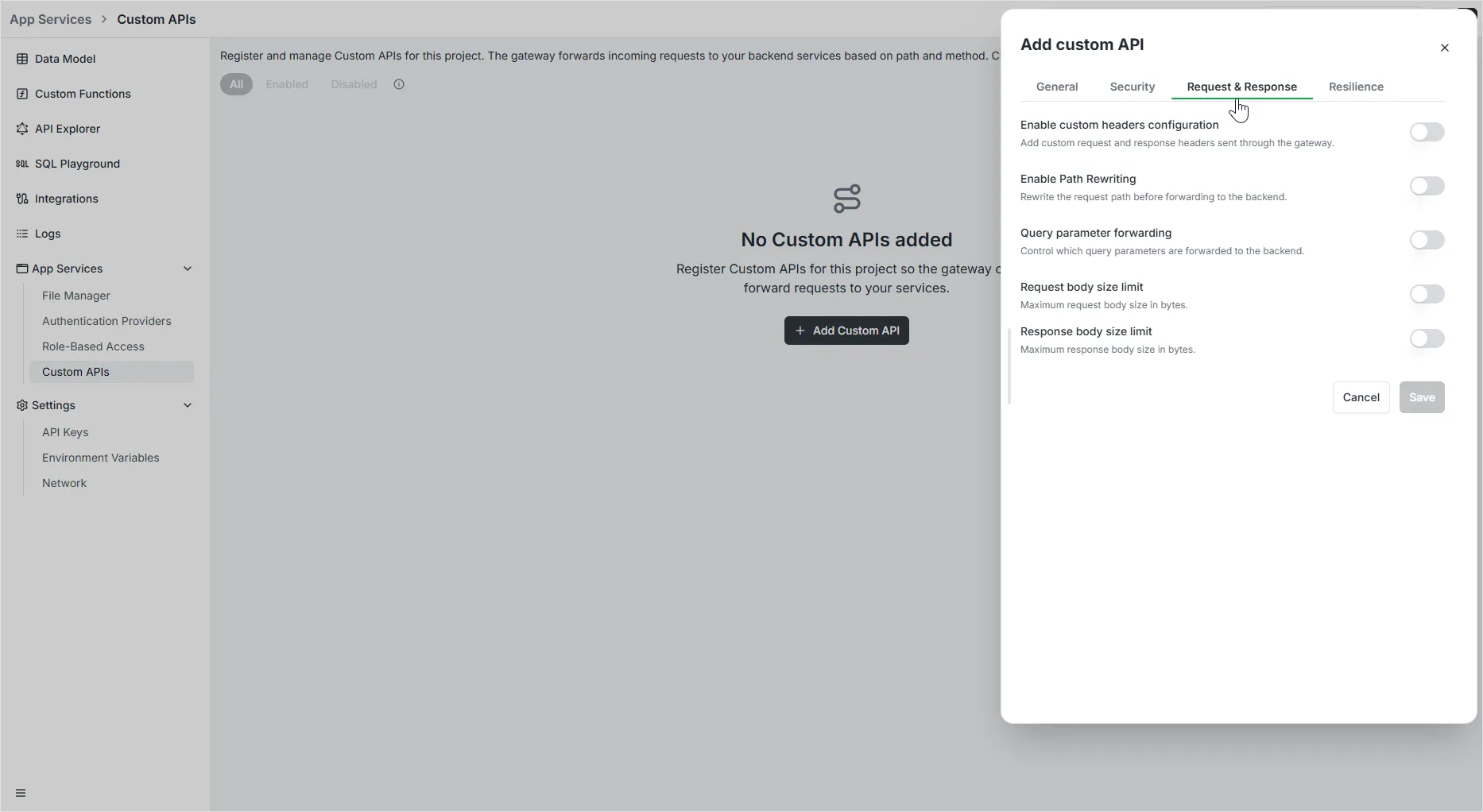
Section titled “4. Request & Response Tab”The Request & Response tab controls how data is transformed and managed as it passes through the gateway:
Custom Headers Configuration
Section titled “Custom Headers Configuration”Add or override HTTP headers to manage metadata between the client and your backend:
- Custom request headers: Add headers that will be sent to your backend service.
- Custom response headers: Add headers that will be returned to the client.
- Each header requires a Header name and a corresponding Value.
Path Rewriting
Section titled “Path Rewriting”Modify the request path before it reaches your backend:
- Strip prefix: Remove a specific starting segment from the source path (e.g., stripping
/v1). - Add prefix: Insert a segment at the beginning of the transformed path (e.g., adding
/api). - Regex pattern & Replacement: Use regular expressions for complex path transformations (e.g., mapping
^/old/(.*)to/new/$1).
Query Parameter Forwarding
Section titled “Query Parameter Forwarding”Control which query string parameters are passed to the backend:
- Forward all parameters: Passes the entire query string unchanged.
- Allow list: Forwards only the specific parameters you define.
- Deny list: Forwards all parameters except those explicitly blocked.
Body Size Limits
Section titled “Body Size Limits”Protect your infrastructure by limiting the volume of data processed:
- Request body size limit: Define the maximum size (in bytes or MB) for incoming request payloads.
- Response body size limit: Define the maximum size for outgoing response payloads.
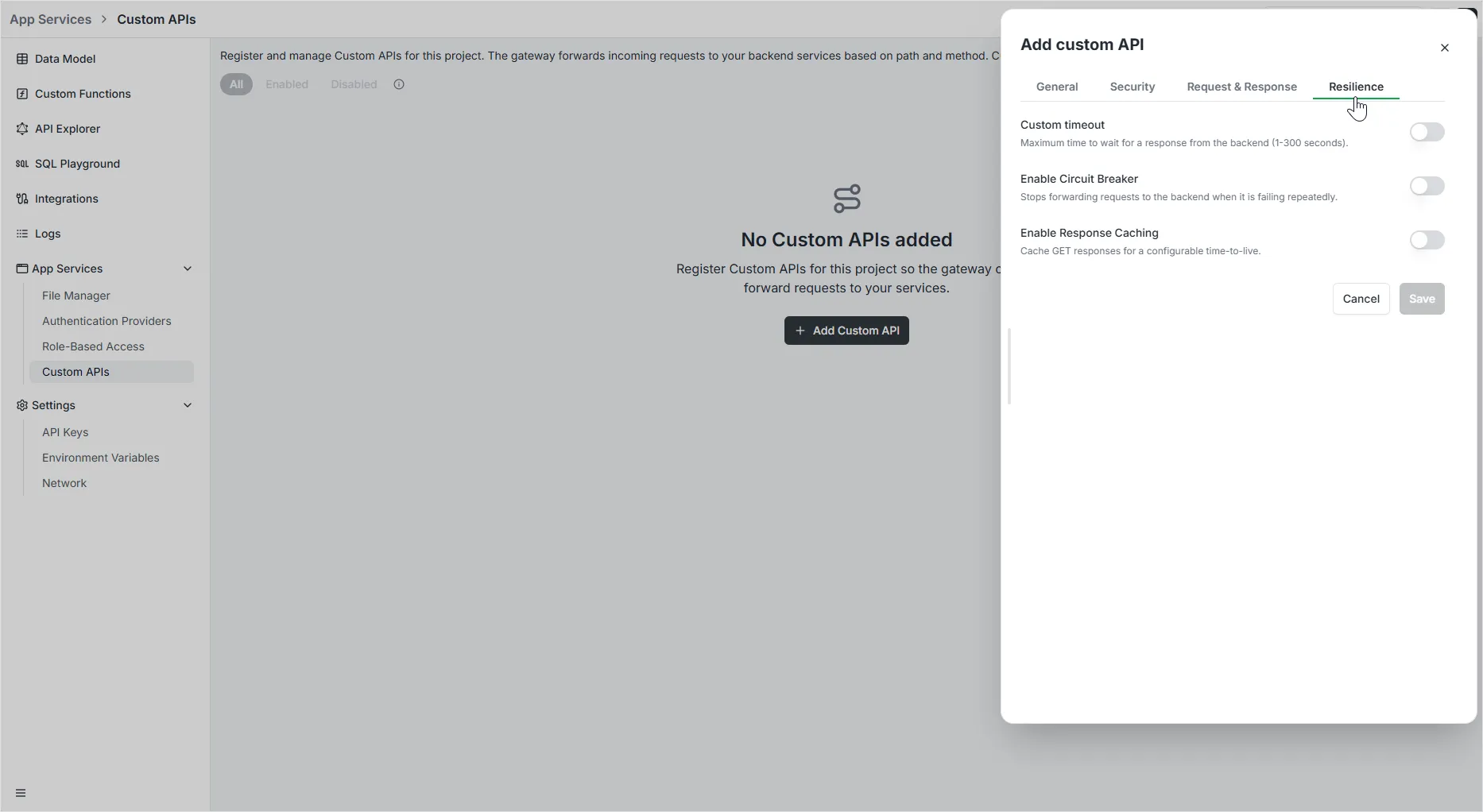
5. Resilience Tab
Section titled “5. Resilience Tab”The Resilience tab provides tools to ensure your API remains reliable even when backend services experience issues:
Custom Timeout
Section titled “Custom Timeout”Define how long the gateway should wait for a response before giving up:
- Timeout (seconds): Set a value between 1 and 300 seconds. This prevents requests from hanging indefinitely if the backend is unresponsive.
Circuit Breaker
Section titled “Circuit Breaker”Automatically stop forwarding requests to a failing backend to prevent cascading failures:
- Presets: Quickly apply common logic like 50% errors, 30% errors, High latency, or 500+ errors.
- Expression: Define custom logic for tripping the circuit (e.g.,
NetworkErrorRatio() > 0.5). - Check (s): Frequency of health checks while the circuit is open.
- Fallback (s): Time to wait before attempting to partially close the circuit.
- Recovery (s): Duration of the recovery phase before fully closing the circuit.
Response Caching
Section titled “Response Caching”Improve performance and reduce backend load by caching successful responses:
- Cache TTL (seconds): Set the Time-To-Live for GET responses. Subsequent identical requests within this window will be served directly from the gateway cache.
Developer API (GraphQL)
Section titled “Developer API (GraphQL)”Creating a Route
Section titled “Creating a Route”Routes can also be created programmatically via the GraphQL API:
mutation RegisterRoute($input: RegisterRouteInput!) { registerRoute(input: $input) { id path targetUrl methods enabled environment }}Deleting Routes by Environment
Section titled “Deleting Routes by Environment”When an environment is deleted, all associated routes are automatically cleaned up. You can also manually delete routes for a specific environment:
mutation DeleteRoutesByEnvironment($input: DeleteRoutesByEnvironmentInput!) { deleteRoutesByEnvironment(input: $input) { deletedCount }}