Creating Environments
You can create a new environment by branching from any existing active environment. The process clones the source database and optionally copies configuration resources, giving you an isolated workspace to develop or test changes.
How to Create a New Environment
Section titled “How to Create a New Environment”- Open the Environment Selector dropdown in the top navigation bar of the Backend Console.
- Click the + Create Environment button.
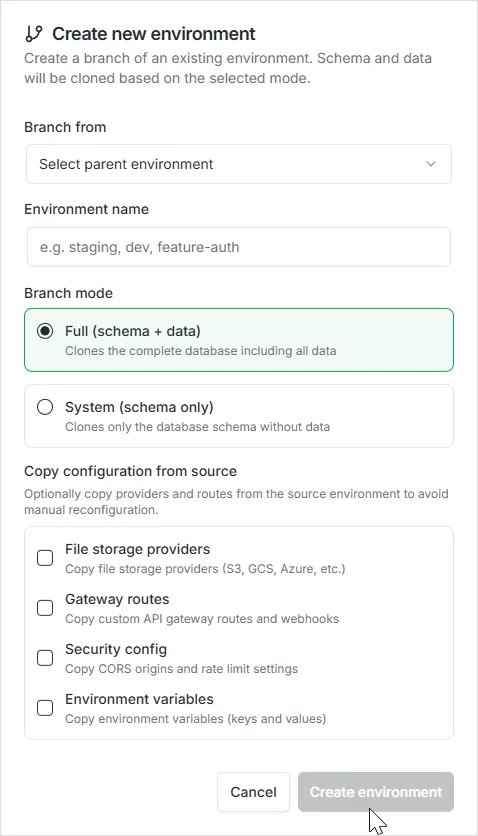
- A modal dialog will appear with the following configuration options.
Configuration Fields
Section titled “Configuration Fields”- Branch From: Select the source environment to branch from. Only environments with an
activestatus are available as sources. - Environment Name: Enter a unique name for the new environment (e.g.,
staging,feature-auth,qa-sprint-12). Names must contain only alphanumeric characters, hyphens, and underscores.
Branch Mode
Section titled “Branch Mode”Choose how the source database is cloned:
- Full (schema + data): Creates a complete copy of the source database, including all table structures and row data. Use this when you need realistic data for testing or QA.
- System (schema only): Copies only the database schema (tables, columns, indexes, relationships, enums, views) without any row data. Use this for clean development environments where you want to start with an empty dataset.
Copy Configuration from Source
Section titled “Copy Configuration from Source”Optionally copy resource configurations from the source environment. Each option is controlled by a checkbox and requires the ProjectOwner role:
- File storage providers: Copy file storage provider configurations (S3, GCS, Azure, Filestack) to the new environment. Each copied provider receives a new unique identifier.
- Gateway routes: Copy custom API gateway routes and webhooks. This preserves your routing configuration in the new environment.
- Security config: Copy CORS origins and rate limit settings. This ensures the new environment inherits the same network policies as its parent.
- Environment variables: Copy environment variable key-value pairs. This allows the new environment to start with the same configuration secrets as the source.
Note: Authentication providers are intentionally excluded from the copy options for security reasons. OAuth client secrets, Cognito credentials, and other authentication keys should be configured independently per environment to prevent accidental credential sharing.
- Click Create environment to begin the branching process.
What Happens During Branching
Section titled “What Happens During Branching”When you create a new environment, the following sequence occurs:
- Validation: The system verifies that the environment name is unique and the source environment is in an
activestate. - Record Creation: A new environment record is created and registered with the project in the platform’s configuration store.
- Database Cloning: The source PostgreSQL database is cloned. In Full mode, all data is included; in System mode, only the schema (table structures) is copied.
- Database Users: New secure database credentials are automatically provisioned for the cloned environment.
- Configuration Registration: The new environment is linked to the project’s global settings.
- Resource Copying: If selected, file providers, gateway routes, security config, and environment variables are copied from the source to the new environment.
- Status Activation: The environment status transitions to
active, and it becomes available for use.
If any step fails, the system performs an automatic rollback: the cloned database and associated credentials are removed, ensuring no orphaned resources remain.
GraphQL API
Section titled “GraphQL API”Mutation: branchEnvironment
Section titled “Mutation: branchEnvironment”mutation BranchEnvironment($input: BranchEnvironmentInput!) { branchEnvironment(input: $input) { success message environment { id name parentId parentName branchMode branchedAt status createdAt updatedAt } }}Variables:
{ "input": { "projectId": "f7e4a264-d659-4719-91e8-c2d74654e529", "name": "staging", "sourceEnvironment": "master", "mode": "full", "copyFileProviders": true, "copyGatewayRoutes": true, "copySecurityConfig": false, "copyEnvironmentVariables": true }}Response:
{ "data": { "branchEnvironment": { "success": true, "message": "Environment created successfully", "environment": { "id": "a1b2c3d4-e5f6-7890-abcd-ef1234567890", "name": "staging", "parentId": "master-env-id", "parentName": "master", "branchMode": "full", "branchedAt": "2026-03-08T20:00:00Z", "status": "active", "createdAt": "2026-03-08T20:00:00Z", "updatedAt": "2026-03-08T20:00:05Z" } } }}Input Fields
Section titled “Input Fields”| Field | Type | Required | Description |
|---|---|---|---|
projectId | String | Yes | The unique identifier of the project |
name | String | Yes | Name for the new environment |
sourceEnvironment | String | Yes | Name of the environment to branch from |
mode | String | Yes | Clone mode: "full" or "system" |
copyFileProviders | Boolean | No | Copy file storage provider configurations |
copyGatewayRoutes | Boolean | No | Copy custom API gateway routes |
copySecurityConfig | Boolean | No | Copy CORS and rate limit settings |
copyEnvironmentVariables | Boolean | No | Copy environment variable key-value pairs |
Permission Requirements
Section titled “Permission Requirements”- Creating an environment with no copy flags requires standard project access.
- Enabling any copy flag (
copyFileProviders,copyGatewayRoutes,copySecurityConfig,copyEnvironmentVariables) requires the ProjectOwner role, as these operations involve copying sensitive configuration data.