SendGrid
SendGrid is a cloud-based service for delivering transactional and marketing emails. Connecting this integration allows your application to send emails programmatically (e.g., welcome emails, password resets, or notifications).
Configuration Steps
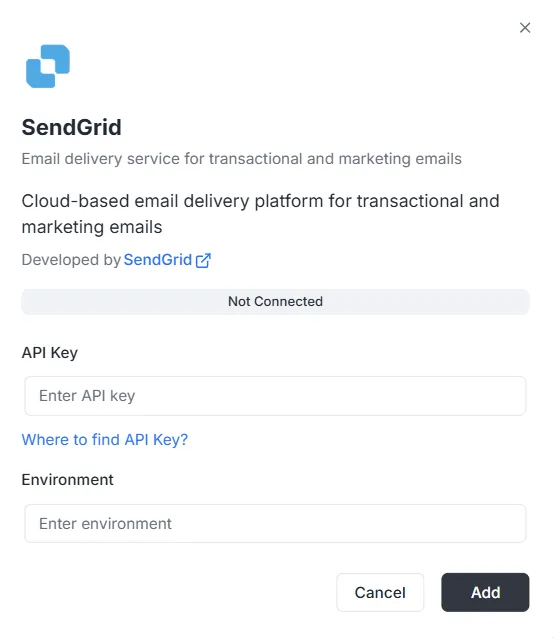
Section intitulée « Configuration Steps »After selecting SendGrid from the integration list, a configuration modal will appear. You must provide the following credentials to establish the connection:
1. API Key
Section intitulée « 1. API Key »This is the authentication token generated within your SendGrid account.
- Input: Paste your private SendGrid API Key into the text field.
- Help: If you do not have one, click the “Where to find API Key?” link provided in the modal for instructions on how to generate it.
2. Environment
Section intitulée « 2. Environment »Specify the environment context for this integration.
- Input: Enter the environment identifier (e.g.,
Production,Staging, or a specific configuration tag) in the Environment field.
Finalizing the Connection
Section intitulée « Finalizing the Connection »Once the fields are filled:
- Review the status bar (currently showing Not Connected).
- Click the black Add button at the bottom right to save the credentials and activate the integration.
SendGrid Integration API Reference
Section intitulée « SendGrid Integration API Reference »Configuración de SendGrid
Section intitulée « Configuración de SendGrid »Configurar API Key de SendGrid
Section intitulée « Configurar API Key de SendGrid »Configura la API key de SendGrid para un proyecto y ambiente específico.
Mutation:
mutation { sendgrid_configureSendGrid ( apiKey: "SG._api_key_here" )}Sending Emails
Section intitulée « Sending Emails »Send Simple Email
Section intitulée « Send Simple Email »Sends an email to one or multiple recipients.
Mutation:
mutation sendgrid_sendEmail { sendgrid_sendEmail ( email: { from: { email: "sender@archie.com", name: "Sender Name" }, subject: "Test Email", to: { email: "recipient@gmail.com", name: "Recipient Name" }, content: { type: "text/html", value: "<h1>Hello World</h1><p>This is a test email.</p>" } } ) { messageId success }}Response:
{ "data": { "sendgrid_sendEmail": { "messageId": "sent-1234567890", "success": true } }}Send Email with CC and BCC
Section intitulée « Send Email with CC and BCC »Mutation:
mutation sendgrid_sendEmail { sendgrid_sendEmail ( email: { from: { email: "sender@example.com" name: "Sender Name" } to: [ { email: "recipient@example.com" name: "Recipient Name" } ] cc: [ { email: "cc@example.com" name: "CC Recipient" } ] bcc: [ { email: "bcc@example.com" } ] subject: "Email with CC and BCC" content: [ { type: "text/html" value: "<h1>Hello</h1><p>This email has CC and BCC recipients.</p>" } ] } ) { messageId success }}Send Email with Attachments
Section intitulée « Send Email with Attachments »Mutation:
mutation sendgrid_sendEmail { sendgrid_sendEmail( email: { from: { email: "sender@example.com" name: "Sender Name" } to: [ { email: "recipient@example.com" name: "Recipient Name" } ] subject: "Email with Attachment" content: [ { type: "text/html" value: "<h1>Hello</h1><p>Please find attached file.</p>" } ] attachments: [ { content: "SGVsbG8gV29ybGQ=" type: "text/plain" filename: "document.txt" disposition: "attachment" } ] } ) { messageId success }}Note: The content field in attachments must be Base64 encoded.
Send Email with Categories and Tags
Section intitulée « Send Email with Categories and Tags »Mutation:
mutation sendgrid_sendEmail { sendgrid_sendEmail( email: { from: { email: "sender@example.com" name: "Sender Name" } to: [ { email: "recipient@example.com" name: "Recipient Name" } ] subject: "Categorized Email" content: [ { type: "text/html" value: "<h1>Hello</h1>" } ] categories: ["transactional", "notification"] tags: ["important", "urgent"] } ) { messageId success }}Send Email Programmed
Section intitulée « Send Email Programmed »Mutation:
mutation sendgrid_sendEmail { sendgrid_sendEmail( email: { from: { email: "sender@example.com" name: "Sender Name" } to: [ { email: "recipient@example.com" name: "Recipient Name" } ] subject: "Scheduled Email" content: [ { type: "text/html" value: "<h1>Hello</h1>" } ] sendAt: "2025-12-25T10:00:00Z" } ) { messageId success }}Send Email with Custom Args
Section intitulée « Send Email with Custom Args »Mutation:
mutation sendgrid_sendEmail { sendgrid_sendEmail( email: { from: { email: "sender@example.com" name: "Sender Name" } to: [ { email: "recipient@example.com" name: "Recipient Name" } ] subject: "Email with Custom Args" content: [ { type: "text/html" value: "<h1>Hello</h1>" } ] customArgs: { orderId: "12345" userId: "67890" campaignId: "abc123" } } ) { messageId success }}Send Bulk Emails
Section intitulée « Send Bulk Emails »Send Multiple Emails
Section intitulée « Send Multiple Emails »Mutation:
mutation sendgrid_sendBulkEmail { sendgrid_sendBulkEmail( emails: { emails: [ { from: { email: "sender@example.com" name: "Sender Name" } to: [ { email: "recipient1@example.com" name: "Recipient 1" } ] subject: "Bulk Email 1" content: [ { type: "text/html" value: "<h1>Email 1</h1>" } ] } { from: { email: "sender@example.com" name: "Sender Name" } to: [ { email: "recipient2@example.com" name: "Recipient 2" } ] subject: "Bulk Email 2" content: [ { type: "text/html" value: "<h1>Email 2</h1>" } ] } ] } ) { messageIds success }}Response:
{ "data": { "sendgrid_sendBulkEmail": { "messageIds": ["sent-1234567890", "sent-1234567891"], "success": true } }}Send Emails with Templates
Section intitulée « Send Emails with Templates »Send Email using Dynamic Template
Section intitulée « Send Email using Dynamic Template »Mutation:
mutation sendgrid_sendTemplate { sendgrid_sendTemplate( email: { from: { email: "sender@example.com" name: "Sender Name" } to: [ { email: "recipient@example.com" name: "Recipient Name" } ] templateId: "d-1234567890abcdef" substitutions: { name: "John Doe" orderNumber: "12345" totalAmount: "$99.99" } } ) { messageId success }}Response:
{ "data": { "sendgrid_sendTemplate": { "messageId": "sent-1234567890", "success": true } }}Send Contact Management
Section intitulée « Send Contact Management »Send Add Contact
Section intitulée « Send Add Contact »Mutation:
mutation sendgrid_addContact { sendgrid_addContact( contact: { email: "newcontact@example.com" firstName: "John" lastName: "Doe" customFields: { company: "Acme Corp" phone: "+1234567890" position: "Developer" } listIds: ["list-id-1", "list-id-2"] } )}Response:
{ "data": { "sendgrid_addContact": true }}Send Update Contact
Section intitulée « Send Update Contact »Mutation:
mutation sendgrid_updateContact { sendgrid_updateContact( contact: { email: "existing@example.com" firstName: "Jane" lastName: "Smith" customFields: { company: "New Company" phone: "+0987654321" } } )}Response:
{ "data": { "sendgrid_updateContact": true }}Send Delete Contact
Section intitulée « Send Delete Contact »Mutation:
mutation sendgrid_deleteContact { sendgrid_deleteContact( email: "contact@example.com" )}Response:
{ "data": { "sendgrid_deleteContact": true }}Send Analytics and Statistics
Section intitulée « Send Analytics and Statistics »Send Get Email Stats
Section intitulée « Send Get Email Stats »Query:
query sendgrid_getEmailStats { sendgrid_getEmailStats ( startDate: "2025-01-01" endDate: "2025-01-31" ) { opens clicks bounces spamReports delivered startDate endDate }}Response:
{ "data": { "sendgrid_getEmailStats": { "opens": 150, "clicks": 75, "bounces": 5, "spamReports": 2, "delivered": 1000, "startDate": "2025-01-01T00:00:00Z", "endDate": "2025-01-31T00:00:00Z" } }}Send Validate Email
Section intitulée « Send Validate Email »Query:
query sendgrid_validateEmail { sendgrid_validateEmail ( email: "test@example.com" ) { valid score local domain reason suggestions }}Response (with SendGrid Premium):
{ "data": { "sendgrid_validateEmail": { "valid": true, "score": 0.95, "local": "test", "domain": "example.com", "reason": "", "suggestions": [] } }}Response (Basic validation - when SendGrid Premium is not available):
{ "data": { "sendgrid_validateEmail": { "valid": true, "score": 0.8, "local": "test", "domain": "example.com", "reason": "Basic validation (SendGrid premium validation not available)", "suggestions": [] } }}Note: The SendGrid email validation endpoint (/v3/validations/email) requires special permissions and may not be available in all accounts. If your API key does not have access to this endpoint (error 403), the system will automatically use basic validation based on regex as a fallback.
Complete Examples with Variables
Section intitulée « Complete Examples with Variables »Example with GraphQL Variables
Section intitulée « Example with GraphQL Variables »Request:
{ "query": "mutation SendEmail($email: EmailInput!) { sendgrid_sendEmail(email: $email) { messageId success } }", "variables": { "email": { "from": { "email": "sender@example.com", "name": "Sender Name" }, "to": [ { "email": "recipient@example.com", "name": "Recipient Name" } ], "subject": "Test Email", "content": [ { "type": "text/html", "value": "<h1>Hello World</h1>" } ] } }}Error Handling
Section intitulée « Error Handling »Error Example
Section intitulée « Error Example »Request:
{ "query": "mutation { sendgrid_sendEmail(email: { from: { email: \"invalid\" }, to: [], subject: \"Test\", content: [] }) { messageId success } }"}Response Error:
{ "errors": [ { "message": "validation error: at least one recipient is required", "path": ["sendgrid_sendEmail"] } ], "data": null}Common Errors
Section intitulée « Common Errors »-
Project ID missing:
{"errors": [{"message": "project ID is required in context"}]} -
Configuration not found:
{"errors": [{"message": "sendgrid configuration not found for project: xxx, environment: master"}]} -
API Key invalid:
{"errors": [{"message": "sendgrid API error: status 401, body: ..."}]}
Webhooks
Section intitulée « Webhooks »Webhooks Endpoint
Section intitulée « Webhooks Endpoint »The webhooks endpoint is available at:
- HTTP:
POST http://localhost:8080/webhooks/sendgrid - Lambda:
POST /webhooks/sendgrid
SendGrid Configuration
Section intitulée « SendGrid Configuration »- Go to SendGrid Dashboard > Settings > Mail Settings > Event Webhook
- Configure the URL:
https://tu-dominio.com/webhooks/sendgrid - Select the events you want to receive
- Configure the verification key in the environment variable
WEBHOOK_VERIFICATION_KEY
Supported Events
Section intitulée « Supported Events »processed: Email processeddelivered: Email deliveredopened: Email openedclicked: Link clickedbounce: Email rebotadodropped: Email descartadospamreport: Reportado como spamunsubscribe: Desuscripción