Stripe
Stripe is an online payment processing platform designed for internet businesses. Integrating Stripe allows your application to handle transactions, subscriptions, and financial data securely.
Configuration Steps
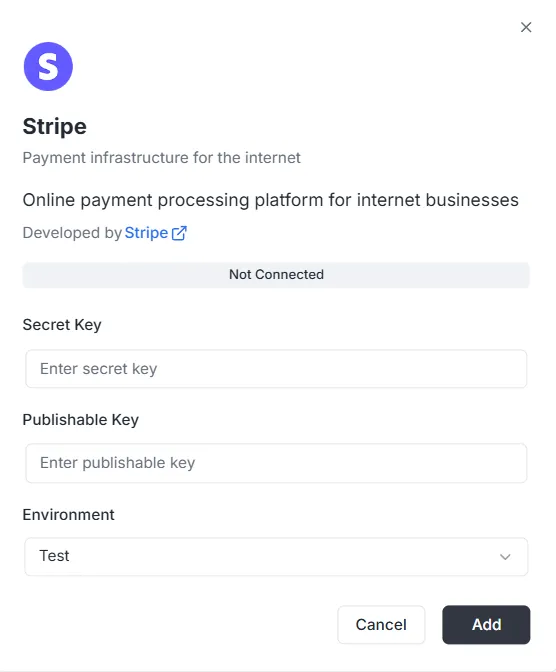
Section intitulée « Configuration Steps »After selecting Stripe from the integration list, a configuration modal will appear. You must provide the following credentials from your Stripe Dashboard to establish the connection:
1. Secret Key
Section intitulée « 1. Secret Key »- Input: Enter your private Stripe Secret Key (usually starting with
sk_) into the Secret Key field. This key allows the backend to authenticate secure requests.
2. Publishable Key
Section intitulée « 2. Publishable Key »- Input: Enter your public Stripe Publishable Key (usually starting with
pk_) into the Publishable Key field. This key is used for frontend implementation.
3. Environment
Section intitulée « 3. Environment »- Input: Select the appropriate environment context from the dropdown menu (e.g., Test for development/sandbox mode or Production for live processing).
Finalizing the Connection
Section intitulée « Finalizing the Connection »Once the keys and environment are configured:
- Review the status bar (currently showing Not Connected).
- Click the black Add button at the bottom right to save the credentials and activate the payment integration.
Stripe Integration API Reference
Section intitulée « Stripe Integration API Reference »- Configuration Management
- Customer Management
- Payment Intents
- Subscriptions
- Products and Prices
- Invoices
- Refunds
- Checkout Sessions
- Billing Portal Sessions
- Payment Methods
- Webhook Events
- Pagination
- Error Handling
Configuration Management
Section intitulée « Configuration Management »configureStripe
Section intitulée « configureStripe »Creates a new Stripe configuration for the project and environment.
Mutation:
mutation ConfigureStripe ( $input: ConfigureStripeInput!) { configureStripe ( input: $input ) { id publishableKey webhookUrl }}Input:
input ConfigureStripeInput { secretKey: String! # Stripe secret key (sk_test_... or sk_live_...) publishableKey: String! # Stripe publishable key (pk_test_... or pk_live_...) environment: StripeEnvironment! # TEST or LIVE webhookSecret: String # Webhook signing secret (optional)}Response:
type ConfigureStripePayload { id: ID! # Configuration ID publishableKey: String! # Publishable key webhookUrl: String! # Generated webhook URL}Example:
{ "input": { "secretKey": "sk_test_...", "publishableKey": "pk_test_...", "environment": "TEST", "webhookSecret": "whsec_..." }}Notes:
- The secret key is encrypted with AES-256-GCM before storage
- Only one configuration per project/environment combination
- Returns error if configuration already exists
updateStripeConfig
Section intitulée « updateStripeConfig »Updates an existing Stripe configuration.
Mutation:
mutation UpdateStripeConfig ( $input: UpdateStripeConfigInput!) { updateStripeConfig ( input: $input ) { id publishableKey webhookUrl }}Input:
input UpdateStripeConfigInput { secretKey: String # Optional publishableKey: String # Optional environment: StripeEnvironment # Optional webhookSecret: String # Optional}Response:
type UpdateStripeConfigPayload { id: ID! publishableKey: String! webhookUrl: String!}Notes:
- All fields are optional
- Only provided fields are updated
- Secret key is encrypted if provided
Customer Management
Section intitulée « Customer Management »stripe_customer
Section intitulée « stripe_customer »Retrieves a single customer by ID.
Query:
query stripe_customer{ stripe_customer( id: "cus_Ts..." ) { id name email phone description metadata object createdAt }}stripe_customers
Section intitulée « stripe_customers »Lists customers with pagination and optional filtering.
Query:
query stripe_customers ( $first: Int, $after: String, $customerId: String) { stripe_customers ( first: $first, after: $after, customerId: $customerId ) { edges { node { id name email phone description createdAt } cursor } pageInfo { hasNextPage hasPreviousPage startCursor endCursor } }}Parameters:
first: Number of items to return (default: 10)after: Cursor for paginationcustomerId: Filter by customer ID (optional)
stripe_createCustomer
Section intitulée « stripe_createCustomer »Creates a new customer.
Mutation:
mutation stripe_createCustomer { stripe_createCustomer ( input: { name: "Customer", email: "example@archie.com", phone: "+573001230001", description: "Description Example" metadata: { data1: "Example data1", data2: "Example data2" } } ) { id name email phone description metadata object createdAt }}stripe_updateCustomer
Section intitulée « stripe_updateCustomer »Updates an existing customer.
Mutation:
mutation stripe_updateCustomer { stripe_updateCustomer( id: "cus_Ts...", input: { name: "Customer", email: "example@archie.com", phone: "+573001230001", description:"Description Example", metadata: { data1: "Example data1 updated", data2: "Example data2 updated" } } ) { id name email phone description metadata object createdAt }}Notes:
- All fields are optional
- Only provided fields are updated
stripe_deleteCustomer
Section intitulée « stripe_deleteCustomer »Deletes a customer.
Mutation:
mutation stripe_deleteCustomer { stripe_deleteCustomer ( id: "cus_Ts...")}Response:
- Returns
trueon success - Returns error if customer not found
Payment Intents
Section intitulée « Payment Intents »stripe_paymentIntent
Section intitulée « stripe_paymentIntent »Retrieves a single payment intent by ID.
Query:
query stripe_paymentIntent { stripe_paymentIntent ( id: "pi_3Su..." ) { id customerId paymentMethodId currency amount status metadata object clientSecret createdAt }}stripe_paymentIntents
Section intitulée « stripe_paymentIntents »Lists payment intents with pagination and optional filtering.
Query:
query stripe_paymentIntents ( $first: Int, $after: String, $customerId: String) { stripe_paymentIntents ( first: $first, after: $after, customerId: $customerId ) { edges { node { id customerId paymentMethodId currency amount status metadata object clientSecret createdAt } cursor } pageInfo { hasPreviousPage hasNextPage startCursor endCursor } }}Parameters:
first: Number of items to return (default: 10)after: Cursor for paginationcustomerId: Filter by customer ID (optional)
stripe_createPaymentIntent
Section intitulée « stripe_createPaymentIntent »Creates a new payment intent.
Mutation:
mutation stripe_createPaymentIntent { stripe_createPaymentIntent ( input: { amount: 12.35, currency: "usd", customerId: "cus_Ts...", paymentMethodId: "pm_1Su...", automaticPaymentMethods: true } ) { id customerId paymentMethodId currency amount status metadata object clientSecret createdAt }}Notes:
clientSecretis returned for frontend confirmation- Use
automaticPaymentMethods: truefor Stripe.js integration
stripe_updatePaymentIntent
Section intitulée « stripe_updatePaymentIntent »Updates a payment intent before confirmation.
Mutation:
mutation stripe_updatePaymentIntent{ stripe_updatePaymentIntent( id: "pi_3S...", input: { amount: 36.92, currency: "usd", paymentMethodId: "pm_1Su..." metadata:{ data1: "Example data1" } } ) { id customerId paymentMethodId currency amount status metadata object clientSecret createdAt }}Notes:
- Can only be updated before confirmation
- All fields are optional
stripe_confirmPaymentIntent
Section intitulée « stripe_confirmPaymentIntent »Confirms a payment intent.
Mutation:
mutation stripe_confirmPaymentIntent{ stripe_confirmPaymentIntent( id: "pi_3Su..." input: { paymentMethodId: "pm_1Su...", returnUrl: "http://localhost:3000/successful-payment" } ) { id customerId paymentMethodId currency amount status metadata object clientSecret createdAt }}Notes:
- Required for completing payment
- May require 3D Secure authentication
- Returns updated status (succeeded, requires_action, etc.)
stripe_cancelPaymentIntent
Section intitulée « stripe_cancelPaymentIntent »Cancels a payment intent.
Mutation:
mutation stripe_cancelPaymentIntent { stripe_cancelPaymentIntent( id: "pi_3Su..." ) { id customerId paymentMethodId currency amount status metadata object clientSecret createdAt }}Notes:
- Can only cancel payment intents that are not succeeded or canceled
- Status changes to “canceled”
Subscriptions
Section intitulée « Subscriptions »stripe_subscription
Section intitulée « stripe_subscription »Retrieves a single subscription by ID.
Query:
query stripe_subscription { stripe_subscription(id: "sub_1Su...") { id customerId status currentPeriodStart currentPeriodEnd createdAt cancelAtPeriodEnd metadata object items { data { id priceId quantity } } }}stripe_subscriptions
Section intitulée « stripe_subscriptions »Lists subscriptions with pagination and optional filtering.
Query:
query stripe_subscriptions ( $first: Int, $after: String, $customerId: String) { stripe_subscriptions ( first: $first, after: $after, customerId: $customerId ) { edges { node { id customerId status currentPeriodStart currentPeriodEnd createdAt cancelAtPeriodEnd metadata object items { data { id priceId quantity } } } cursor } pageInfo { hasPreviousPage hasNextPage startCursor endCursor } }}Parameters:
first: Number of items to return (default: 10)after: Cursor for paginationcustomerId: Filter by customer ID (optional)status: Filter by status (optional)
stripe_createSubscription
Section intitulée « stripe_createSubscription »Creates a new subscription.
Mutation:
mutation stripe_createSubscription { stripe_createSubscription ( input: { customerId: "cus_TsQ...", items: { priceId: "price_1Su...", quantity: 1 }, metadata: { data1: "Example data1" }, trialPeriodDays: 0 } ) { id customerId status currentPeriodStart currentPeriodEnd createdAt cancelAtPeriodEnd metadata object items { data { id priceId quantity } } }}Notes:
paymentBehaviorcan be “default_incomplete” for subscriptions requiring payment method- Trial period is specified in days
- Latest invoice and payment intent are automatically expanded
stripe_updateSubscription
Section intitulée « stripe_updateSubscription »Updates an existing subscription.
Mutation:
mutation stripe_updateSubscription { stripe_updateSubscription( id: "sub_1Sv..." input: { cancelAtPeriodEnd: false metadata: { data2: "Example data2" } } ) { id customerId status currentPeriodStart currentPeriodEnd createdAt cancelAtPeriodEnd metadata object items { data { id priceId quantity } } }}stripe_cancelSubscription
Section intitulée « stripe_cancelSubscription »Cancels a subscription.
Mutation:
mutation stripe_cancelSubscription { stripe_cancelSubscription ( cancelAtPeriodEnd: true, id: "sub_1Sv..." ) { id customerId status currentPeriodStart currentPeriodEnd createdAt cancelAtPeriodEnd metadata object items { data { id priceId quantity } } }}Parameters:
id: Subscription ID (required)cancelAtPeriodEnd: If true, cancels at period end; if false, cancels immediately (default: false)
Notes:
- Immediate cancellation: subscription ends now
- Period end cancellation: subscription continues until current period ends
Products and Prices
Section intitulée « Products and Prices »stripe_products
Section intitulée « stripe_products »Lists products with pagination.
Query:
query stripe_products ( $first: Int, $after: String) { stripe_products ( first: $first, after: $after ) { edges { node { id name description active metadata object createdAt } cursor } pageInfo { hasPreviousPage hasNextPage startCursor endCursor } }}stripe_createProduct
Section intitulée « stripe_createProduct »Creates a new product.
Mutation:
mutation stripe_createProduct { stripe_createProduct ( input: { name: "Product 01", description: "Description product 01", metadata: { data1: "Example data1" } } ) { id name description active metadata object createdAt }}stripe_prices
Section intitulée « stripe_prices »Lists prices with pagination and optional filtering.
Query:
query stripe_prices ( $first: Int, $after: String, $productId: String) { stripe_prices ( first: $first, after: $after, productId: $productId ) { edges { node { id productId active currency unitAmount object metadata createdAt recurring { interval intervalCount } } cursor } pageInfo { hasPreviousPage hasNextPage startCursor endCursor } }}Parameters:
first: Number of items to return (default: 10)after: Cursor for paginationproductId: Filter by product ID (optional)
stripe_createPrice
Section intitulée « stripe_createPrice »Creates a new price.
Mutation:
mutation stripe_createPrice { stripe_createPrice ( input: { productId: "prod_Tst...", unitAmount: 25.85, currency: "usd", recurring: { interval: "month", intervalCount: 1 }, metadata: { data1: "Example data1" } } ) { id productId currency unitAmount active object createdAt metadata recurring { interval intervalCount } }}Notes:
- Omit
recurringfor one-time prices intervalmust be one of: “day”, “week”, “month”, “year”
Invoices
Section intitulée « Invoices »stripe_invoice
Section intitulée « stripe_invoice »Retrieves a single invoice by ID.
Query:
query stripe_invoice { stripe_invoice ( id: "in_1Su..." ) { id customerId subscriptionId currency amountPaid amountDue status object metadata createdAt lineItems { data { id description currency amount quantity } } }}Notes:
- Subscription ID is populated via API expansion when available
stripe_invoices
Section intitulée « stripe_invoices »Lists invoices with pagination and optional filtering.
Query:
query stripe_invoices ( $first: Int, $after: String, $customerId: String, $status: String) { stripe_invoices ( first: $first, after: $after, customerId: $customerId, status: $status ) { edges { node { id customerId subscriptionId currency amountPaid amountDue status object metadata createdAt lineItems { data { id description currency amount quantity } } } cursor } pageInfo { hasPreviousPage hasNextPage startCursor endCursor } }}Parameters:
first: Number of items to return (default: 10)after: Cursor for paginationcustomerId: Filter by customer ID (optional)status: Filter by status (optional)
stripe_payInvoice
Section intitulée « stripe_payInvoice »Pays an invoice programmatically.
Mutation:
mutation stripe_payInvoice { stripe_payInvoice ( id: "in_1Sv..." ) { id customerId subscriptionId currency amountPaid amountDue status object metadata createdAt lineItems { data { id description currency amount quantity } } }}Notes:
- Attempts to pay the invoice using the customer’s default payment method
- Returns error if payment fails
- Updates invoice status to “paid” on success
stripe_refunds
Section intitulée « stripe_refunds »Lists refunds with pagination and optional filtering.
Query:
query stripe_refunds ( $first: Int, $after: String, $paymentIntentId: String) { stripe_refunds ( first: $first, after: $after, paymentIntentId: $paymentIntentId ) { edges { node { id paymentIntentId reason status currency amount metadata object createdAt } cursor } pageInfo { hasPreviousPage hasNextPage startCursor endCursor } }}Parameters:
first: Number of items to return (default: 10)after: Cursor for paginationpaymentIntentId: Filter by payment intent ID (optional)
stripe_createRefund
Section intitulée « stripe_createRefund »Creates a refund for a payment intent.
Mutation:
mutation stripe_createRefund { stripe_createRefund ( input: { paymentIntentId: "pi_3Sv...", amount: 200, reason: "requested_by_customer" } ) { id reason paymentIntentId status currency amount object metadata createdAt }}Notes:
- Omit
amountfor full refund reasoncan be: “duplicate”, “fraudulent”, “requested_by_customer”- Refund status starts as “pending” and updates to “succeeded” or “failed”
Checkout Sessions
Section intitulée « Checkout Sessions »stripe_createCheckoutSession
Section intitulée « stripe_createCheckoutSession »Creates a Stripe Checkout Session for one-time payments or subscriptions. Returns a URL that redirects customers to Stripe’s hosted payment page.
Mutation:
mutation CreateCheckoutSession($input: StripeCreateCheckoutSessionInput!) { stripe_createCheckoutSession(input: $input) { id url customerId customerEmail paymentIntentId subscriptionId mode status currency amountTotal metadata createdAt }}Input:
input StripeCreateCheckoutSessionInput {  customerId: String              # Existing Stripe customer ID (optional)  customerEmail: String            # Customer email for new customers (optional)  mode: String!                   # "payment" for one-time or "subscription" for recurring  successUrl: String!             # URL to redirect after successful payment  cancelUrl: String!              # URL to redirect if customer cancels  lineItems: [StripeCheckoutSessionLineItemInput!]!  # Items to purchase  paymentMethodTypes: [String!]    # Allowed payment methods (optional)  metadata: Map                    # Custom metadata (optional)}
input StripeCheckoutSessionLineItemInput {  priceId: String      # Stripe Price ID (for existing prices)  quantity: Int!        # Quantity of items  amount: Float         # Custom amount in dollars (for one-time payments)  currency: String      # Currency code (required if amount is provided)}
Response:
type StripeCheckoutSession { id: ID! # Session ID object: String! # "checkout.session" url: String! # Redirect URL for customer customerId: String # Customer ID (if customer exists) customerEmail: String # Customer email paymentIntentId: String # Payment Intent ID (for one-time payments) subscriptionId: String # Subscription ID (for subscriptions) mode: String! # "payment" or "subscription" status: String! # Session status currency: String # Currency code amountTotal: Float # Total amount in dollars metadata: Map # Custom metadata createdAt: Time! # Creation timestamp}Example - One-time Payment:
{ "input": { "mode": "payment", "successUrl": "https://example.com/success", "cancelUrl": "https://example.com/cancel", "lineItems": [ { "priceId": "price_1234567890", "quantity": 1 } ] }}Example - Custom Amount One-time Payment:
{ "input": { "mode": "payment", "customerEmail": "customer@example.com", "successUrl": "https://example.com/success", "cancelUrl": "https://example.com/cancel", "lineItems": [ { "amount": 29.99, "currency": "usd", "quantity": 1 } ] }}Example - Subscription:
{ "input": { "mode": "subscription", "customerId": "cus_1234567890", "successUrl": "https://example.com/success", "cancelUrl": "https://example.com/cancel", "lineItems": [ { "priceId": "price_monthly_subscription", "quantity": 1 } ] }}Notes:
- The
urlfield contains the redirect URL that customers should be sent to - For one-time payments, use
mode: "payment"and provide eitherpriceIdoramount+currency - For subscriptions, use
mode: "subscription"and providepriceId(must be a recurring price) - Either
customerIdorcustomerEmailshould be provided, but not both paymentMethodTypescan include: “card”, “us_bank_account”, “link”, etc.- Sessions expire after 24 hours if not completed
Billing Portal Sessions
Section intitulée « Billing Portal Sessions »stripe_createBillingPortalSession
Section intitulée « stripe_createBillingPortalSession »Creates a Stripe Billing Portal session that allows customers to manage their subscriptions, payment methods, and billing information through Stripe’s hosted portal.
Mutation:
mutation CreateBillingPortalSession($input: StripeCreateBillingPortalSessionInput!) { stripe_createBillingPortalSession(input: $input) { id url customerId returnUrl createdAt }}Input:
input StripeCreateBillingPortalSessionInput { customerId: String! # Stripe customer ID (required) returnUrl: String! # URL to redirect after customer exits portal configuration: String # Portal configuration ID (optional)}Response:
type StripeBillingPortalSession { id: ID! # Session ID object: String! # "billing_portal.session" url: String! # Redirect URL for customer customerId: String! # Customer ID returnUrl: String # Return URL createdAt: Time! # Creation timestamp}Example:
{ "input": { "customerId": "cus_1234567890", "returnUrl": "https://example.com/account" }}Notes:
- The
urlfield contains the redirect URL that customers should be sent to - The portal session is short-lived and expires after use
- Customers can manage subscriptions, update payment methods, view invoices, and update billing information
- Portal features are configured in the Stripe Dashboard
- If
configurationis not provided, the default portal configuration is used - The portal only shows subscriptions and invoices for the specified customer
Payment Methods
Section intitulée « Payment Methods »stripe_paymentMethods
Section intitulée « stripe_paymentMethods »Lists payment methods with pagination and optional filtering.
Query:
query stripe_paymentMethods ( $first: Int, $after: String, $customerId: String) { stripe_paymentMethods( first: $first, after: $after, customerId: $customerId ) { edges { node { id customerId type object metadata createdAt card { brand expMonth expYear last4 } } cursor } pageInfo { hasPreviousPage hasNextPage startCursor endCursor } }}Parameters:
first: Number of items to return (default: 10)after: Cursor for paginationcustomerId: Filter by customer ID (optional)
Notes:
- Only safe card information is returned (last4, brand, expiration)
- Full card numbers are never exposed
stripe_attachPaymentMethod
Section intitulée « stripe_attachPaymentMethod »Attaches a payment method to a customer.
Mutation:
mutation stripe_attachPaymentMethod { stripe_attachPaymentMethod ( id: "pm_1Sv...", input: { customerId: "cus_Ts4..." } ) { id customerId type card { brand expMonth expYear last4 } metadata object createdAt }}Notes:
- Payment method must be created first (typically via Stripe.js)
- Attached payment methods can be used for subscriptions and payments
stripe_detachPaymentMethod
Section intitulée « stripe_detachPaymentMethod »Detaches a payment method from a customer.
Mutation:
mutation stripe_detachPaymentMethod { stripe_detachPaymentMethod ( id: "pm_1Sv..." ) { id customerId type card { brand expYear expMonth last4 } metadata object createdAt }}Notes:
- Detached payment methods can no longer be used for payments
- Returns the payment method with
customerIdset to null
Webhook Events
Section intitulée « Webhook Events »stripe_webhookEvents
Section intitulée « stripe_webhookEvents »Lists webhook events received by the service.
Query:
query ListWebhookEvents ( $first: Int, $after: String) { stripe_webhookEvents ( first: $first, after: $after ) { edges { node { id type data processed createdAt } cursor } pageInfo { hasNextPage hasPreviousPage endCursor } }}Response:
type StripeWebhookEvent { id: ID! type: String! # Event type (e.g., "payment_intent.succeeded") data: String! # JSON string of event data processed: Boolean! # Whether event has been processed createdAt: Time!}Parameters:
first: Number of items to return (default: 10)after: Cursor for pagination
Notes:
- Events are automatically received via webhook endpoint
- Events are stored after signature verification
datafield contains the full event payload as JSON string
Pagination
Section intitulée « Pagination »All list queries support cursor-based pagination using the Relay connection pattern.
PageInfo
Section intitulée « PageInfo »type PageInfo { hasNextPage: Boolean! hasPreviousPage: Boolean! startCursor: String endCursor: String}Usage Example
Section intitulée « Usage Example »query ListCustomers ( $first: Int, $after: String) { stripe_customers ( first: $first, after: $after ) { edges { node { id email } cursor } pageInfo { hasNextPage endCursor } }}Pagination Flow:
- Initial request:
first: 10, after: null - Use
pageInfo.endCursorfrom response asafterin next request - Check
hasNextPageto determine if more pages exist
Default Values:
first: Defaults to 10 if not providedafter: Starts from beginning if not provided
Error Handling
Section intitulée « Error Handling »All operations return GraphQL errors with user-friendly messages. Errors are mapped from Stripe API errors to provide clear feedback.
Common Error Scenarios
Section intitulée « Common Error Scenarios »Configuration Errors:
400: Invalid Stripe keys format404: Project or configuration not found400: Configuration already exists
Customer Errors:
404: Customer not found400: Invalid customer data
Payment Intent Errors:
404: Payment intent not found400: Invalid amount or currency402: Payment failed (card declined, insufficient funds, etc.)
Subscription Errors:
404: Subscription not found400: Invalid subscription parameters400: Cannot update canceled subscription
Stripe Error Codes: Common Stripe error codes are mapped to user-friendly messages:
card_declined: “Your card was declined”insufficient_funds: “Insufficient funds”invalid_number: “Invalid card number”expired_card: “Card has expired”incorrect_cvc: “Incorrect CVC code”
Error Response Format
Section intitulée « Error Response Format »{ "errors": [ { "message": "Customer not found", "extensions": { "code": "NOT_FOUND", "stripeErrorCode": "resource_missing" } } ], "data": null}Data Types
Section intitulée « Data Types »StripeEnvironment
Section intitulée « StripeEnvironment »enum StripeEnvironment { TEST # Test mode LIVE # Live/production mode}Map Scalar
Section intitulée « Map Scalar »The Map scalar type represents a key-value map where:
- Keys are strings
- Values can be strings, numbers, booleans, or nested maps
- Used for metadata fields
Example:
{ "metadata": { "order_id": "12345", "user_id": "67890", "premium": true }}Time Scalar
Section intitulée « Time Scalar »The Time scalar type represents ISO 8601 formatted timestamps.
Example: "2025-11-16T00:28:48.081Z"