Stripe
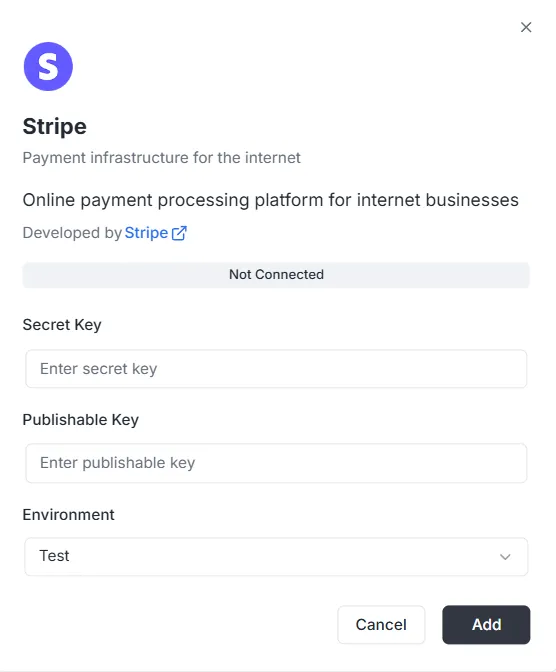
Stripe היא פלטפורמה לעיבוד תשלומים מקוון המיועדת לעסקים באינטרנט. אינטגרציה עם Stripe מאפשרת לאפליקציה שלכם לנהל עסקאות, מנויים ונתונים פיננסיים בצורה מאובטחת.
שלבי התצורה {#configuration-steps}
Section titled “שלבי התצורה {#configuration-steps}”לאחר בחירת Stripe מרשימת האינטגרציות, יופיע חלון תצורה. יש להזין את פרטי האימות הבאים מלוח הבקרה של Stripe כדי ליצור את החיבור:
1. מפתח סודי {#1-secret-key}
Section titled “1. מפתח סודי {#1-secret-key}”- קלט: הזינו את Secret Key הפרטי של Stripe (בדרך כלל מתחיל ב-
sk_) בשדה Secret Key. מפתח זה מאפשר לשרת האחורי לאמת בקשות מאובטחות.
2. מפתח ציבורי (Publishable) {#2-publishable-key}
Section titled “2. מפתח ציבורי (Publishable) {#2-publishable-key}”- קלט: הזינו את Publishable Key הציבורי של Stripe (בדרך כלל מתחיל ב-
pk_) בשדה Publishable Key. מפתח זה משמש למימוש בצד הלקוח.
3. סביבה {#3-environment}
Section titled “3. סביבה {#3-environment}”- קלט: בחרו את הקשר הסביבתי המתאים מהתפריט הנפתח (למשל Test לפיתוח/ארגז חול או Production לעיבוד חי).
השלמת החיבור {#finalizing-the-connection}
Section titled “השלמת החיבור {#finalizing-the-connection}”לאחר הגדרת המפתחות והסביבה:
- בדקו את שורת הסטטוס (מציגה כעת Not Connected).
- לחצו על הכפתור השחור Add בפינה הימנית התחתונה כדי לשמור את פרטי האימות ולהפעיל את אינטגרציית התשלומים.
מדריך API לאינטגרציית Stripe {#stripe-integration-api-reference}
Section titled “מדריך API לאינטגרציית Stripe {#stripe-integration-api-reference}”- ניהול תצורה
- ניהול לקוחות
- כוונות תשלום (Payment Intents)
- מנויים
- מוצרים ומחירים
- חשבוניות
- זיכויים
- הפעלות Checkout
- הפעלות פורטל חיוב
- אמצעי תשלום
- אירועי Webhook
- עימוד (Pagination)
- טיפול בשגיאות
ניהול תצורה {#configuration-management}
Section titled “ניהול תצורה {#configuration-management}”configureStripe {#configurestripe}
Section titled “configureStripe {#configurestripe}”יוצר תצורת Stripe חדשה לפרויקט ולסביבה.
Mutation:
mutation ConfigureStripe ( $input: ConfigureStripeInput!) { configureStripe ( input: $input ) { id publishableKey webhookUrl }}Input:
input ConfigureStripeInput { secretKey: String! # Stripe secret key (sk_test_... or sk_live_...) publishableKey: String! # Stripe publishable key (pk_test_... or pk_live_...) environment: StripeEnvironment! # TEST or LIVE webhookSecret: String # Webhook signing secret (optional)}Response:
type ConfigureStripePayload { id: ID! # Configuration ID publishableKey: String! # Publishable key webhookUrl: String! # Generated webhook URL}Example:
{ "input": { "secretKey": "sk_test_...", "publishableKey": "pk_test_...", "environment": "TEST", "webhookSecret": "whsec_..." }}הערות:
- מפתח סודי מוצפן ב-AES-256-GCM לפני האחסון
- תצורה אחת בלבד לכל שילוב פרויקט/סביבה
- מחזיר שגיאה אם התצורה כבר קיימת
updateStripeConfig {#updatestripeconfig}
Section titled “updateStripeConfig {#updatestripeconfig}”מעדכן תצורת Stripe קיימת.
Mutation:
mutation UpdateStripeConfig ( $input: UpdateStripeConfigInput!) { updateStripeConfig ( input: $input ) { id publishableKey webhookUrl }}Input:
input UpdateStripeConfigInput { secretKey: String # Optional publishableKey: String # Optional environment: StripeEnvironment # Optional webhookSecret: String # Optional}Response:
type UpdateStripeConfigPayload { id: ID! publishableKey: String! webhookUrl: String!}הערות:
- כל השדות אופציונליים
- מתעדכן רק מה שמועבר
- מפתח סודי מוצפן אם הועבר
ניהול לקוחות {#customer-management}
Section titled “ניהול לקוחות {#customer-management}”stripe_customer {#stripe_customer}
Section titled “stripe_customer {#stripe_customer}”מחזיר לקוח יחיד לפי מזהה.
Query:
query stripe_customer{ stripe_customer( id: "cus_Ts..." ) { id name email phone description metadata object createdAt }}stripe_customers {#stripe_customers}
Section titled “stripe_customers {#stripe_customers}”מחזיר רשימת לקוחות עם עימוד וסינון אופציונלי.
Query:
query stripe_customers ( $first: Int, $after: String, $customerId: String) { stripe_customers ( first: $first, after: $after, customerId: $customerId ) { edges { node { id name email phone description createdAt } cursor } pageInfo { hasNextPage hasPreviousPage startCursor endCursor } }}פרמטרים:
first: מספר פריטים (ברירת מחדל: 10)after: סמן עימוד (cursor)customerId: סינון לפי מזהה לקוח (אופציונלי)
stripe_createCustomer {#stripe_createcustomer}
Section titled “stripe_createCustomer {#stripe_createcustomer}”יוצר לקוח חדש.
Mutation:
mutation stripe_createCustomer { stripe_createCustomer ( input: { name: "Customer", email: "example@archie.com", phone: "+573001230001", description: "Description Example" metadata: { data1: "Example data1", data2: "Example data2" } } ) { id name email phone description metadata object createdAt }}stripe_updateCustomer {#stripe_updatecustomer}
Section titled “stripe_updateCustomer {#stripe_updatecustomer}”מעדכן לקוח קיים.
Mutation:
mutation stripe_updateCustomer { stripe_updateCustomer( id: "cus_Ts...", input: { name: "Customer", email: "example@archie.com", phone: "+573001230001", description:"Description Example", metadata: { data1: "Example data1 updated", data2: "Example data2 updated" } } ) { id name email phone description metadata object createdAt }}הערות:
- כל השדות אופציונליים
- מתעדכן רק מה שמועבר
stripe_deleteCustomer {#stripe_deletecustomer}
Section titled “stripe_deleteCustomer {#stripe_deletecustomer}”מוחק לקוח.
Mutation:
mutation stripe_deleteCustomer { stripe_deleteCustomer ( id: "cus_Ts...")}Response:
- מחזיר
trueבהצלחה - מחזיר שגיאה אם הלקוח לא נמצא
כוונות תשלום (Payment Intents) {#payment-intents}
Section titled “כוונות תשלום (Payment Intents) {#payment-intents}”stripe_paymentIntent {#stripe_paymentintent}
Section titled “stripe_paymentIntent {#stripe_paymentintent}”מחזיר כוונת תשלום אחת לפי מזהה.
Query:
query stripe_paymentIntent { stripe_paymentIntent ( id: "pi_3Su..." ) { id customerId paymentMethodId currency amount status metadata object clientSecret createdAt }}stripe_paymentIntents {#stripe_paymentintents}
Section titled “stripe_paymentIntents {#stripe_paymentintents}”מחזיר רשימת כוונות תשלום עם עימוד וסינון אופציונלי.
Query:
query stripe_paymentIntents ( $first: Int, $after: String, $customerId: String) { stripe_paymentIntents ( first: $first, after: $after, customerId: $customerId ) { edges { node { id customerId paymentMethodId currency amount status metadata object clientSecret createdAt } cursor } pageInfo { hasPreviousPage hasNextPage startCursor endCursor } }}פרמטרים:
first: מספר פריטים (ברירת מחדל: 10)after: סמן עימוד (cursor)customerId: סינון לפי מזהה לקוח (אופציונלי)
stripe_createPaymentIntent {#stripe_createpaymentintent}
Section titled “stripe_createPaymentIntent {#stripe_createpaymentintent}”יוצר כוונת תשלום חדשה.
Mutation:
mutation stripe_createPaymentIntent { stripe_createPaymentIntent ( input: { amount: 12.35, currency: "usd", customerId: "cus_Ts...", paymentMethodId: "pm_1Su...", automaticPaymentMethods: true } ) { id customerId paymentMethodId currency amount status metadata object clientSecret createdAt }}הערות:
- מחזיר
clientSecretלאישור בצד הלקוח - השתמשו ב-
automaticPaymentMethods: trueעם אינטגרציות Stripe.js
stripe_updatePaymentIntent {#stripe_updatepaymentintent}
Section titled “stripe_updatePaymentIntent {#stripe_updatepaymentintent}”מעדכן כוונת תשלום לפני אישור.
Mutation:
mutation stripe_updatePaymentIntent{ stripe_updatePaymentIntent( id: "pi_3S...", input: { amount: 36.92, currency: "usd", paymentMethodId: "pm_1Su..." metadata:{ data1: "Example data1" } } ) { id customerId paymentMethodId currency amount status metadata object clientSecret createdAt }}הערות:
- ניתן לעדכן רק לפני אישור
- כל השדות אופציונליים
stripe_confirmPaymentIntent {#stripe_confirmpaymentintent}
Section titled “stripe_confirmPaymentIntent {#stripe_confirmpaymentintent}”מאשר כוונת תשלום.
Mutation:
mutation stripe_confirmPaymentIntent{ stripe_confirmPaymentIntent( id: "pi_3Su..." input: { paymentMethodId: "pm_1Su...", returnUrl: "http://localhost:3000/successful-payment" } ) { id customerId paymentMethodId currency amount status metadata object clientSecret createdAt }}הערות:
- נדרש להשלמת התשלום
- עשוי לדרוש אימות 3D Secure
- מחזיר סטטוס מעודכן (succeeded, requires_action וכו’)
stripe_cancelPaymentIntent {#stripe_cancelpaymentintent}
Section titled “stripe_cancelPaymentIntent {#stripe_cancelpaymentintent}”מבטל כוונת תשלום.
Mutation:
mutation stripe_cancelPaymentIntent { stripe_cancelPaymentIntent( id: "pi_3Su..." ) { id customerId paymentMethodId currency amount status metadata object clientSecret createdAt }}הערות:
- ניתן לבטל רק כוונות אינן succeeded או canceled
- הסטטוס משתנה ל-”canceled”
מנויים {#subscriptions}
Section titled “מנויים {#subscriptions}”stripe_subscription {#stripe_subscription}
Section titled “stripe_subscription {#stripe_subscription}”מחזיר מנוי אחד לפי מזהה.
Query:
query stripe_subscription { stripe_subscription(id: "sub_1Su...") { id customerId status currentPeriodStart currentPeriodEnd createdAt cancelAtPeriodEnd metadata object items { data { id priceId quantity } } }}stripe_subscriptions {#stripe_subscriptions}
Section titled “stripe_subscriptions {#stripe_subscriptions}”מחזיר רשימת מנויים עם עימוד וסינון אופציונלי.
Query:
query stripe_subscriptions ( $first: Int, $after: String, $customerId: String) { stripe_subscriptions ( first: $first, after: $after, customerId: $customerId ) { edges { node { id customerId status currentPeriodStart currentPeriodEnd createdAt cancelAtPeriodEnd metadata object items { data { id priceId quantity } } } cursor } pageInfo { hasPreviousPage hasNextPage startCursor endCursor } }}פרמטרים:
first: מספר פריטים (ברירת מחדל: 10)after: סמן עימוד (cursor)customerId: סינון לפי מזהה לקוח (אופציונלי)status: סינון לפי סטטוס (אופציונלי)
stripe_createSubscription {#stripe_createsubscription}
Section titled “stripe_createSubscription {#stripe_createsubscription}”יוצר מנוי חדש.
Mutation:
mutation stripe_createSubscription { stripe_createSubscription ( input: { customerId: "cus_TsQ...", items: { priceId: "price_1Su...", quantity: 1 }, metadata: { data1: "Example data1" }, trialPeriodDays: 0 } ) { id customerId status currentPeriodStart currentPeriodEnd createdAt cancelAtPeriodEnd metadata object items { data { id priceId quantity } } }}הערות:
paymentBehaviorיכול להיות “default_incomplete” למנויים שדורשים אמצעי תשלום- תקופת ניסיון בימים
- החשבונית והכוונת התשלום האחרונות מורחבות אוטומטית
stripe_updateSubscription {#stripe_updatesubscription}
Section titled “stripe_updateSubscription {#stripe_updatesubscription}”מעדכן מנוי קיים.
Mutation:
mutation stripe_updateSubscription { stripe_updateSubscription( id: "sub_1Sv..." input: { cancelAtPeriodEnd: false metadata: { data2: "Example data2" } } ) { id customerId status currentPeriodStart currentPeriodEnd createdAt cancelAtPeriodEnd metadata object items { data { id priceId quantity } } }}stripe_cancelSubscription {#stripe_cancelsubscription}
Section titled “stripe_cancelSubscription {#stripe_cancelsubscription}”מבטל מנוי.
Mutation:
mutation stripe_cancelSubscription { stripe_cancelSubscription ( cancelAtPeriodEnd: true, id: "sub_1Sv..." ) { id customerId status currentPeriodStart currentPeriodEnd createdAt cancelAtPeriodEnd metadata object items { data { id priceId quantity } } }}פרמטרים:
id: מזהה מנוי (נדרש)cancelAtPeriodEnd: אם true — ביטול בסוף התקופה; אחרת מיד (ברירת מחדל: false)
הערות:
- ביטול מיידי: המנוי מסתיים עכשיו
- ביטול בסוף התקופה: המנוי נמשך עד סוף התקופה הנוכחית
מוצרים ומחירים {#products-and-prices}
Section titled “מוצרים ומחירים {#products-and-prices}”stripe_products {#stripe_products}
Section titled “stripe_products {#stripe_products}”מחזיר רשימת מוצרים עם עימוד.
Query:
query stripe_products ( $first: Int, $after: String) { stripe_products ( first: $first, after: $after ) { edges { node { id name description active metadata object createdAt } cursor } pageInfo { hasPreviousPage hasNextPage startCursor endCursor } }}stripe_createProduct {#stripe_createproduct}
Section titled “stripe_createProduct {#stripe_createproduct}”יוצר מוצר חדש.
Mutation:
mutation stripe_createProduct { stripe_createProduct ( input: { name: "Product 01", description: "Description product 01", metadata: { data1: "Example data1" } } ) { id name description active metadata object createdAt }}stripe_prices {#stripe_prices}
Section titled “stripe_prices {#stripe_prices}”מחזיר רשימת מחירים עם עימוד וסינון אופציונלי.
Query:
query stripe_prices ( $first: Int, $after: String, $productId: String) { stripe_prices ( first: $first, after: $after, productId: $productId ) { edges { node { id productId active currency unitAmount object metadata createdAt recurring { interval intervalCount } } cursor } pageInfo { hasPreviousPage hasNextPage startCursor endCursor } }}פרמטרים:
first: מספר פריטים (ברירת מחדל: 10)after: סמן עימוד (cursor)productId: סינון לפי מזהה מוצר (אופציונלי)
stripe_createPrice {#stripe_createprice}
Section titled “stripe_createPrice {#stripe_createprice}”יוצר מחיר חדש.
Mutation:
mutation stripe_createPrice { stripe_createPrice ( input: { productId: "prod_Tst...", unitAmount: 25.85, currency: "usd", recurring: { interval: "month", intervalCount: 1 }, metadata: { data1: "Example data1" } } ) { id productId currency unitAmount active object createdAt metadata recurring { interval intervalCount } }}הערות:
- השמיטו
recurringלמחירים חד-פעמיים intervalחייב להיות אחד מ: “day”, “week”, “month”, “year”
חשבוניות {#invoices}
Section titled “חשבוניות {#invoices}”stripe_invoice {#stripe_invoice}
Section titled “stripe_invoice {#stripe_invoice}”מחזיר חשבונית אחת לפי מזהה.
Query:
query stripe_invoice { stripe_invoice ( id: "in_1Su..." ) { id customerId subscriptionId currency amountPaid amountDue status object metadata createdAt lineItems { data { id description currency amount quantity } } }}הערות:
- מזהה המנוי מתמלא ב-expand של ה-API כשזה זמין
stripe_invoices {#stripe_invoices}
Section titled “stripe_invoices {#stripe_invoices}”מחזיר רשימת חשבוניות עם עימוד וסינון אופציונלי.
Query:
query stripe_invoices ( $first: Int, $after: String, $customerId: String, $status: String) { stripe_invoices ( first: $first, after: $after, customerId: $customerId, status: $status ) { edges { node { id customerId subscriptionId currency amountPaid amountDue status object metadata createdAt lineItems { data { id description currency amount quantity } } } cursor } pageInfo { hasPreviousPage hasNextPage startCursor endCursor } }}פרמטרים:
first: מספר פריטים (ברירת מחדל: 10)after: סמן עימוד (cursor)customerId: סינון לפי מזהה לקוח (אופציונלי)status: סינון לפי סטטוס (אופציונלי)
stripe_payInvoice {#stripe_payinvoice}
Section titled “stripe_payInvoice {#stripe_payinvoice}”משלם חשבונית באופן פרוגרמטי.
Mutation:
mutation stripe_payInvoice { stripe_payInvoice ( id: "in_1Sv..." ) { id customerId subscriptionId currency amountPaid amountDue status object metadata createdAt lineItems { data { id description currency amount quantity } } }}הערות:
- מנסה לשלם לפי אמצעי התשלום הברירתי של הלקוח
- מחזיר שגיאה אם התשלום נכשל
- מעדכן את סטטוס החשבונית ל-”paid” בהצלחה
זיכויים {#refunds}
Section titled “זיכויים {#refunds}”stripe_refunds {#stripe_refunds}
Section titled “stripe_refunds {#stripe_refunds}”מחזיר רשימת זיכויים עם עימוד וסינון אופציונלי.
Query:
query stripe_refunds ( $first: Int, $after: String, $paymentIntentId: String) { stripe_refunds ( first: $first, after: $after, paymentIntentId: $paymentIntentId ) { edges { node { id paymentIntentId reason status currency amount metadata object createdAt } cursor } pageInfo { hasPreviousPage hasNextPage startCursor endCursor } }}פרמטרים:
first: מספר פריטים (ברירת מחדל: 10)after: סמן עימוד (cursor)paymentIntentId: סינון לפי מזהה כוונת תשלום (אופציונלי)
stripe_createRefund {#stripe_createrefund}
Section titled “stripe_createRefund {#stripe_createrefund}”יוצר זיכוי לכוונת תשלום.
Mutation:
mutation stripe_createRefund { stripe_createRefund ( input: { paymentIntentId: "pi_3Sv...", amount: 200, reason: "requested_by_customer" } ) { id reason paymentIntentId status currency amount object metadata createdAt }}הערות:
- השמיטו
amountלזיכוי מלא reasonיכול להיות: “duplicate”, “fraudulent”, “requested_by_customer”- הסטטוס מתחיל ב-”pending” ומתעדכן ל-”succeeded” או “failed”
הפעלות Checkout {#checkout-sessions}
Section titled “הפעלות Checkout {#checkout-sessions}”stripe_createCheckoutSession {#stripe_createcheckoutsession}
Section titled “stripe_createCheckoutSession {#stripe_createcheckoutsession}”יוצר הפעלת Stripe Checkout לתשלום חד-פעמי או מנויים. מחזיר URL להפניה לדף התשלום המאוחסן של Stripe.
Mutation:
mutation CreateCheckoutSession($input: StripeCreateCheckoutSessionInput!) { stripe_createCheckoutSession(input: $input) { id url customerId customerEmail paymentIntentId subscriptionId mode status currency amountTotal metadata createdAt }}Input:
input StripeCreateCheckoutSessionInput {  customerId: String              # Existing Stripe customer ID (optional)  customerEmail: String            # Customer email for new customers (optional)  mode: String!                   # "payment" for one-time or "subscription" for recurring  successUrl: String!             # URL to redirect after successful payment  cancelUrl: String!              # URL to redirect if customer cancels  lineItems: [StripeCheckoutSessionLineItemInput!]!  # Items to purchase  paymentMethodTypes: [String!]    # Allowed payment methods (optional)  metadata: Map                    # Custom metadata (optional)}
input StripeCheckoutSessionLineItemInput {  priceId: String      # Stripe Price ID (for existing prices)  quantity: Int!        # Quantity of items  amount: Float         # Custom amount in dollars (for one-time payments)  currency: String      # Currency code (required if amount is provided)}
Response:
type StripeCheckoutSession { id: ID! # Session ID object: String! # "checkout.session" url: String! # Redirect URL for customer customerId: String # Customer ID (if customer exists) customerEmail: String # Customer email paymentIntentId: String # Payment Intent ID (for one-time payments) subscriptionId: String # Subscription ID (for subscriptions) mode: String! # "payment" or "subscription" status: String! # Session status currency: String # Currency code amountTotal: Float # Total amount in dollars metadata: Map # Custom metadata createdAt: Time! # Creation timestamp}Example - One-time Payment:
{ "input": { "mode": "payment", "successUrl": "https://example.com/success", "cancelUrl": "https://example.com/cancel", "lineItems": [ { "priceId": "price_1234567890", "quantity": 1 } ] }}Example - Custom Amount One-time Payment:
{ "input": { "mode": "payment", "customerEmail": "customer@example.com", "successUrl": "https://example.com/success", "cancelUrl": "https://example.com/cancel", "lineItems": [ { "amount": 29.99, "currency": "usd", "quantity": 1 } ] }}Example - Subscription:
{ "input": { "mode": "subscription", "customerId": "cus_1234567890", "successUrl": "https://example.com/success", "cancelUrl": "https://example.com/cancel", "lineItems": [ { "priceId": "price_monthly_subscription", "quantity": 1 } ] }}הערות:
- שדה
urlמכיל את כתובת ההפניה שאליה יש לשלוח לקוחות - לתשלום חד-פעמי השתמשו ב-
mode: "payment"וספקוpriceIdאוamount+currency - למנויים השתמשו ב-
mode: "subscription"וספקוpriceId(חייב להיות מחיר חוזר) - יש לספק
customerIdאוcustomerEmail— לא את שניהם paymentMethodTypesיכול לכלול: “card”, “us_bank_account”, “link” וכו’- ההפעלות פגות 24 שעות אם לא הושלמו
הפעלות פורטל חיוב {#billing-portal-sessions}
Section titled “הפעלות פורטל חיוב {#billing-portal-sessions}”stripe_createBillingPortalSession {#stripe_createbillingportalsession}
Section titled “stripe_createBillingPortalSession {#stripe_createbillingportalsession}”יוצר הפעלת Stripe Billing Portal לניהול מנויים, אמצעי תשלום ופרטי חיוב בפורטל המאוחסן של Stripe.
Mutation:
mutation CreateBillingPortalSession($input: StripeCreateBillingPortalSessionInput!) { stripe_createBillingPortalSession(input: $input) { id url customerId returnUrl createdAt }}Input:
input StripeCreateBillingPortalSessionInput { customerId: String! # Stripe customer ID (required) returnUrl: String! # URL to redirect after customer exits portal configuration: String # Portal configuration ID (optional)}Response:
type StripeBillingPortalSession { id: ID! # Session ID object: String! # "billing_portal.session" url: String! # Redirect URL for customer customerId: String! # Customer ID returnUrl: String # Return URL createdAt: Time! # Creation timestamp}Example:
{ "input": { "customerId": "cus_1234567890", "returnUrl": "https://example.com/account" }}הערות:
- שדה
urlמכיל כתובת הפניה - ההפעלה קצרת חיים ופגה לאחר השימוש
- לקוחות יכולים לנהל מנויים, לעדכן אמצעי תשלום ולצפות בחשבוניות
- תכונות הפורטל מוגדרות בלוח Stripe
- אם
configurationלא מסופק — משתמשים בתצורת ברירת המחדל - הפורטל מציג רק מנויים וחשבוניות של הלקוח שצוין
אמצעי תשלום {#payment-methods}
Section titled “אמצעי תשלום {#payment-methods}”stripe_paymentMethods {#stripe_paymentmethods}
Section titled “stripe_paymentMethods {#stripe_paymentmethods}”מחזיר רשימת אמצעי תשלום עם עימוד וסינון אופציונלי.
Query:
query stripe_paymentMethods ( $first: Int, $after: String, $customerId: String) { stripe_paymentMethods( first: $first, after: $after, customerId: $customerId ) { edges { node { id customerId type object metadata createdAt card { brand expMonth expYear last4 } } cursor } pageInfo { hasPreviousPage hasNextPage startCursor endCursor } }}פרמטרים:
first: מספר פריטים (ברירת מחדל: 10)after: סמן עימוד (cursor)customerId: סינון לפי מזהה לקוח (אופציונלי)
הערות:
- מחזיר רק מידע בטוח על כרטיס (last4, brand, תוקף)
- מספרי כרטיס מלאים אף פעם לא מוצגים
stripe_attachPaymentMethod {#stripe_attachpaymentmethod}
Section titled “stripe_attachPaymentMethod {#stripe_attachpaymentmethod}”מקשר אמצעי תשלום ללקוח.
Mutation:
mutation stripe_attachPaymentMethod { stripe_attachPaymentMethod ( id: "pm_1Sv...", input: { customerId: "cus_Ts4..." } ) { id customerId type card { brand expMonth expYear last4 } metadata object createdAt }}הערות:
- יש ליצור אמצעי תשלום קודם (בדרך כלל דרך Stripe.js)
- ניתן להשתמש באמצעים מקושרים למנויים ומחויבים
stripe_detachPaymentMethod {#stripe_detachpaymentmethod}
Section titled “stripe_detachPaymentMethod {#stripe_detachpaymentmethod}”מנתק אמצעי תשלום מלקוח.
Mutation:
mutation stripe_detachPaymentMethod { stripe_detachPaymentMethod ( id: "pm_1Sv..." ) { id customerId type card { brand expYear expMonth last4 } metadata object createdAt }}הערות:
- אמצעים מנותקים אינם יכולים לשמש לתשלום
- מחזיר אמצעי תשלום עם
customerId= null
אירועי Webhook {#webhook-events}
Section titled “אירועי Webhook {#webhook-events}”stripe_webhookEvents {#stripe_webhookevents}
Section titled “stripe_webhookEvents {#stripe_webhookevents}”מחזיר אירועי webhook שהשירות קיבל.
Query:
query ListWebhookEvents ( $first: Int, $after: String) { stripe_webhookEvents ( first: $first, after: $after ) { edges { node { id type data processed createdAt } cursor } pageInfo { hasNextPage hasPreviousPage endCursor } }}Response:
type StripeWebhookEvent { id: ID! type: String! # Event type (e.g., "payment_intent.succeeded") data: String! # JSON string of event data processed: Boolean! # Whether event has been processed createdAt: Time!}פרמטרים:
first: מספר פריטים (ברירת מחדל: 10)after: סמן עימוד (cursor)
הערות:
- האירועים מתקבלים אוטומטית בנקודת קצה webhook
- נשמרים לאחר אימות חתימה
- שדה
dataמכיל את ה-payload המלא כמחרוזת JSON
עימוד (Pagination) {#pagination}
Section titled “עימוד (Pagination) {#pagination}”כל שאילתות הרשימה תומכות בעימוד מבוסס cursor (תבנית Relay).
PageInfo {#pageinfo}
Section titled “PageInfo {#pageinfo}”type PageInfo { hasNextPage: Boolean! hasPreviousPage: Boolean! startCursor: String endCursor: String}דוגמת שימוש {#usage-example}
Section titled “דוגמת שימוש {#usage-example}”query ListCustomers ( $first: Int, $after: String) { stripe_customers ( first: $first, after: $after ) { edges { node { id email } cursor } pageInfo { hasNextPage endCursor } }}זרימת עימוד:
- בקשה ראשונה:
first: 10, after: null - השתמשו ב-
pageInfo.endCursorמהתגובה כ-afterבבקשה הבאה - בדקו
hasNextPageאם יש עמודים נוספים
ערכי ברירת מחדל:
first: 10 אם לא צויןafter: מתחיל מההתחלה אם לא צוין
טיפול בשגיאות {#error-handling}
Section titled “טיפול בשגיאות {#error-handling}”כל הפעולות מחזירות שגיאות GraphQL עם הודעות ברורות. השגיאות ממופות משגיאות Stripe.
תרחישי שגיאה נפוצים {#common-error-scenarios}
Section titled “תרחישי שגיאה נפוצים {#common-error-scenarios}”שגיאות תצורה:
400: פורמט מפתחות Stripe לא תקין404: פרויקט או תצורה לא נמצאו400: התצורה כבר קיימת
שגיאות לקוח:
404: לקוח לא נמצא400: נתוני לקוח לא תקינים
שגיאות כוונת תשלום:
404: כוונת תשלום לא נמצאה400: סכום או מטבע לא תקין402: תשלום נכשל (הכרטיס נדחה וכו’)
שגיאות מנוי:
404: מנוי לא נמצא400: פרמטרי מנוי לא תקינים400: לא ניתן לעדכן מנוי שבוטל
קודי שגיאה של Stripe: קודי שגיאה נפוצים ממופים להודעות ברורות:
card_declined: “Your card was declined”insufficient_funds: “Insufficient funds”invalid_number: “Invalid card number”expired_card: “Card has expired”incorrect_cvc: “Incorrect CVC code”
פורמט תגובת שגיאה {#error-response-format}
Section titled “פורמט תגובת שגיאה {#error-response-format}”{ "errors": [ { "message": "Customer not found", "extensions": { "code": "NOT_FOUND", "stripeErrorCode": "resource_missing" } } ], "data": null}טיפוסי נתונים {#data-types}
Section titled “טיפוסי נתונים {#data-types}”StripeEnvironment {#stripeenvironment}
Section titled “StripeEnvironment {#stripeenvironment}”enum StripeEnvironment { TEST # Test mode LIVE # Live/production mode}סקלאר Map {#map-scalar}
Section titled “סקלאר Map {#map-scalar}”סקלאר Map מייצג מפתח מפתח/ערך כאשר:
- המפתחות הם מחרוזות
- הערכים יכולים להיות מחרוזות, מספרים, בוליאניים או מפות מקוננות
- משמש בשדות metadata
Example:
{ "metadata": { "order_id": "12345", "user_id": "67890", "premium": true }}סקלאר Time {#time-scalar}
Section titled “סקלאר Time {#time-scalar}”סקלאר Time מייצג חותמות זמן בפורמט ISO 8601.
Example: "2025-11-16T00:28:48.081Z"