Stripe
Stripe is een online betaalplatform voor internetbedrijven. Door Stripe te integreren kan uw applicatie veilig transacties, abonnementen en financiële gegevens verwerken.
Configuratiestappen
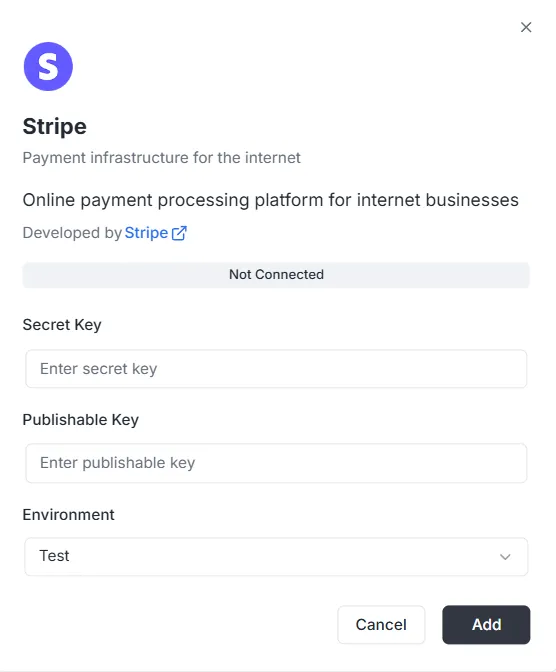
Section titled “Configuratiestappen”Nadat u Stripe in de integratielijst hebt gekozen, opent er een configuratievenster. U moet de volgende gegevens uit uw Stripe-dashboard opgeven om de verbinding tot stand te brengen:
1. Geheime sleutel
Section titled “1. Geheime sleutel”- Invoer: Voer uw privé Secret Key van Stripe (meestal beginnend met
sk_) in het veld Secret Key in. Met deze sleutel kan de backend beveiligde verzoeken authenticeren.
2. Publiceerbare sleutel
Section titled “2. Publiceerbare sleutel”- Invoer: Voer uw openbare Publishable Key van Stripe (meestal beginnend met
pk_) in het veld Publishable Key in. Deze sleutel wordt gebruikt in de frontend-implementatie.
3. Omgeving
Section titled “3. Omgeving”- Invoer: Kies de juiste omgeving in het vervolgkeuzemenu (bijv. Test voor ontwikkeling/sandbox of Production voor live verwerking).
Verbinding afronden
Section titled “Verbinding afronden”Zodra de sleutels en omgeving zijn ingesteld:
- Controleer de statusbalk (nu Not Connected).
- Klik rechtsonder op de zwarte knop Add om de gegevens op te slaan en de betaalintegratie te activeren.
API-referentie Stripe-integratie
Section titled “API-referentie Stripe-integratie”- Configuratiebeheer
- Klantenbeheer
- Betalingsintenties
- Abonnementen
- Producten en prijzen
- Facturen
- Terugbetalingen
- Checkout-sessies
- Billingportaal-sessies
- Betaalmethoden
- Webhookgebeurtenissen
- Paginering
- Foutafhandeling
Configuratiebeheer {#configuration-management}
Section titled “Configuratiebeheer {#configuration-management}”configureStripe {#configurestripe}
Section titled “configureStripe {#configurestripe}”Maakt een nieuwe Stripe-configuratie voor het project en de omgeving.
Mutatie:
mutation ConfigureStripe ( $input: ConfigureStripeInput!) { configureStripe ( input: $input ) { id publishableKey webhookUrl }}Invoer:
input ConfigureStripeInput { secretKey: String! # Stripe Secret Key (sk_test_... of sk_live_...) publishableKey: String! # Stripe Publishable Key (pk_test_... of pk_live_...) environment: StripeEnvironment! # TEST of LIVE webhookSecret: String # Webhook-handtekeninggeheim (optioneel)}Antwoord:
type ConfigureStripePayload { id: ID! # Configuratie-ID publishableKey: String! # Publiceerbare sleutel webhookUrl: String! # Gegenereerde webhook-URL}Voorbeeld:
{ "input": { "secretKey": "sk_test_...", "publishableKey": "pk_test_...", "environment": "TEST", "webhookSecret": "whsec_..." }}Opmerkingen:
- De geheime sleutel wordt met AES-256-GCM versleuteld voordat deze wordt opgeslagen
- Slechts één configuratie per combinatie project/omgeving
- Geeft een fout als de configuratie al bestaat
updateStripeConfig {#updatestripeconfig}
Section titled “updateStripeConfig {#updatestripeconfig}”Werkt een bestaande Stripe-configuratie bij.
Mutatie:
mutation UpdateStripeConfig ( $input: UpdateStripeConfigInput!) { updateStripeConfig ( input: $input ) { id publishableKey webhookUrl }}Invoer:
input UpdateStripeConfigInput { secretKey: String # Optioneel publishableKey: String # Optioneel environment: StripeEnvironment # Optioneel webhookSecret: String # Optioneel}Antwoord:
type UpdateStripeConfigPayload { id: ID! publishableKey: String! webhookUrl: String!}Opmerkingen:
- Alle velden zijn optioneel
- Alleen opgegeven velden worden bijgewerkt
- De geheime sleutel wordt versleuteld als deze wordt opgegeven
Klantenbeheer {#customer-management}
Section titled “Klantenbeheer {#customer-management}”stripe_customer {#stripe_customer}
Section titled “stripe_customer {#stripe_customer}”Haalt één klant op op ID.
Query:
query stripe_customer{ stripe_customer( id: "cus_Ts..." ) { id name email phone description metadata object createdAt }}stripe_customers {#stripe_customers}
Section titled “stripe_customers {#stripe_customers}”Lijst klanten met paginering en optionele filtering.
Query:
query stripe_customers ( $first: Int, $after: String, $customerId: String) { stripe_customers ( first: $first, after: $after, customerId: $customerId ) { edges { node { id name email phone description createdAt } cursor } pageInfo { hasNextPage hasPreviousPage startCursor endCursor } }}Parameters:
first: Aantal items om terug te geven (standaard: 10)after: Cursor voor pagineringcustomerId: Filteren op klant-ID (optioneel)
stripe_createCustomer {#stripe_createcustomer}
Section titled “stripe_createCustomer {#stripe_createcustomer}”Maakt een nieuwe klant aan.
Mutatie:
mutation stripe_createCustomer { stripe_createCustomer ( input: { name: "Customer", email: "example@archie.com", phone: "+573001230001", description: "Description Example" metadata: { data1: "Example data1", data2: "Example data2" } } ) { id name email phone description metadata object createdAt }}stripe_updateCustomer {#stripe_updatecustomer}
Section titled “stripe_updateCustomer {#stripe_updatecustomer}”Werkt een bestaande klant bij.
Mutatie:
mutation stripe_updateCustomer { stripe_updateCustomer( id: "cus_Ts...", input: { name: "Customer", email: "example@archie.com", phone: "+573001230001", description:"Description Example", metadata: { data1: "Example data1 updated", data2: "Example data2 updated" } } ) { id name email phone description metadata object createdAt }}Opmerkingen:
- Alle velden zijn optioneel
- Alleen opgegeven velden worden bijgewerkt
stripe_deleteCustomer {#stripe_deletecustomer}
Section titled “stripe_deleteCustomer {#stripe_deletecustomer}”Verwijdert een klant.
Mutatie:
mutation stripe_deleteCustomer { stripe_deleteCustomer ( id: "cus_Ts...")}Antwoord:
- Geeft
truebij succes - Geeft een fout als de klant niet wordt gevonden
Betalingsintenties {#payment-intents}
Section titled “Betalingsintenties {#payment-intents}”stripe_paymentIntent {#stripe_paymentintent}
Section titled “stripe_paymentIntent {#stripe_paymentintent}”Haalt één betalingsintentie op op ID.
Query:
query stripe_paymentIntent { stripe_paymentIntent ( id: "pi_3Su..." ) { id customerId paymentMethodId currency amount status metadata object clientSecret createdAt }}stripe_paymentIntents {#stripe_paymentintents}
Section titled “stripe_paymentIntents {#stripe_paymentintents}”Lijst betalingsintenties met paginering en optionele filtering.
Query:
query stripe_paymentIntents ( $first: Int, $after: String, $customerId: String) { stripe_paymentIntents ( first: $first, after: $after, customerId: $customerId ) { edges { node { id customerId paymentMethodId currency amount status metadata object clientSecret createdAt } cursor } pageInfo { hasPreviousPage hasNextPage startCursor endCursor } }}Parameters:
first: Aantal items om terug te geven (standaard: 10)after: Cursor voor pagineringcustomerId: Filteren op klant-ID (optioneel)
stripe_createPaymentIntent {#stripe_createpaymentintent}
Section titled “stripe_createPaymentIntent {#stripe_createpaymentintent}”Maakt een nieuwe betalingsintentie aan.
Mutatie:
mutation stripe_createPaymentIntent { stripe_createPaymentIntent ( input: { amount: 12.35, currency: "usd", customerId: "cus_Ts...", paymentMethodId: "pm_1Su...", automaticPaymentMethods: true } ) { id customerId paymentMethodId currency amount status metadata object clientSecret createdAt }}Opmerkingen:
clientSecretwordt teruggegeven voor bevestiging in de frontend- Gebruik
automaticPaymentMethods: truevoor integratie met Stripe.js
stripe_updatePaymentIntent {#stripe_updatepaymentintent}
Section titled “stripe_updatePaymentIntent {#stripe_updatepaymentintent}”Werkt een betalingsintentie bij vóór bevestiging.
Mutatie:
mutation stripe_updatePaymentIntent{ stripe_updatePaymentIntent( id: "pi_3S...", input: { amount: 36.92, currency: "usd", paymentMethodId: "pm_1Su..." metadata:{ data1: "Example data1" } } ) { id customerId paymentMethodId currency amount status metadata object clientSecret createdAt }}Opmerkingen:
- Kan alleen vóór bevestiging worden bijgewerkt
- Alle velden zijn optioneel
stripe_confirmPaymentIntent {#stripe_confirmpaymentintent}
Section titled “stripe_confirmPaymentIntent {#stripe_confirmpaymentintent}”Bevestigt een betalingsintentie.
Mutatie:
mutation stripe_confirmPaymentIntent{ stripe_confirmPaymentIntent( id: "pi_3Su..." input: { paymentMethodId: "pm_1Su...", returnUrl: "http://localhost:3000/successful-payment" } ) { id customerId paymentMethodId currency amount status metadata object clientSecret createdAt }}Opmerkingen:
- Vereist om de betaling te voltooien
- Kan 3D Secure-authenticatie vereisen
- Geeft de bijgewerkte status terug (succeeded, requires_action, enz.)
stripe_cancelPaymentIntent {#stripe_cancelpaymentintent}
Section titled “stripe_cancelPaymentIntent {#stripe_cancelpaymentintent}”Annuleert een betalingsintentie.
Mutatie:
mutation stripe_cancelPaymentIntent { stripe_cancelPaymentIntent( id: "pi_3Su..." ) { id customerId paymentMethodId currency amount status metadata object clientSecret createdAt }}Opmerkingen:
- Alleen intenties die niet succeeded of canceled zijn, kunnen worden geannuleerd
- De status wordt “canceled”
Abonnementen {#subscriptions}
Section titled “Abonnementen {#subscriptions}”stripe_subscription {#stripe_subscription}
Section titled “stripe_subscription {#stripe_subscription}”Haalt één abonnement op op ID.
Query:
query stripe_subscription { stripe_subscription(id: "sub_1Su...") { id customerId status currentPeriodStart currentPeriodEnd createdAt cancelAtPeriodEnd metadata object items { data { id priceId quantity } } }}stripe_subscriptions {#stripe_subscriptions}
Section titled “stripe_subscriptions {#stripe_subscriptions}”Lijst abonnementen met paginering en optionele filtering.
Query:
query stripe_subscriptions ( $first: Int, $after: String, $customerId: String) { stripe_subscriptions ( first: $first, after: $after, customerId: $customerId ) { edges { node { id customerId status currentPeriodStart currentPeriodEnd createdAt cancelAtPeriodEnd metadata object items { data { id priceId quantity } } } cursor } pageInfo { hasPreviousPage hasNextPage startCursor endCursor } }}Parameters:
first: Aantal items om terug te geven (standaard: 10)after: Cursor voor pagineringcustomerId: Filteren op klant-ID (optioneel)status: Filteren op status (optioneel)
stripe_createSubscription {#stripe_createsubscription}
Section titled “stripe_createSubscription {#stripe_createsubscription}”Maakt een nieuw abonnement aan.
Mutatie:
mutation stripe_createSubscription { stripe_createSubscription ( input: { customerId: "cus_TsQ...", items: { priceId: "price_1Su...", quantity: 1 }, metadata: { data1: "Example data1" }, trialPeriodDays: 0 } ) { id customerId status currentPeriodStart currentPeriodEnd createdAt cancelAtPeriodEnd metadata object items { data { id priceId quantity } } }}Opmerkingen:
paymentBehaviorkan “default_incomplete” zijn voor abonnementen die een betaalmethode vereisen- De proefperiode wordt in dagen aangegeven
- De laatste factuur en betalingsintentie worden automatisch uitgebreid
stripe_updateSubscription {#stripe_updatesubscription}
Section titled “stripe_updateSubscription {#stripe_updatesubscription}”Werkt een bestaand abonnement bij.
Mutatie:
mutation stripe_updateSubscription { stripe_updateSubscription( id: "sub_1Sv..." input: { cancelAtPeriodEnd: false metadata: { data2: "Example data2" } } ) { id customerId status currentPeriodStart currentPeriodEnd createdAt cancelAtPeriodEnd metadata object items { data { id priceId quantity } } }}stripe_cancelSubscription {#stripe_cancelsubscription}
Section titled “stripe_cancelSubscription {#stripe_cancelsubscription}”Annuleert een abonnement.
Mutatie:
mutation stripe_cancelSubscription { stripe_cancelSubscription ( cancelAtPeriodEnd: true, id: "sub_1Sv..." ) { id customerId status currentPeriodStart currentPeriodEnd createdAt cancelAtPeriodEnd metadata object items { data { id priceId quantity } } }}Parameters:
id: Abonnements-ID (verplicht)cancelAtPeriodEnd: Als true, annuleert aan het einde van de periode; als false, onmiddellijk (standaard: false)
Opmerkingen:
- Onmiddellijke annulering: het abonnement eindigt nu
- Annulering aan het einde van de periode: het abonnement loopt door tot het einde van de huidige periode
Producten en prijzen {#products-and-prices}
Section titled “Producten en prijzen {#products-and-prices}”stripe_products {#stripe_products}
Section titled “stripe_products {#stripe_products}”Lijst producten met paginering.
Query:
query stripe_products ( $first: Int, $after: String) { stripe_products ( first: $first, after: $after ) { edges { node { id name description active metadata object createdAt } cursor } pageInfo { hasPreviousPage hasNextPage startCursor endCursor } }}stripe_createProduct {#stripe_createproduct}
Section titled “stripe_createProduct {#stripe_createproduct}”Maakt een nieuw product aan.
Mutatie:
mutation stripe_createProduct { stripe_createProduct ( input: { name: "Product 01", description: "Description product 01", metadata: { data1: "Example data1" } } ) { id name description active metadata object createdAt }}stripe_prices {#stripe_prices}
Section titled “stripe_prices {#stripe_prices}”Lijst prijzen met paginering en optionele filtering.
Query:
query stripe_prices ( $first: Int, $after: String, $productId: String) { stripe_prices ( first: $first, after: $after, productId: $productId ) { edges { node { id productId active currency unitAmount object metadata createdAt recurring { interval intervalCount } } cursor } pageInfo { hasPreviousPage hasNextPage startCursor endCursor } }}Parameters:
first: Aantal items om terug te geven (standaard: 10)after: Cursor voor pagineringproductId: Filteren op product-ID (optioneel)
stripe_createPrice {#stripe_createprice}
Section titled “stripe_createPrice {#stripe_createprice}”Maakt een nieuwe prijs aan.
Mutatie:
mutation stripe_createPrice { stripe_createPrice ( input: { productId: "prod_Tst...", unitAmount: 25.85, currency: "usd", recurring: { interval: "month", intervalCount: 1 }, metadata: { data1: "Example data1" } } ) { id productId currency unitAmount active object createdAt metadata recurring { interval intervalCount } }}Opmerkingen:
- Laat
recurringweg voor eenmalige prijzen intervalmoet een van: “day”, “week”, “month”, “year” zijn
Facturen {#invoices}
Section titled “Facturen {#invoices}”stripe_invoice {#stripe_invoice}
Section titled “stripe_invoice {#stripe_invoice}”Haalt één factuur op op ID.
Query:
query stripe_invoice { stripe_invoice ( id: "in_1Su..." ) { id customerId subscriptionId currency amountPaid amountDue status object metadata createdAt lineItems { data { id description currency amount quantity } } }}Opmerkingen:
- De abonnements-ID wordt ingevuld via API-expansie indien beschikbaar
stripe_invoices {#stripe_invoices}
Section titled “stripe_invoices {#stripe_invoices}”Lijst facturen met paginering en optionele filtering.
Query:
query stripe_invoices ( $first: Int, $after: String, $customerId: String, $status: String) { stripe_invoices ( first: $first, after: $after, customerId: $customerId, status: $status ) { edges { node { id customerId subscriptionId currency amountPaid amountDue status object metadata createdAt lineItems { data { id description currency amount quantity } } } cursor } pageInfo { hasPreviousPage hasNextPage startCursor endCursor } }}Parameters:
first: Aantal items om terug te geven (standaard: 10)after: Cursor voor pagineringcustomerId: Filteren op klant-ID (optioneel)status: Filteren op status (optioneel)
stripe_payInvoice {#stripe_payinvoice}
Section titled “stripe_payInvoice {#stripe_payinvoice}”Betaalt een factuur programmatisch.
Mutatie:
mutation stripe_payInvoice { stripe_payInvoice ( id: "in_1Sv..." ) { id customerId subscriptionId currency amountPaid amountDue status object metadata createdAt lineItems { data { id description currency amount quantity } } }}Opmerkingen:
- Probeert de factuur te betalen met de standaard betaalmethode van de klant
- Geeft een fout als de betaling mislukt
- Werkt de factuurstatus bij naar “paid” bij succes
Terugbetalingen {#refunds}
Section titled “Terugbetalingen {#refunds}”stripe_refunds {#stripe_refunds}
Section titled “stripe_refunds {#stripe_refunds}”Lijst terugbetalingen met paginering en optionele filtering.
Query:
query stripe_refunds ( $first: Int, $after: String, $paymentIntentId: String) { stripe_refunds ( first: $first, after: $after, paymentIntentId: $paymentIntentId ) { edges { node { id paymentIntentId reason status currency amount metadata object createdAt } cursor } pageInfo { hasPreviousPage hasNextPage startCursor endCursor } }}Parameters:
first: Aantal items om terug te geven (standaard: 10)after: Cursor voor pagineringpaymentIntentId: Filteren op betalingsintentie-ID (optioneel)
stripe_createRefund {#stripe_createrefund}
Section titled “stripe_createRefund {#stripe_createrefund}”Maakt een terugbetaling voor een betalingsintentie aan.
Mutatie:
mutation stripe_createRefund { stripe_createRefund ( input: { paymentIntentId: "pi_3Sv...", amount: 200, reason: "requested_by_customer" } ) { id reason paymentIntentId status currency amount object metadata createdAt }}Opmerkingen:
- Laat
amountweg voor volledige terugbetaling reasonkan zijn: “duplicate”, “fraudulent”, “requested_by_customer”- De terugbetalingsstatus begint als “pending” en wordt “succeeded” of “failed”
Checkout-sessies {#checkout-sessions}
Section titled “Checkout-sessies {#checkout-sessions}”stripe_createCheckoutSession {#stripe_createcheckoutsession}
Section titled “stripe_createCheckoutSession {#stripe_createcheckoutsession}”Maakt een Stripe Checkout-sessie voor eenmalige betalingen of abonnementen. Geeft een URL terug die klanten naar de gehoste betaalpagina van Stripe leidt.
Mutatie:
mutation CreateCheckoutSession($input: StripeCreateCheckoutSessionInput!) { stripe_createCheckoutSession(input: $input) { id url customerId customerEmail paymentIntentId subscriptionId mode status currency amountTotal metadata createdAt }}Invoer:
input StripeCreateCheckoutSessionInput {  customerId: String              # Bestaande Stripe-klant-ID (optioneel)  customerEmail: String            # E-mail voor nieuwe klanten (optioneel)  mode: String!                   # "payment" voor eenmalig of "subscription" voor terugkerend  successUrl: String!             # Omleidings-URL na geslaagde betaling  cancelUrl: String!              # Omleidings-URL als de klant annuleert  lineItems: [StripeCheckoutSessionLineItemInput!]!  # Te kopen regels  paymentMethodTypes: [String!]    # Toegestane betaalmethoden (optioneel)  metadata: Map                    # Aangepaste metadata (optioneel)}
input StripeCheckoutSessionLineItemInput {  priceId: String      # Stripe-prijs-ID (bestaande prijzen)  quantity: Int!        # Aantal items  amount: Float         # Aangepast bedrag in dollars (eenmalige betalingen)  currency: String      # Valutacode (verplicht als amount is opgegeven)}
Antwoord:
type StripeCheckoutSession { id: ID! # Sessie-ID object: String! # "checkout.session" url: String! # Omleidings-URL voor de klant customerId: String # Klant-ID (indien aanwezig) customerEmail: String # E-mail van de klant paymentIntentId: String # Betalingsintentie-ID (eenmalige betalingen) subscriptionId: String # Abonnements-ID (abonnementen) mode: String! # "payment" of "subscription" status: String! # Sessiestatus currency: String # Valutacode amountTotal: Float # Totaalbedrag in dollars metadata: Map # Aangepaste metadata createdAt: Time! # Aanmaaktijd}Voorbeeld — Eenmalige betaling:
{ "input": { "mode": "payment", "successUrl": "https://example.com/success", "cancelUrl": "https://example.com/cancel", "lineItems": [ { "priceId": "price_1234567890", "quantity": 1 } ] }}Voorbeeld — Eenmalige betaling met aangepast bedrag:
{ "input": { "mode": "payment", "customerEmail": "customer@example.com", "successUrl": "https://example.com/success", "cancelUrl": "https://example.com/cancel", "lineItems": [ { "amount": 29.99, "currency": "usd", "quantity": 1 } ] }}Voorbeeld — Abonnement:
{ "input": { "mode": "subscription", "customerId": "cus_1234567890", "successUrl": "https://example.com/success", "cancelUrl": "https://example.com/cancel", "lineItems": [ { "priceId": "price_monthly_subscription", "quantity": 1 } ] }}Opmerkingen:
- Het veld
urlbevat de omleidings-URL waarnaar klanten moeten worden gestuurd - Voor eenmalige betalingen gebruikt u
mode: "payment"en geeft upriceIdofamount+currencyop - Voor abonnementen gebruikt u
mode: "subscription"en geeft upriceIdop (moet een terugkerende prijs zijn) - Geef
customerIdofcustomerEmailop, maar niet beide paymentMethodTypeskan bevatten: “card”, “us_bank_account”, “link”, enz.- Sessies verlopen na 24 uur als ze niet zijn voltooid
Billingportaal-sessies {#billing-portal-sessions}
Section titled “Billingportaal-sessies {#billing-portal-sessions}”stripe_createBillingPortalSession {#stripe_createbillingportalsession}
Section titled “stripe_createBillingPortalSession {#stripe_createbillingportalsession}”Maakt een Stripe Billingportaal-sessie zodat klanten abonnementen, betaalmethoden en factureringsgegevens beheren in het door Stripe gehoste portaal.
Mutatie:
mutation CreateBillingPortalSession($input: StripeCreateBillingPortalSessionInput!) { stripe_createBillingPortalSession(input: $input) { id url customerId returnUrl createdAt }}Invoer:
input StripeCreateBillingPortalSessionInput { customerId: String! # Stripe-klant-ID (verplicht) returnUrl: String! # Omleidings-URL bij verlaten van het portaal configuration: String # Portalconfiguratie-ID (optioneel)}Antwoord:
type StripeBillingPortalSession { id: ID! # Sessie-ID object: String! # "billing_portal.session" url: String! # Omleidings-URL voor de klant customerId: String! # Klant-ID returnUrl: String # Terugkeer-URL createdAt: Time! # Aanmaaktijd}Voorbeeld:
{ "input": { "customerId": "cus_1234567890", "returnUrl": "https://example.com/account" }}Opmerkingen:
- Het veld
urlbevat de omleidings-URL waarnaar klanten moeten worden gestuurd - De portalsessie is kort geldig en verloopt na gebruik
- Klanten kunnen abonnementen beheren, betaalmethoden bijwerken, facturen bekijken en factureringsgegevens bijwerken
- Portaalfuncties worden ingesteld in het Stripe-dashboard
- Als
configurationniet wordt opgegeven, wordt de standaard portalconfiguratie gebruikt - Het portaal toont alleen abonnementen en facturen van de opgegeven klant
Betaalmethoden {#payment-methods}
Section titled “Betaalmethoden {#payment-methods}”stripe_paymentMethods {#stripe_paymentmethods}
Section titled “stripe_paymentMethods {#stripe_paymentmethods}”Lijst betaalmethoden met paginering en optionele filtering.
Query:
query stripe_paymentMethods ( $first: Int, $after: String, $customerId: String) { stripe_paymentMethods( first: $first, after: $after, customerId: $customerId ) { edges { node { id customerId type object metadata createdAt card { brand expMonth expYear last4 } } cursor } pageInfo { hasPreviousPage hasNextPage startCursor endCursor } }}Parameters:
first: Aantal items om terug te geven (standaard: 10)after: Cursor voor pagineringcustomerId: Filteren op klant-ID (optioneel)
Opmerkingen:
- Alleen veilige kaartgegevens worden teruggegeven (last4, merk, vervaldatum)
- Volledige kaartnummers worden nooit getoond
stripe_attachPaymentMethod {#stripe_attachpaymentmethod}
Section titled “stripe_attachPaymentMethod {#stripe_attachpaymentmethod}”Koppelt een betaalmethode aan een klant.
Mutatie:
mutation stripe_attachPaymentMethod { stripe_attachPaymentMethod ( id: "pm_1Sv...", input: { customerId: "cus_Ts4..." } ) { id customerId type card { brand expMonth expYear last4 } metadata object createdAt }}Opmerkingen:
- De betaalmethode moet eerst worden aangemaakt (meestal via Stripe.js)
- Gekoppelde betaalmethoden kunnen worden gebruikt voor abonnementen en betalingen
stripe_detachPaymentMethod {#stripe_detachpaymentmethod}
Section titled “stripe_detachPaymentMethod {#stripe_detachpaymentmethod}”Ontkoppelt een betaalmethode van een klant.
Mutatie:
mutation stripe_detachPaymentMethod { stripe_detachPaymentMethod ( id: "pm_1Sv..." ) { id customerId type card { brand expYear expMonth last4 } metadata object createdAt }}Opmerkingen:
- Ontkoppelde betaalmethoden kunnen niet meer worden gebruikt voor betalingen
- Geeft de betaalmethode terug met
customerIdop null
Webhookgebeurtenissen {#webhook-events}
Section titled “Webhookgebeurtenissen {#webhook-events}”stripe_webhookEvents {#stripe_webhookevents}
Section titled “stripe_webhookEvents {#stripe_webhookevents}”Lijst webhookgebeurtenissen die door de service zijn ontvangen.
Query:
query ListWebhookEvents ( $first: Int, $after: String) { stripe_webhookEvents ( first: $first, after: $after ) { edges { node { id type data processed createdAt } cursor } pageInfo { hasNextPage hasPreviousPage endCursor } }}Antwoord:
type StripeWebhookEvent { id: ID! type: String! # Gebeurtenistype (bijv. "payment_intent.succeeded") data: String! # JSON-string met gegevens van de gebeurtenis processed: Boolean! # Of de gebeurtenis is verwerkt createdAt: Time!}Parameters:
first: Aantal items om terug te geven (standaard: 10)after: Cursor voor paginering
Opmerkingen:
- Gebeurtenissen worden automatisch ontvangen op het webhook-endpoint
- Gebeurtenissen worden opgeslagen na handtekeningverificatie
- Het veld
databevat de volledige gebeurtenis-lading als JSON-string
Paginering {#pagination}
Section titled “Paginering {#pagination}”Alle lijstquery’s ondersteunen op cursor gebaseerde paginering met het Relay-verbindingpatroon.
PageInfo {#pageinfo}
Section titled “PageInfo {#pageinfo}”type PageInfo { hasNextPage: Boolean! hasPreviousPage: Boolean! startCursor: String endCursor: String}Gebruiksvoorbeeld {#usage-example}
Section titled “Gebruiksvoorbeeld {#usage-example}”query ListCustomers ( $first: Int, $after: String) { stripe_customers ( first: $first, after: $after ) { edges { node { id email } cursor } pageInfo { hasNextPage endCursor } }}Pagineringstroom:
- Eerste aanvraag:
first: 10, after: null - Gebruik
pageInfo.endCursoruit het antwoord alsafterin de volgende aanvraag - Controleer
hasNextPageom te zien of er meer pagina’s zijn
Standaardwaarden:
first: Standaard 10 indien niet opgegevenafter: Begint aan het begin indien niet opgegeven
Foutafhandeling {#error-handling}
Section titled “Foutafhandeling {#error-handling}”Alle bewerkingen geven GraphQL-fouten met duidelijke berichten terug. Fouten worden afgebeeld vanuit Stripe API-fouten om nuttige feedback te geven.
Veelvoorkomende foutscenario’s {#common-error-scenarios}
Section titled “Veelvoorkomende foutscenario’s {#common-error-scenarios}”Configuratiefouten:
400: Ongeldig Stripe-sleutelformaat404: Project of configuratie niet gevonden400: Configuratie bestaat al
Klantfouten:
404: Klant niet gevonden400: Ongeldige klantgegevens
Betalingsintentiefouten:
404: Betalingsintentie niet gevonden400: Ongeldig bedrag of valuta402: Betaling mislukt (kaart geweigerd, onvoldoende saldo, enz.)
Abonnementsfouten:
404: Abonnement niet gevonden400: Ongeldige abonnementsparameters400: Geannuleerd abonnement kan niet worden bijgewerkt
Stripe-foutcodes: Veelvoorkomende Stripe-foutcodes worden afgebeeld naar duidelijke berichten:
card_declined: “Uw kaart is geweigerd”insufficient_funds: “Onvoldoende saldo”invalid_number: “Ongeldig kaartnummer”expired_card: “Kaart is verlopen”incorrect_cvc: “Onjuiste CVC-code”
Foutantwoordformaat {#error-response-format}
Section titled “Foutantwoordformaat {#error-response-format}”{ "errors": [ { "message": "Klant niet gevonden", "extensions": { "code": "NOT_FOUND", "stripeErrorCode": "resource_missing" } } ], "data": null}Gegevenstypen {#data-types}
Section titled “Gegevenstypen {#data-types}”StripeEnvironment {#stripe-environment}
Section titled “StripeEnvironment {#stripe-environment}”enum StripeEnvironment { TEST # Testmodus LIVE # Live-/productiemodus}Map-scalaartype {#map-scalar}
Section titled “Map-scalaartype {#map-scalar}”Het scalaire type Map representeert een sleutel-waardepaar waarbij:
- Sleutels tekenreeksen zijn
- Waarden tekenreeksen, getallen, booleans of geneste maps kunnen zijn
- Het wordt gebruikt voor metadatavelden
Voorbeeld:
{ "metadata": { "order_id": "12345", "user_id": "67890", "premium": true }}Time-scalaartype {#time-scalar}
Section titled “Time-scalaartype {#time-scalar}”Het scalaire type Time representeert tijdstempels in ISO 8601-formaat.
Voorbeeld: "2025-11-16T00:28:48.081Z"