SendGrid
O SendGrid é um serviço na nuvem para enviar e-mails transacionais e de marketing. Ligar esta integração permite que seu aplicativo envie e-mails de forma programática (por exemplo, boas-vindas, redefinição de senha ou notificações).
Passos de configuração
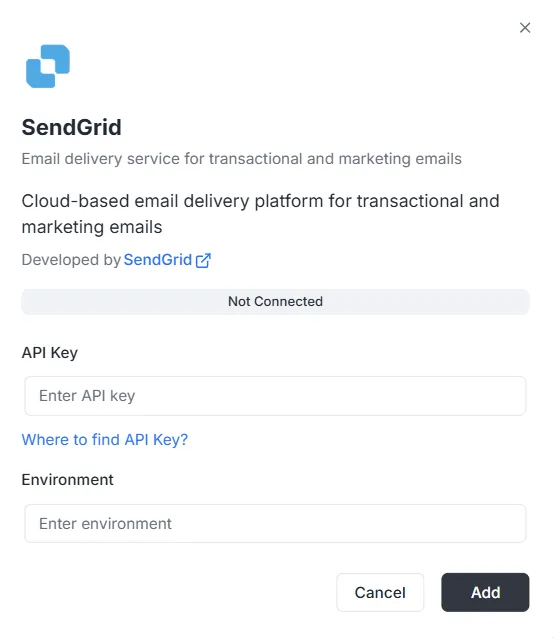
Seção intitulada “Passos de configuração”Depois de selecionar SendGrid na lista de integrações, será exibido um modal de configuração. Você deve informar as seguintes credenciais para estabelecer a conexão:
1. Chave API
Seção intitulada “1. Chave API”É o token de autenticação gerado na sua conta SendGrid.
- Campo: Cole sua chave API privada do SendGrid no campo de texto.
- Ajuda: Se não tiver uma, clique no link “Where to find API Key?” no modal para ver como gerá-la.
2. Ambiente
Seção intitulada “2. Ambiente”Indique o contexto de ambiente desta integração.
- Campo: Digite o identificador de ambiente (por exemplo,
Production,Stagingou uma etiqueta de configuração específica) no campo Environment.
Concluir a conexão
Seção intitulada “Concluir a conexão”Quando os campos estiverem preenchidos:
- Verifique a barra de status (mostrará Not Connected).
- Clique no botão preto Add no canto inferior direito para salvar as credenciais e ativar a integração.
Referência da API de integração SendGrid
Seção intitulada “Referência da API de integração SendGrid”Configuração do SendGrid {#sendgrid-configuration}
Seção intitulada “Configuração do SendGrid {#sendgrid-configuration}”Configurar a chave API do SendGrid {#sendgrid-configure-api-key}
Seção intitulada “Configurar a chave API do SendGrid {#sendgrid-configure-api-key}”Configura a chave API do SendGrid para um projeto e um ambiente específicos.
Mutação:
mutation { sendgrid_configureSendGrid ( apiKey: "SG._api_key_here" )}Envio de e-mails {#sending-emails}
Seção intitulada “Envio de e-mails {#sending-emails}”Enviar e-mail simples {#send-simple-email}
Seção intitulada “Enviar e-mail simples {#send-simple-email}”Envia um e-mail para um ou vários destinatários.
Mutação:
mutation sendgrid_sendEmail { sendgrid_sendEmail ( email: { from: { email: "sender@archie.com", name: "Sender Name" }, subject: "Test Email", to: { email: "recipient@gmail.com", name: "Recipient Name" }, content: { type: "text/html", value: "<h1>Hello World</h1><p>This is a test email.</p>" } } ) { messageId success }}Resposta:
{ "data": { "sendgrid_sendEmail": { "messageId": "sent-1234567890", "success": true } }}E-mail com CC e BCC {#send-email-with-cc-and-bcc}
Seção intitulada “E-mail com CC e BCC {#send-email-with-cc-and-bcc}”Mutação:
mutation sendgrid_sendEmail { sendgrid_sendEmail ( email: { from: { email: "sender@example.com" name: "Sender Name" } to: [ { email: "recipient@example.com" name: "Recipient Name" } ] cc: [ { email: "cc@example.com" name: "CC Recipient" } ] bcc: [ { email: "bcc@example.com" } ] subject: "Email with CC and BCC" content: [ { type: "text/html" value: "<h1>Hello</h1><p>This email has CC and BCC recipients.</p>" } ] } ) { messageId success }}E-mail com anexos {#send-email-with-attachments}
Seção intitulada “E-mail com anexos {#send-email-with-attachments}”Mutação:
mutation sendgrid_sendEmail { sendgrid_sendEmail( email: { from: { email: "sender@example.com" name: "Sender Name" } to: [ { email: "recipient@example.com" name: "Recipient Name" } ] subject: "Email with Attachment" content: [ { type: "text/html" value: "<h1>Hello</h1><p>Please find attached file.</p>" } ] attachments: [ { content: "SGVsbG8gV29ybGQ=" type: "text/plain" filename: "document.txt" disposition: "attachment" } ] } ) { messageId success }}Nota: O campo content dos anexos precisa estar codificado em Base64.
E-mail com categorias e etiquetas {#send-email-with-categories-and-tags}
Seção intitulada “E-mail com categorias e etiquetas {#send-email-with-categories-and-tags}”Mutação:
mutation sendgrid_sendEmail { sendgrid_sendEmail( email: { from: { email: "sender@example.com" name: "Sender Name" } to: [ { email: "recipient@example.com" name: "Recipient Name" } ] subject: "Categorized Email" content: [ { type: "text/html" value: "<h1>Hello</h1>" } ] categories: ["transactional", "notification"] tags: ["important", "urgent"] } ) { messageId success }}E-mail agendado {#send-email-programmed}
Seção intitulada “E-mail agendado {#send-email-programmed}”Mutação:
mutation sendgrid_sendEmail { sendgrid_sendEmail( email: { from: { email: "sender@example.com" name: "Sender Name" } to: [ { email: "recipient@example.com" name: "Recipient Name" } ] subject: "Scheduled Email" content: [ { type: "text/html" value: "<h1>Hello</h1>" } ] sendAt: "2025-12-25T10:00:00Z" } ) { messageId success }}E-mail com argumentos personalizados {#send-email-with-custom-args}
Seção intitulada “E-mail com argumentos personalizados {#send-email-with-custom-args}”Mutação:
mutation sendgrid_sendEmail { sendgrid_sendEmail( email: { from: { email: "sender@example.com" name: "Sender Name" } to: [ { email: "recipient@example.com" name: "Recipient Name" } ] subject: "Email with Custom Args" content: [ { type: "text/html" value: "<h1>Hello</h1>" } ] customArgs: { orderId: "12345" userId: "67890" campaignId: "abc123" } } ) { messageId success }}Envio em massa de e-mails {#send-bulk-emails}
Seção intitulada “Envio em massa de e-mails {#send-bulk-emails}”Enviar vários e-mails {#send-multiple-emails}
Seção intitulada “Enviar vários e-mails {#send-multiple-emails}”Mutação:
mutation sendgrid_sendBulkEmail { sendgrid_sendBulkEmail( emails: { emails: [ { from: { email: "sender@example.com" name: "Sender Name" } to: [ { email: "recipient1@example.com" name: "Recipient 1" } ] subject: "Bulk Email 1" content: [ { type: "text/html" value: "<h1>Email 1</h1>" } ] } { from: { email: "sender@example.com" name: "Sender Name" } to: [ { email: "recipient2@example.com" name: "Recipient 2" } ] subject: "Bulk Email 2" content: [ { type: "text/html" value: "<h1>Email 2</h1>" } ] } ] } ) { messageIds success }}Resposta:
{ "data": { "sendgrid_sendBulkEmail": { "messageIds": ["sent-1234567890", "sent-1234567891"], "success": true } }}E-mails com modelos {#send-emails-with-templates}
Seção intitulada “E-mails com modelos {#send-emails-with-templates}”Enviar e-mail com modelo dinâmico {#send-email-using-dynamic-template}
Seção intitulada “Enviar e-mail com modelo dinâmico {#send-email-using-dynamic-template}”Mutação:
mutation sendgrid_sendTemplate { sendgrid_sendTemplate( email: { from: { email: "sender@example.com" name: "Sender Name" } to: [ { email: "recipient@example.com" name: "Recipient Name" } ] templateId: "d-1234567890abcdef" substitutions: { name: "John Doe" orderNumber: "12345" totalAmount: "$99.99" } } ) { messageId success }}Resposta:
{ "data": { "sendgrid_sendTemplate": { "messageId": "sent-1234567890", "success": true } }}Gestão de contatos {#send-contact-management}
Seção intitulada “Gestão de contatos {#send-contact-management}”Adicionar contato {#send-add-contact}
Seção intitulada “Adicionar contato {#send-add-contact}”Mutação:
mutation sendgrid_addContact { sendgrid_addContact( contact: { email: "newcontact@example.com" firstName: "John" lastName: "Doe" customFields: { company: "Acme Corp" phone: "+1234567890" position: "Developer" } listIds: ["list-id-1", "list-id-2"] } )}Resposta:
{ "data": { "sendgrid_addContact": true }}Atualizar contato {#send-update-contact}
Seção intitulada “Atualizar contato {#send-update-contact}”Mutação:
mutation sendgrid_updateContact { sendgrid_updateContact( contact: { email: "existing@example.com" firstName: "Jane" lastName: "Smith" customFields: { company: "New Company" phone: "+0987654321" } } )}Resposta:
{ "data": { "sendgrid_updateContact": true }}Excluir contato {#send-delete-contact}
Seção intitulada “Excluir contato {#send-delete-contact}”Mutação:
mutation sendgrid_deleteContact { sendgrid_deleteContact( email: "contact@example.com" )}Resposta:
{ "data": { "sendgrid_deleteContact": true }}Análise e estatísticas {#send-analytics-and-statistics}
Seção intitulada “Análise e estatísticas {#send-analytics-and-statistics}”Obter estatísticas de e-mail {#send-get-email-stats}
Seção intitulada “Obter estatísticas de e-mail {#send-get-email-stats}”Consulta:
query sendgrid_getEmailStats { sendgrid_getEmailStats ( startDate: "2025-01-01" endDate: "2025-01-31" ) { opens clicks bounces spamReports delivered startDate endDate }}Resposta:
{ "data": { "sendgrid_getEmailStats": { "opens": 150, "clicks": 75, "bounces": 5, "spamReports": 2, "delivered": 1000, "startDate": "2025-01-01T00:00:00Z", "endDate": "2025-01-31T00:00:00Z" } }}Validar e-mail {#send-validate-email}
Seção intitulada “Validar e-mail {#send-validate-email}”Consulta:
query sendgrid_validateEmail { sendgrid_validateEmail ( email: "test@example.com" ) { valid score local domain reason suggestions }}Resposta (com SendGrid Premium):
{ "data": { "sendgrid_validateEmail": { "valid": true, "score": 0.95, "local": "test", "domain": "example.com", "reason": "", "suggestions": [] } }}Resposta (validação básica — quando o SendGrid Premium não está disponível):
{ "data": { "sendgrid_validateEmail": { "valid": true, "score": 0.8, "local": "test", "domain": "example.com", "reason": "Validação básica (validação premium do SendGrid não disponível)", "suggestions": [] } }}Nota: O endpoint de validação de e-mail do SendGrid (/v3/validations/email) requer permissões especiais e pode não estar disponível em todas as contas. Se a sua chave API não tiver acesso a este endpoint (erro 403), o sistema utilizará automaticamente validação básica baseada em expressões regulares como alternativa.
Exemplos completos com variáveis {#complete-examples-with-variables}
Seção intitulada “Exemplos completos com variáveis {#complete-examples-with-variables}”Exemplo com variáveis GraphQL {#example-with-graphql-variables}
Seção intitulada “Exemplo com variáveis GraphQL {#example-with-graphql-variables}”Requisição:
{ "query": "mutation SendEmail($email: EmailInput!) { sendgrid_sendEmail(email: $email) { messageId success } }", "variables": { "email": { "from": { "email": "sender@example.com", "name": "Sender Name" }, "to": [ { "email": "recipient@example.com", "name": "Recipient Name" } ], "subject": "Test Email", "content": [ { "type": "text/html", "value": "<h1>Hello World</h1>" } ] } }}Tratamento de erros {#error-handling}
Seção intitulada “Tratamento de erros {#error-handling}”Exemplo de erro {#error-example}
Seção intitulada “Exemplo de erro {#error-example}”Requisição:
{ "query": "mutation { sendgrid_sendEmail(email: { from: { email: \"invalid\" }, to: [], subject: \"Test\", content: [] }) { messageId success } }"}Resposta de erro:
{ "errors": [ { "message": "erro de validação: é necessário pelo menos um destinatário", "path": ["sendgrid_sendEmail"] } ], "data": null}Erros frequentes {#common-errors}
Seção intitulada “Erros frequentes {#common-errors}”-
Falta o ID do projeto:
{"errors": [{"message": "o ID do projeto é necessário no contexto"}]} -
Configuração não encontrada:
{"errors": [{"message": "configuração sendgrid não encontrada para o projeto: xxx, ambiente: master"}]} -
Chave API inválida:
{"errors": [{"message": "erro da API sendgrid: estado 401, corpo: ..."}]}
Webhooks {#webhooks}
Seção intitulada “Webhooks {#webhooks}”Endpoint de webhooks {#webhooks-endpoint}
Seção intitulada “Endpoint de webhooks {#webhooks-endpoint}”O endpoint de webhooks está disponível em:
- HTTP:
POST http://localhost:8080/webhooks/sendgrid - Lambda:
POST /webhooks/sendgrid
Configuração no SendGrid {#sendgrid-configuration-webhooks}
Seção intitulada “Configuração no SendGrid {#sendgrid-configuration-webhooks}”- Acesse a SendGrid Dashboard > Settings > Mail Settings > Event Webhook
- Configure a URL:
https://seu-dominio.com/webhooks/sendgrid - Selecione os eventos que deseja receber
- Configure a chave de verificação na variável de ambiente
WEBHOOK_VERIFICATION_KEY
Eventos suportados {#supported-events}
Seção intitulada “Eventos suportados {#supported-events}”processed: E-mail processadodelivered: E-mail entregueopened: E-mail abertoclicked: Link clicadobounce: Rejeição do e-maildropped: E-mail descartadospamreport: Reportado como spamunsubscribe: Cancelamento da assinatura