SendGrid
SendGrid خدمة سحابية لإرسال رسائل البريد الإلكتروني المعاملاتية والتسويقية. يتيح لك ربط هذا التكامل إرسال البريد برمجياً من تطبيقك (مثل رسائل الترحيب أو إعادة تعيين كلمة المرور أو الإشعارات).
خطوات التكوين
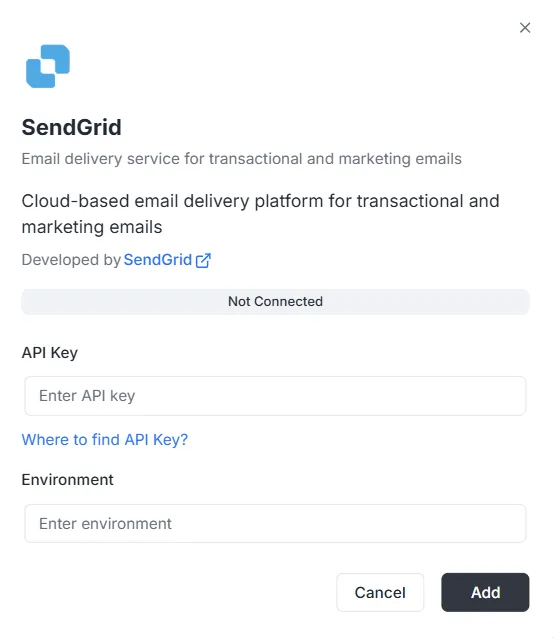
Section titled “خطوات التكوين”بعد اختيار SendGrid من قائمة عمليات التكوين، ستظهر نافذة تكوين. يجب إدخال بيانات الاعتماد التالية لإنشاء الاتصال:
1. مفتاح API
Section titled “1. مفتاح API”هذا رمز المصادقة الذي تُنشئه في حساب SendGrid.
- الإدخال: الصق مفتاح SendGrid API الخاص في حقل النص.
- المساعدة: إن لم يكن لديك مفتاح، انقر رابط «Where to find API Key?» في النافذة لمعرفة كيفية إنشائه.
2. البيئة
Section titled “2. البيئة”حدد سياق البيئة لهذا الدمج.
- الإدخال: أدخل مُعرّف البيئة (مثل
ProductionأوStagingأو وسماً للتكوين) في حقل Environment.
إكمال الاتصال
Section titled “إكمال الاتصال”عند تعبئة الحقول:
- راجع شريط الحالة (يظهر حالياً Not Connected).
- انقر الزر الأسود Add في أسفل اليمين لحفظ بيانات الاعتماد وتفعيل الدمج.
مرجع واجهة برمجة تطبيقات دمج SendGrid
Section titled “مرجع واجهة برمجة تطبيقات دمج SendGrid”إعداد SendGrid {#sendgrid-configuration}
Section titled “إعداد SendGrid {#sendgrid-configuration}”تكوين مفتاح API لـ SendGrid {#sendgrid-configure-api-key}
Section titled “تكوين مفتاح API لـ SendGrid {#sendgrid-configure-api-key}”يُكوِّن مفتاح SendGrid API لمشروع وبيئة محددين.
Mutation:
mutation { sendgrid_configureSendGrid ( apiKey: "SG._api_key_here" )}إرسال البريد {#sending-emails}
Section titled “إرسال البريد {#sending-emails}”إرسال بريد بسيط {#send-simple-email}
Section titled “إرسال بريد بسيط {#send-simple-email}”يرسل بريداً إلى مستلم واحد أو عدة مستلمين.
Mutation:
mutation sendgrid_sendEmail { sendgrid_sendEmail ( email: { from: { email: "sender@archie.com", name: "Sender Name" }, subject: "Test Email", to: { email: "recipient@gmail.com", name: "Recipient Name" }, content: { type: "text/html", value: "<h1>Hello World</h1><p>This is a test email.</p>" } } ) { messageId success }}الاستجابة:
{ "data": { "sendgrid_sendEmail": { "messageId": "sent-1234567890", "success": true } }}بريد مع نسخة ونسخة مخفية {#send-email-with-cc-and-bcc}
Section titled “بريد مع نسخة ونسخة مخفية {#send-email-with-cc-and-bcc}”Mutation:
mutation sendgrid_sendEmail { sendgrid_sendEmail ( email: { from: { email: "sender@example.com" name: "Sender Name" } to: [ { email: "recipient@example.com" name: "Recipient Name" } ] cc: [ { email: "cc@example.com" name: "CC Recipient" } ] bcc: [ { email: "bcc@example.com" } ] subject: "Email with CC and BCC" content: [ { type: "text/html" value: "<h1>Hello</h1><p>This email has CC and BCC recipients.</p>" } ] } ) { messageId success }}بريد مع مرفقات {#send-email-with-attachments}
Section titled “بريد مع مرفقات {#send-email-with-attachments}”Mutation:
mutation sendgrid_sendEmail { sendgrid_sendEmail( email: { from: { email: "sender@example.com" name: "Sender Name" } to: [ { email: "recipient@example.com" name: "Recipient Name" } ] subject: "Email with Attachment" content: [ { type: "text/html" value: "<h1>Hello</h1><p>Please find attached file.</p>" } ] attachments: [ { content: "SGVsbG8gV29ybGQ=" type: "text/plain" filename: "document.txt" disposition: "attachment" } ] } ) { messageId success }}ملاحظة: يجب أن يكون حقل content في المرفقات مشفراً بـ Base64.
بريد مع فئات ووسوم {#send-email-with-categories-and-tags}
Section titled “بريد مع فئات ووسوم {#send-email-with-categories-and-tags}”Mutation:
mutation sendgrid_sendEmail { sendgrid_sendEmail( email: { from: { email: "sender@example.com" name: "Sender Name" } to: [ { email: "recipient@example.com" name: "Recipient Name" } ] subject: "Categorized Email" content: [ { type: "text/html" value: "<h1>Hello</h1>" } ] categories: ["transactional", "notification"] tags: ["important", "urgent"] } ) { messageId success }}بريد مجدول {#send-email-programmed}
Section titled “بريد مجدول {#send-email-programmed}”Mutation:
mutation sendgrid_sendEmail { sendgrid_sendEmail( email: { from: { email: "sender@example.com" name: "Sender Name" } to: [ { email: "recipient@example.com" name: "Recipient Name" } ] subject: "Scheduled Email" content: [ { type: "text/html" value: "<h1>Hello</h1>" } ] sendAt: "2025-12-25T10:00:00Z" } ) { messageId success }}بريد مع وسائط مخصصة {#send-email-with-custom-args}
Section titled “بريد مع وسائط مخصصة {#send-email-with-custom-args}”Mutation:
mutation sendgrid_sendEmail { sendgrid_sendEmail( email: { from: { email: "sender@example.com" name: "Sender Name" } to: [ { email: "recipient@example.com" name: "Recipient Name" } ] subject: "Email with Custom Args" content: [ { type: "text/html" value: "<h1>Hello</h1>" } ] customArgs: { orderId: "12345" userId: "67890" campaignId: "abc123" } } ) { messageId success }}إرسال جماعي {#send-bulk-emails}
Section titled “إرسال جماعي {#send-bulk-emails}”إرسال عدة رسائل {#send-multiple-emails}
Section titled “إرسال عدة رسائل {#send-multiple-emails}”Mutation:
mutation sendgrid_sendBulkEmail { sendgrid_sendBulkEmail( emails: { emails: [ { from: { email: "sender@example.com" name: "Sender Name" } to: [ { email: "recipient1@example.com" name: "Recipient 1" } ] subject: "Bulk Email 1" content: [ { type: "text/html" value: "<h1>Email 1</h1>" } ] } { from: { email: "sender@example.com" name: "Sender Name" } to: [ { email: "recipient2@example.com" name: "Recipient 2" } ] subject: "Bulk Email 2" content: [ { type: "text/html" value: "<h1>Email 2</h1>" } ] } ] } ) { messageIds success }}الاستجابة:
{ "data": { "sendgrid_sendBulkEmail": { "messageIds": ["sent-1234567890", "sent-1234567891"], "success": true } }}بريد باستخدام القوالب {#send-emails-with-templates}
Section titled “بريد باستخدام القوالب {#send-emails-with-templates}”إرسال بريد بقالب ديناميكي {#send-email-using-dynamic-template}
Section titled “إرسال بريد بقالب ديناميكي {#send-email-using-dynamic-template}”Mutation:
mutation sendgrid_sendTemplate { sendgrid_sendTemplate( email: { from: { email: "sender@example.com" name: "Sender Name" } to: [ { email: "recipient@example.com" name: "Recipient Name" } ] templateId: "d-1234567890abcdef" substitutions: { name: "John Doe" orderNumber: "12345" totalAmount: "$99.99" } } ) { messageId success }}الاستجابة:
{ "data": { "sendgrid_sendTemplate": { "messageId": "sent-1234567890", "success": true } }}إدارة جهات الاتصال {#send-contact-management}
Section titled “إدارة جهات الاتصال {#send-contact-management}”إضافة جهة اتصال {#send-add-contact}
Section titled “إضافة جهة اتصال {#send-add-contact}”Mutation:
mutation sendgrid_addContact { sendgrid_addContact( contact: { email: "newcontact@example.com" firstName: "John" lastName: "Doe" customFields: { company: "Acme Corp" phone: "+1234567890" position: "Developer" } listIds: ["list-id-1", "list-id-2"] } )}الاستجابة:
{ "data": { "sendgrid_addContact": true }}تحديث جهة اتصال {#send-update-contact}
Section titled “تحديث جهة اتصال {#send-update-contact}”Mutation:
mutation sendgrid_updateContact { sendgrid_updateContact( contact: { email: "existing@example.com" firstName: "Jane" lastName: "Smith" customFields: { company: "New Company" phone: "+0987654321" } } )}الاستجابة:
{ "data": { "sendgrid_updateContact": true }}حذف جهة اتصال {#send-delete-contact}
Section titled “حذف جهة اتصال {#send-delete-contact}”Mutation:
mutation sendgrid_deleteContact { sendgrid_deleteContact( email: "contact@example.com" )}الاستجابة:
{ "data": { "sendgrid_deleteContact": true }}التحليلات والإحصاءات {#send-analytics-and-statistics}
Section titled “التحليلات والإحصاءات {#send-analytics-and-statistics}”إحصاءات البريد {#send-get-email-stats}
Section titled “إحصاءات البريد {#send-get-email-stats}”الاستعلام:
query sendgrid_getEmailStats { sendgrid_getEmailStats ( startDate: "2025-01-01" endDate: "2025-01-31" ) { opens clicks bounces spamReports delivered startDate endDate }}الاستجابة:
{ "data": { "sendgrid_getEmailStats": { "opens": 150, "clicks": 75, "bounces": 5, "spamReports": 2, "delivered": 1000, "startDate": "2025-01-01T00:00:00Z", "endDate": "2025-01-31T00:00:00Z" } }}التحقق من البريد {#send-validate-email}
Section titled “التحقق من البريد {#send-validate-email}”الاستعلام:
query sendgrid_validateEmail { sendgrid_validateEmail ( email: "test@example.com" ) { valid score local domain reason suggestions }}الاستجابة (مع SendGrid Premium):
{ "data": { "sendgrid_validateEmail": { "valid": true, "score": 0.95, "local": "test", "domain": "example.com", "reason": "", "suggestions": [] } }}الاستجابة (تحقق أساسي — عند عدم توفر SendGrid Premium):
{ "data": { "sendgrid_validateEmail": { "valid": true, "score": 0.8, "local": "test", "domain": "example.com", "reason": "Basic validation (SendGrid premium validation not available)", "suggestions": [] } }}ملاحظة: يتطلب نقطة نهاية التحقق من البريد في SendGrid (/v3/validations/email) صلاحيات خاصة وقد لا تكون متاحة في كل الحسابات. إذا لم يكن لمفتاح API وصول إلى هذه النقطة (خطأ 403)، يستخدم النظام تلقائياً تحققاً أساسياً بالاعتماد على تعبيرات منتظمة كاحتياطي.
أمثلة كاملة مع متغيرات {#complete-examples-with-variables}
Section titled “أمثلة كاملة مع متغيرات {#complete-examples-with-variables}”مثال مع متغيرات GraphQL {#example-with-graphql-variables}
Section titled “مثال مع متغيرات GraphQL {#example-with-graphql-variables}”الطلب:
{ "query": "mutation SendEmail($email: EmailInput!) { sendgrid_sendEmail(email: $email) { messageId success } }", "variables": { "email": { "from": { "email": "sender@example.com", "name": "Sender Name" }, "to": [ { "email": "recipient@example.com", "name": "Recipient Name" } ], "subject": "Test Email", "content": [ { "type": "text/html", "value": "<h1>Hello World</h1>" } ] } }}معالجة الأخطاء {#error-handling}
Section titled “معالجة الأخطاء {#error-handling}”مثال خطأ {#error-example}
Section titled “مثال خطأ {#error-example}”الطلب:
{ "query": "mutation { sendgrid_sendEmail(email: { from: { email: \"invalid\" }, to: [], subject: \"Test\", content: [] }) { messageId success } }"}خطأ الاستجابة:
{ "errors": [ { "message": "validation error: at least one recipient is required", "path": ["sendgrid_sendEmail"] } ], "data": null}أخطاء شائعة {#common-errors}
Section titled “أخطاء شائعة {#common-errors}”-
معرّف المشروع مفقود:
{"errors": [{"message": "project ID is required in context"}]} -
التكوين غير موجود:
{"errors": [{"message": "sendgrid configuration not found for project: xxx, environment: master"}]} -
مفتاح API غير صالح:
{"errors": [{"message": "sendgrid API error: status 401, body: ..."}]}
Webhooks {#webhooks}
Section titled “Webhooks {#webhooks}”نقطة نهاية Webhooks {#webhooks-endpoint}
Section titled “نقطة نهاية Webhooks {#webhooks-endpoint}”تتوفر نقطة نهاية webhooks على:
- HTTP:
POST http://localhost:8080/webhooks/sendgrid - Lambda:
POST /webhooks/sendgrid
التكوين في SendGrid {#sendgrid-configuration-webhooks}
Section titled “التكوين في SendGrid {#sendgrid-configuration-webhooks}”- انتقل إلى SendGrid Dashboard > Settings > Mail Settings > Event Webhook
- اضبط العنوان:
https://your-domain.com/webhooks/sendgrid - اختر الأحداث التي تريد استلامها
- اضبط مفتاح التحقق في متغير البيئة
WEBHOOK_VERIFICATION_KEY
الأحداث المدعومة {#supported-events}
Section titled “الأحداث المدعومة {#supported-events}”processed: تمت معالجة البريدdelivered: تم التسليمopened: تم الفتحclicked: تم النقر على رابطbounce: ارتدادdropped: تم الإسقاطspamreport: إبلاغ كبريد مزعجunsubscribe: إلغاء الاشتراك