Stripe
Stripe منصة لمعالجة المدفوعات عبر الإنترنت مخصّصة للأعمال الرقمية. يتيح دمج Stripe لتطبيقك معالجة المعاملات والاشتراكات والبيانات المالية بأمان.
خطوات التكوين {#configuration-steps}
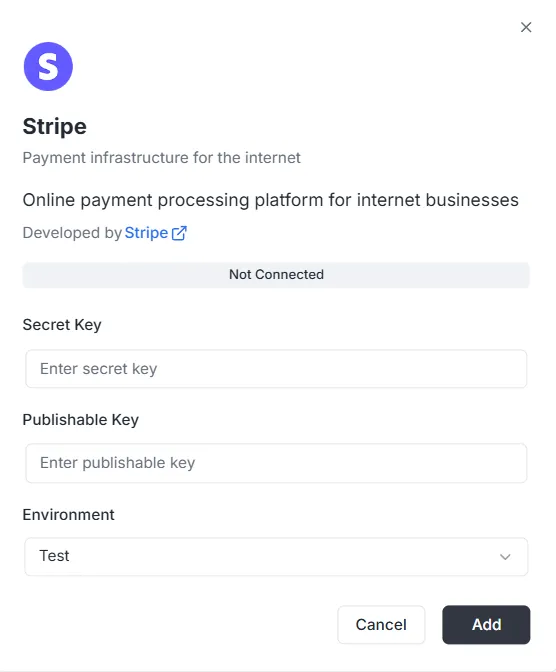
Section titled “خطوات التكوين {#configuration-steps}”بعد اختيار Stripe من قائمة عمليات التكوين، ستظهر نافذة تكوين. يجب إدخال بيانات الاعتماد التالية من لوحة Stripe لإنشاء الاتصال:
1. المفتاح السري {#1-secret-key}
Section titled “1. المفتاح السري {#1-secret-key}”- الإدخال: أدخل Secret Key الخاص بـ Stripe (عادةً يبدأ بـ
sk_) في حقل Secret Key. يمكّن هذا المفتاح الخادم الخلفي من مصادقة الطلبات الآمنة.
2. المفتاح القابل للنشر {#2-publishable-key}
Section titled “2. المفتاح القابل للنشر {#2-publishable-key}”- الإدخال: أدخل Publishable Key العام لـ Stripe (عادةً يبدأ بـ
pk_) في حقل Publishable Key. يُستخدم هذا المفتاح في الواجهة الأمامية.
3. البيئة {#3-environment}
Section titled “3. البيئة {#3-environment}”- الإدخال: اختر سياق البيئة المناسب من القائمة المنسدلة (مثل Test للتطوير/البيئة التجريبية أو Production للمعالجة الفعلية).
إكمال الاتصال {#finalizing-the-connection}
Section titled “إكمال الاتصال {#finalizing-the-connection}”عند تكوين المفاتيح والبيئة:
- راجع شريط الحالة (يظهر حالياً Not Connected).
- انقر الزر الأسود Add في أسفل اليمين لحفظ بيانات الاعتماد وتفعيل دمج الدفع.
مرجع واجهة برمجة تطبيقات دمج Stripe {#stripe-integration-api-reference}
Section titled “مرجع واجهة برمجة تطبيقات دمج Stripe {#stripe-integration-api-reference}”- إدارة التكوين
- إدارة العملاء
- نوايا الدفع
- الاشتراكات
- المنتجات والأسعار
- الفواتير
- المبالغ المستردة
- جلسات Checkout
- جلسات بوابة الفوترة
- طرق الدفع
- أحداث Webhook
- ترقيم الصفحات
- معالجة الأخطاء
إدارة التكوين {#configuration-management}
Section titled “إدارة التكوين {#configuration-management}”configureStripe {#configurestripe}
Section titled “configureStripe {#configurestripe}”ينشئ تكوين Stripe جديداً للمشروع والبيئة.
Mutation:
mutation ConfigureStripe ( $input: ConfigureStripeInput!) { configureStripe ( input: $input ) { id publishableKey webhookUrl }}Input:
input ConfigureStripeInput { secretKey: String! # Stripe secret key (sk_test_... or sk_live_...) publishableKey: String! # Stripe publishable key (pk_test_... or pk_live_...) environment: StripeEnvironment! # TEST or LIVE webhookSecret: String # Webhook signing secret (optional)}Response:
type ConfigureStripePayload { id: ID! # Configuration ID publishableKey: String! # Publishable key webhookUrl: String! # Generated webhook URL}Example:
{ "input": { "secretKey": "sk_test_...", "publishableKey": "pk_test_...", "environment": "TEST", "webhookSecret": "whsec_..." }}ملاحظات:
- يُشفّر المفتاح السري بـ AES-256-GCM قبل التخزين
- تكوين واحد فقط لكل مجموعة مشروع/بيئة
- يُرجع خطأ إن كان التكوين موجوداً مسبقاً
updateStripeConfig {#updatestripeconfig}
Section titled “updateStripeConfig {#updatestripeconfig}”يحدّث تكوين Stripe موجوداً.
Mutation:
mutation UpdateStripeConfig ( $input: UpdateStripeConfigInput!) { updateStripeConfig ( input: $input ) { id publishableKey webhookUrl }}Input:
input UpdateStripeConfigInput { secretKey: String # Optional publishableKey: String # Optional environment: StripeEnvironment # Optional webhookSecret: String # Optional}Response:
type UpdateStripeConfigPayload { id: ID! publishableKey: String! webhookUrl: String!}ملاحظات:
- جميع الحقول اختيارية
- يُحدَّث فقط ما يُمرَّر
- يُشفّر المفتاح السري إن وُجد
إدارة العملاء {#customer-management}
Section titled “إدارة العملاء {#customer-management}”stripe_customer {#stripe_customer}
Section titled “stripe_customer {#stripe_customer}”يسترجع عميلاً واحداً حسب المعرّف.
Query:
query stripe_customer{ stripe_customer( id: "cus_Ts..." ) { id name email phone description metadata object createdAt }}stripe_customers {#stripe_customers}
Section titled “stripe_customers {#stripe_customers}”يعرض قائمة العملاء مع ترقيم الصفحات وتصفية اختيارية.
Query:
query stripe_customers ( $first: Int, $after: String, $customerId: String) { stripe_customers ( first: $first, after: $after, customerId: $customerId ) { edges { node { id name email phone description createdAt } cursor } pageInfo { hasNextPage hasPreviousPage startCursor endCursor } }}المعاملات:
first: عدد العناصر (افتراضياً: 10)after: مؤشر الترقيمcustomerId: تصفية حسب معرّف العميل (اختياري)
stripe_createCustomer {#stripe_createcustomer}
Section titled “stripe_createCustomer {#stripe_createcustomer}”ينشئ عميلاً جديداً.
Mutation:
mutation stripe_createCustomer { stripe_createCustomer ( input: { name: "Customer", email: "example@archie.com", phone: "+573001230001", description: "Description Example" metadata: { data1: "Example data1", data2: "Example data2" } } ) { id name email phone description metadata object createdAt }}stripe_updateCustomer {#stripe_updatecustomer}
Section titled “stripe_updateCustomer {#stripe_updatecustomer}”يحدّث عميلاً موجوداً.
Mutation:
mutation stripe_updateCustomer { stripe_updateCustomer( id: "cus_Ts...", input: { name: "Customer", email: "example@archie.com", phone: "+573001230001", description:"Description Example", metadata: { data1: "Example data1 updated", data2: "Example data2 updated" } } ) { id name email phone description metadata object createdAt }}ملاحظات:
- جميع الحقول اختيارية
- يُحدَّث فقط ما يُمرَّر
stripe_deleteCustomer {#stripe_deletecustomer}
Section titled “stripe_deleteCustomer {#stripe_deletecustomer}”يحذف عميلاً.
Mutation:
mutation stripe_deleteCustomer { stripe_deleteCustomer ( id: "cus_Ts...")}Response:
- يُرجع
trueعند النجاح - يُرجع خطأ إن لم يُعثر على العميل
نوايا الدفع {#payment-intents}
Section titled “نوايا الدفع {#payment-intents}”stripe_paymentIntent {#stripe_paymentintent}
Section titled “stripe_paymentIntent {#stripe_paymentintent}”يسترجع نية دفع واحدة حسب المعرّف.
Query:
query stripe_paymentIntent { stripe_paymentIntent ( id: "pi_3Su..." ) { id customerId paymentMethodId currency amount status metadata object clientSecret createdAt }}stripe_paymentIntents {#stripe_paymentintents}
Section titled “stripe_paymentIntents {#stripe_paymentintents}”يعرض قائمة نوايا الدفع مع ترقيم الصفحات وتصفية اختيارية.
Query:
query stripe_paymentIntents ( $first: Int, $after: String, $customerId: String) { stripe_paymentIntents ( first: $first, after: $after, customerId: $customerId ) { edges { node { id customerId paymentMethodId currency amount status metadata object clientSecret createdAt } cursor } pageInfo { hasPreviousPage hasNextPage startCursor endCursor } }}المعاملات:
first: عدد العناصر (افتراضياً: 10)after: مؤشر الترقيمcustomerId: تصفية حسب معرّف العميل (اختياري)
stripe_createPaymentIntent {#stripe_createpaymentintent}
Section titled “stripe_createPaymentIntent {#stripe_createpaymentintent}”ينشئ نية دفع جديدة.
Mutation:
mutation stripe_createPaymentIntent { stripe_createPaymentIntent ( input: { amount: 12.35, currency: "usd", customerId: "cus_Ts...", paymentMethodId: "pm_1Su...", automaticPaymentMethods: true } ) { id customerId paymentMethodId currency amount status metadata object clientSecret createdAt }}ملاحظات:
- يُرجع
clientSecretلتأكيد الواجهة الأمامية - استخدم
automaticPaymentMethods: trueمع تكامل Stripe.js
stripe_updatePaymentIntent {#stripe_updatepaymentintent}
Section titled “stripe_updatePaymentIntent {#stripe_updatepaymentintent}”يحدّث نية الدفع قبل التأكيد.
Mutation:
mutation stripe_updatePaymentIntent{ stripe_updatePaymentIntent( id: "pi_3S...", input: { amount: 36.92, currency: "usd", paymentMethodId: "pm_1Su..." metadata:{ data1: "Example data1" } } ) { id customerId paymentMethodId currency amount status metadata object clientSecret createdAt }}ملاحظات:
- يُحدَّث فقط قبل التأكيد
- جميع الحقول اختيارية
stripe_confirmPaymentIntent {#stripe_confirmpaymentintent}
Section titled “stripe_confirmPaymentIntent {#stripe_confirmpaymentintent}”يؤكد نية الدفع.
Mutation:
mutation stripe_confirmPaymentIntent{ stripe_confirmPaymentIntent( id: "pi_3Su..." input: { paymentMethodId: "pm_1Su...", returnUrl: "http://localhost:3000/successful-payment" } ) { id customerId paymentMethodId currency amount status metadata object clientSecret createdAt }}ملاحظات:
- مطلوب لإتمام الدفع
- قد يتطلب مصادقة 3D Secure
- يُرجع الحالة المحدّثة (succeeded، requires_action، إلخ)
stripe_cancelPaymentIntent {#stripe_cancelpaymentintent}
Section titled “stripe_cancelPaymentIntent {#stripe_cancelpaymentintent}”يلغي نية الدفع.
Mutation:
mutation stripe_cancelPaymentIntent { stripe_cancelPaymentIntent( id: "pi_3Su..." ) { id customerId paymentMethodId currency amount status metadata object clientSecret createdAt }}ملاحظات:
- يُلغى فقط نوايا الدفع غير الناجحة أو الملغاة مسبقاً
- تصبح الحالة “canceled”
الاشتراكات {#subscriptions}
Section titled “الاشتراكات {#subscriptions}”stripe_subscription {#stripe_subscription}
Section titled “stripe_subscription {#stripe_subscription}”يسترجع اشتراكاً واحداً حسب المعرّف.
Query:
query stripe_subscription { stripe_subscription(id: "sub_1Su...") { id customerId status currentPeriodStart currentPeriodEnd createdAt cancelAtPeriodEnd metadata object items { data { id priceId quantity } } }}stripe_subscriptions {#stripe_subscriptions}
Section titled “stripe_subscriptions {#stripe_subscriptions}”يعرض قائمة الاشتراكات مع ترقيم الصفحات وتصفية اختيارية.
Query:
query stripe_subscriptions ( $first: Int, $after: String, $customerId: String) { stripe_subscriptions ( first: $first, after: $after, customerId: $customerId ) { edges { node { id customerId status currentPeriodStart currentPeriodEnd createdAt cancelAtPeriodEnd metadata object items { data { id priceId quantity } } } cursor } pageInfo { hasPreviousPage hasNextPage startCursor endCursor } }}المعاملات:
first: عدد العناصر (افتراضياً: 10)after: مؤشر الترقيمcustomerId: تصفية حسب معرّف العميل (اختياري)status: تصفية حسب الحالة (اختياري)
stripe_createSubscription {#stripe_createsubscription}
Section titled “stripe_createSubscription {#stripe_createsubscription}”ينشئ اشتراكاً جديداً.
Mutation:
mutation stripe_createSubscription { stripe_createSubscription ( input: { customerId: "cus_TsQ...", items: { priceId: "price_1Su...", quantity: 1 }, metadata: { data1: "Example data1" }, trialPeriodDays: 0 } ) { id customerId status currentPeriodStart currentPeriodEnd createdAt cancelAtPeriodEnd metadata object items { data { id priceId quantity } } }}ملاحظات:
- يمكن أن يكون
paymentBehaviorمساوياً لـ “default_incomplete” للاشتراكات التي تتطلب طريقة دفع - الفترة التجريبية بالأيام
- تُوسَّع الفاتورة ونية الدفع الأخيرة تلقائياً
stripe_updateSubscription {#stripe_updatesubscription}
Section titled “stripe_updateSubscription {#stripe_updatesubscription}”يحدّث اشتراكاً موجوداً.
Mutation:
mutation stripe_updateSubscription { stripe_updateSubscription( id: "sub_1Sv..." input: { cancelAtPeriodEnd: false metadata: { data2: "Example data2" } } ) { id customerId status currentPeriodStart currentPeriodEnd createdAt cancelAtPeriodEnd metadata object items { data { id priceId quantity } } }}stripe_cancelSubscription {#stripe_cancelsubscription}
Section titled “stripe_cancelSubscription {#stripe_cancelsubscription}”يلغي اشتراكاً.
Mutation:
mutation stripe_cancelSubscription { stripe_cancelSubscription ( cancelAtPeriodEnd: true, id: "sub_1Sv..." ) { id customerId status currentPeriodStart currentPeriodEnd createdAt cancelAtPeriodEnd metadata object items { data { id priceId quantity } } }}المعاملات:
id: معرّف الاشتراك (مطلوب)cancelAtPeriodEnd: إن كان true يُلغى عند نهاية الفترة؛ وإلا فوراً (افتراضياً: false)
ملاحظات:
- الإلغاء الفوري: ينتهي الاشتراك الآن
- الإلغاء عند نهاية الفترة: يستمر حتى نهاية الفترة الحالية
المنتجات والأسعار {#products-and-prices}
Section titled “المنتجات والأسعار {#products-and-prices}”stripe_products {#stripe_products}
Section titled “stripe_products {#stripe_products}”يعرض قائمة المنتجات مع ترقيم الصفحات.
Query:
query stripe_products ( $first: Int, $after: String) { stripe_products ( first: $first, after: $after ) { edges { node { id name description active metadata object createdAt } cursor } pageInfo { hasPreviousPage hasNextPage startCursor endCursor } }}stripe_createProduct {#stripe_createproduct}
Section titled “stripe_createProduct {#stripe_createproduct}”ينشئ منتجاً جديداً.
Mutation:
mutation stripe_createProduct { stripe_createProduct ( input: { name: "Product 01", description: "Description product 01", metadata: { data1: "Example data1" } } ) { id name description active metadata object createdAt }}stripe_prices {#stripe_prices}
Section titled “stripe_prices {#stripe_prices}”يعرض قائمة الأسعار مع ترقيم الصفحات وتصفية اختيارية.
Query:
query stripe_prices ( $first: Int, $after: String, $productId: String) { stripe_prices ( first: $first, after: $after, productId: $productId ) { edges { node { id productId active currency unitAmount object metadata createdAt recurring { interval intervalCount } } cursor } pageInfo { hasPreviousPage hasNextPage startCursor endCursor } }}المعاملات:
first: عدد العناصر (افتراضياً: 10)after: مؤشر الترقيمproductId: تصفية حسب معرّف المنتج (اختياري)
stripe_createPrice {#stripe_createprice}
Section titled “stripe_createPrice {#stripe_createprice}”ينشئ سعراً جديداً.
Mutation:
mutation stripe_createPrice { stripe_createPrice ( input: { productId: "prod_Tst...", unitAmount: 25.85, currency: "usd", recurring: { interval: "month", intervalCount: 1 }, metadata: { data1: "Example data1" } } ) { id productId currency unitAmount active object createdAt metadata recurring { interval intervalCount } }}ملاحظات:
- احذف
recurringللأسعار لمرة واحدة - يجب أن يكون
intervalأحد: “day”، “week”، “month”، “year”
الفواتير {#invoices}
Section titled “الفواتير {#invoices}”stripe_invoice {#stripe_invoice}
Section titled “stripe_invoice {#stripe_invoice}”يسترجع فاتورة واحدة حسب المعرّف.
Query:
query stripe_invoice { stripe_invoice ( id: "in_1Su..." ) { id customerId subscriptionId currency amountPaid amountDue status object metadata createdAt lineItems { data { id description currency amount quantity } } }}ملاحظات:
- يُملأ معرّف الاشتراك عبر توسيع واجهة البرمجة عند التوفر
stripe_invoices {#stripe_invoices}
Section titled “stripe_invoices {#stripe_invoices}”يعرض قائمة الفواتير مع ترقيم الصفحات وتصفية اختيارية.
Query:
query stripe_invoices ( $first: Int, $after: String, $customerId: String, $status: String) { stripe_invoices ( first: $first, after: $after, customerId: $customerId, status: $status ) { edges { node { id customerId subscriptionId currency amountPaid amountDue status object metadata createdAt lineItems { data { id description currency amount quantity } } } cursor } pageInfo { hasPreviousPage hasNextPage startCursor endCursor } }}المعاملات:
first: عدد العناصر (افتراضياً: 10)after: مؤشر الترقيمcustomerId: تصفية حسب معرّف العميل (اختياري)status: تصفية حسب الحالة (اختياري)
stripe_payInvoice {#stripe_payinvoice}
Section titled “stripe_payInvoice {#stripe_payinvoice}”يدفع فاتورة برمجياً.
Mutation:
mutation stripe_payInvoice { stripe_payInvoice ( id: "in_1Sv..." ) { id customerId subscriptionId currency amountPaid amountDue status object metadata createdAt lineItems { data { id description currency amount quantity } } }}ملاحظات:
- يحاول دفع الفاتورة بطريقة الدفع الافتراضية للعميل
- يُرجع خطأ عند فشل الدفع
- يُحدّث حالة الفاتورة إلى “paid” عند النجاح
المبالغ المستردة {#refunds}
Section titled “المبالغ المستردة {#refunds}”stripe_refunds {#stripe_refunds}
Section titled “stripe_refunds {#stripe_refunds}”يعرض قائمة المبالغ المستردة مع ترقيم الصفحات وتصفية اختيارية.
Query:
query stripe_refunds ( $first: Int, $after: String, $paymentIntentId: String) { stripe_refunds ( first: $first, after: $after, paymentIntentId: $paymentIntentId ) { edges { node { id paymentIntentId reason status currency amount metadata object createdAt } cursor } pageInfo { hasPreviousPage hasNextPage startCursor endCursor } }}المعاملات:
first: عدد العناصر (افتراضياً: 10)after: مؤشر الترقيمpaymentIntentId: تصفية حسب معرّف نية الدفع (اختياري)
stripe_createRefund {#stripe_createrefund}
Section titled “stripe_createRefund {#stripe_createrefund}”ينشئ مبلغاً مسترداً لنية دفع.
Mutation:
mutation stripe_createRefund { stripe_createRefund ( input: { paymentIntentId: "pi_3Sv...", amount: 200, reason: "requested_by_customer" } ) { id reason paymentIntentId status currency amount object metadata createdAt }}ملاحظات:
- احذف
amountللاسترداد الكامل - يمكن أن يكون
reason: “duplicate”، “fraudulent”، “requested_by_customer” - تبدأ حالة الاسترداد “pending” ثم تتحدّث إلى “succeeded” أو “failed”
جلسات Checkout {#checkout-sessions}
Section titled “جلسات Checkout {#checkout-sessions}”stripe_createCheckoutSession {#stripe_createcheckoutsession}
Section titled “stripe_createCheckoutSession {#stripe_createcheckoutsession}”ينشئ جلسة Stripe Checkout للدفعات لمرة واحدة أو للاشتراكات. يُرجع عنوان URL يوجّه العملاء إلى صفحة الدفع المستضافة من Stripe.
Mutation:
mutation CreateCheckoutSession($input: StripeCreateCheckoutSessionInput!) { stripe_createCheckoutSession(input: $input) { id url customerId customerEmail paymentIntentId subscriptionId mode status currency amountTotal metadata createdAt }}Input:
input StripeCreateCheckoutSessionInput {  customerId: String              # Existing Stripe customer ID (optional)  customerEmail: String            # Customer email for new customers (optional)  mode: String!                   # "payment" for one-time or "subscription" for recurring  successUrl: String!             # URL to redirect after successful payment  cancelUrl: String!              # URL to redirect if customer cancels  lineItems: [StripeCheckoutSessionLineItemInput!]!  # Items to purchase  paymentMethodTypes: [String!]    # Allowed payment methods (optional)  metadata: Map                    # Custom metadata (optional)}
input StripeCheckoutSessionLineItemInput {  priceId: String      # Stripe Price ID (for existing prices)  quantity: Int!        # Quantity of items  amount: Float         # Custom amount in dollars (for one-time payments)  currency: String      # Currency code (required if amount is provided)}
Response:
type StripeCheckoutSession { id: ID! # Session ID object: String! # "checkout.session" url: String! # Redirect URL for customer customerId: String # Customer ID (if customer exists) customerEmail: String # Customer email paymentIntentId: String # Payment Intent ID (for one-time payments) subscriptionId: String # Subscription ID (for subscriptions) mode: String! # "payment" or "subscription" status: String! # Session status currency: String # Currency code amountTotal: Float # Total amount in dollars metadata: Map # Custom metadata createdAt: Time! # Creation timestamp}Example - One-time Payment:
{ "input": { "mode": "payment", "successUrl": "https://example.com/success", "cancelUrl": "https://example.com/cancel", "lineItems": [ { "priceId": "price_1234567890", "quantity": 1 } ] }}Example - Custom Amount One-time Payment:
{ "input": { "mode": "payment", "customerEmail": "customer@example.com", "successUrl": "https://example.com/success", "cancelUrl": "https://example.com/cancel", "lineItems": [ { "amount": 29.99, "currency": "usd", "quantity": 1 } ] }}Example - Subscription:
{ "input": { "mode": "subscription", "customerId": "cus_1234567890", "successUrl": "https://example.com/success", "cancelUrl": "https://example.com/cancel", "lineItems": [ { "priceId": "price_monthly_subscription", "quantity": 1 } ] }}ملاحظات:
- يحتوي حقل
urlعلى عنوان إعادة التوجيه الذي يجب إرسال العملاء إليه - للدفعات لمرة واحدة استخدم
mode: "payment"وقدّم إماpriceIdأوamount+currency - للاشتراكات استخدم
mode: "subscription"وقدّمpriceId(يجب أن يكون سعراً متكرراً) - يجب تقديم
customerIdأوcustomerEmailدون الجمع بينهما - يمكن أن يتضمّن
paymentMethodTypes: “card”، “us_bank_account”، “link”، إلخ - تنتهي صلاحية الجلسات بعد 24 ساعة إن لم تُكمل
جلسات بوابة الفوترة {#billing-portal-sessions}
Section titled “جلسات بوابة الفوترة {#billing-portal-sessions}”stripe_createBillingPortalSession {#stripe_createbillingportalsession}
Section titled “stripe_createBillingPortalSession {#stripe_createbillingportalsession}”ينشئ جلسة Stripe Billing Portal لإدارة الاشتراكات وطرق الدفع ومعلومات الفوترة عبر البوابة المستضافة من Stripe.
Mutation:
mutation CreateBillingPortalSession($input: StripeCreateBillingPortalSessionInput!) { stripe_createBillingPortalSession(input: $input) { id url customerId returnUrl createdAt }}Input:
input StripeCreateBillingPortalSessionInput { customerId: String! # Stripe customer ID (required) returnUrl: String! # URL to redirect after customer exits portal configuration: String # Portal configuration ID (optional)}Response:
type StripeBillingPortalSession { id: ID! # Session ID object: String! # "billing_portal.session" url: String! # Redirect URL for customer customerId: String! # Customer ID returnUrl: String # Return URL createdAt: Time! # Creation timestamp}Example:
{ "input": { "customerId": "cus_1234567890", "returnUrl": "https://example.com/account" }}ملاحظات:
- يحتوي حقل
urlعلى عنوان إعادة التوجيه - الجلسة قصيرة العمر وتنتهي بعد الاستخدام
- يمكن للعملاء إدارة الاشتراكات وتحديث طرق الدفع وعرض الفواتير
- تُضبط ميزات البوابة في لوحة Stripe
- إن لم يُعطَ
configurationتُستخدم التكوين الافتراضي - تعرض البوابة المشتراكات والفواتير للعميل المحدد فقط
طرق الدفع {#payment-methods}
Section titled “طرق الدفع {#payment-methods}”stripe_paymentMethods {#stripe_paymentmethods}
Section titled “stripe_paymentMethods {#stripe_paymentmethods}”يعرض قائمة طرق الدفع مع ترقيم الصفحات وتصفية اختيارية.
Query:
query stripe_paymentMethods ( $first: Int, $after: String, $customerId: String) { stripe_paymentMethods( first: $first, after: $after, customerId: $customerId ) { edges { node { id customerId type object metadata createdAt card { brand expMonth expYear last4 } } cursor } pageInfo { hasPreviousPage hasNextPage startCursor endCursor } }}المعاملات:
first: عدد العناصر (افتراضياً: 10)after: مؤشر الترقيمcustomerId: تصفية حسب معرّف العميل (اختياري)
ملاحظات:
- يُرجع فقط معلومات بطاقة آمنة (last4، brand، انتهاء الصلاحية)
- لا تُعرض أرقام البطاقات الكاملة أبداً
stripe_attachPaymentMethod {#stripe_attachpaymentmethod}
Section titled “stripe_attachPaymentMethod {#stripe_attachpaymentmethod}”يربط طريقة دفع بعميل.
Mutation:
mutation stripe_attachPaymentMethod { stripe_attachPaymentMethod ( id: "pm_1Sv...", input: { customerId: "cus_Ts4..." } ) { id customerId type card { brand expMonth expYear last4 } metadata object createdAt }}ملاحظات:
- يجب إنشاء طريقة الدفع أولاً (عادةً عبر Stripe.js)
- يمكن استخدام طرق الدفع المربوطة للاشتراكات والمدفوعات
stripe_detachPaymentMethod {#stripe_detachpaymentmethod}
Section titled “stripe_detachPaymentMethod {#stripe_detachpaymentmethod}”يفصل طريقة دفع عن عميل.
Mutation:
mutation stripe_detachPaymentMethod { stripe_detachPaymentMethod ( id: "pm_1Sv..." ) { id customerId type card { brand expYear expMonth last4 } metadata object createdAt }}ملاحظات:
- لا يمكن استخدام طرق الدفع المفصولة بعد ذلك للدفع
- يُرجع طريقة الدفع مع
customerId= null
أحداث Webhook {#webhook-events}
Section titled “أحداث Webhook {#webhook-events}”stripe_webhookEvents {#stripe_webhookevents}
Section titled “stripe_webhookEvents {#stripe_webhookevents}”يعرض أحداث webhook التي استلمها الخدمة.
Query:
query ListWebhookEvents ( $first: Int, $after: String) { stripe_webhookEvents ( first: $first, after: $after ) { edges { node { id type data processed createdAt } cursor } pageInfo { hasNextPage hasPreviousPage endCursor } }}Response:
type StripeWebhookEvent { id: ID! type: String! # Event type (e.g., "payment_intent.succeeded") data: String! # JSON string of event data processed: Boolean! # Whether event has been processed createdAt: Time!}المعاملات:
first: عدد العناصر (افتراضياً: 10)after: مؤشر الترقيم
ملاحظات:
- تُستقبل الأحداث تلقائياً عبر نقطة نهاية webhook
- تُخزَّن بعد التحقق من التوقيع
- يحتوي حقل
dataعلى الحمولة الكاملة كسلسلة JSON
ترقيم الصفحات {#pagination}
Section titled “ترقيم الصفحات {#pagination}”تدعم جميع استعلامات القائمة الترقيم المؤشّر (نمط Relay).
PageInfo {#pageinfo}
Section titled “PageInfo {#pageinfo}”type PageInfo { hasNextPage: Boolean! hasPreviousPage: Boolean! startCursor: String endCursor: String}مثال استخدام {#usage-example}
Section titled “مثال استخدام {#usage-example}”query ListCustomers ( $first: Int, $after: String) { stripe_customers ( first: $first, after: $after ) { edges { node { id email } cursor } pageInfo { hasNextPage endCursor } }}تدفق الترقيم:
- الطلب الأول:
first: 10, after: null - استخدم
pageInfo.endCursorمن الاستجابة كـafterفي الطلب التالي - تحقق من
hasNextPageلمعرفة وجود صفحات إضافية
القيم الافتراضية:
first: 10 إن لم يُحدَّدafter: يبدأ من البداية إن لم يُحدَّد
معالجة الأخطاء {#error-handling}
Section titled “معالجة الأخطاء {#error-handling}”تُرجع جميع العمليات أخطاء GraphQL برسائل واضحة. تُعَدَّل الأخطاء من أخطاء Stripe لتقديم ملاحظات.
سيناريوهات أخطاء شائعة {#common-error-scenarios}
Section titled “سيناريوهات أخطاء شائعة {#common-error-scenarios}”أخطاء التكوين:
400: تنسيق مفاتيح Stripe غير صالح404: المشروع أو التكوين غير موجود400: التكوين موجود مسبقاً
أخطاء العملاء:
404: العميل غير موجود400: بيانات عميل غير صالحة
أخطاء نية الدفع:
404: نية الدفع غير موجودة400: مبلغ أو عملة غير صالحة402: فشل الدفع (رفض البطاقة، إلخ)
أخطاء الاشتراك:
404: الاشتراك غير موجود400: معاملات اشتراك غير صالحة400: لا يمكن تحديث اشتراك ملغى
رموز أخطاء Stripe: تُعَدَّل الأخطاء الشائعة إلى رسائل واضحة:
card_declined: “Your card was declined”insufficient_funds: “Insufficient funds”invalid_number: “Invalid card number”expired_card: “Card has expired”incorrect_cvc: “Incorrect CVC code”
تنسيق استجابة الخطأ {#error-response-format}
Section titled “تنسيق استجابة الخطأ {#error-response-format}”{ "errors": [ { "message": "Customer not found", "extensions": { "code": "NOT_FOUND", "stripeErrorCode": "resource_missing" } } ], "data": null}أنواع البيانات {#data-types}
Section titled “أنواع البيانات {#data-types}”StripeEnvironment {#stripeenvironment}
Section titled “StripeEnvironment {#stripeenvironment}”enum StripeEnvironment { TEST # Test mode LIVE # Live/production mode}Scalar من نوع Map {#map-scalar}
Section titled “Scalar من نوع Map {#map-scalar}”يمثل نوع Map خريطة مفاتيح/قيم حيث:
- المفاتيح سلاسل
- القيم يمكن أن تكون سلاسل أو أرقاماً أو منطقية أو خرائط متداخلة
- يُستخدم في حقول metadata
Example:
{ "metadata": { "order_id": "12345", "user_id": "67890", "premium": true }}Scalar من نوع Time {#time-scalar}
Section titled “Scalar من نوع Time {#time-scalar}”يمثل نوع Time طوابع زمنية بصيغة ISO 8601.
Example: "2025-11-16T00:28:48.081Z"