SendGrid
SendGrid est un service infonuagique pour l’envoi de courriels transactionnels et marketing. L’activation de cette intégration permet à votre application d’envoyer des courriels de façon programmée (par exemple courriels de bienvenue, réinitialisations de mot de passe ou avis).
Étapes de configuration
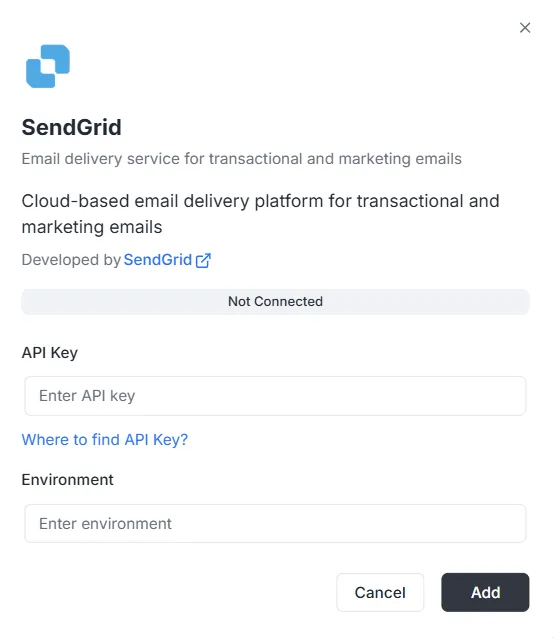
Section intitulée « Étapes de configuration »Après avoir sélectionné SendGrid dans la liste des intégrations, une fenêtre modale de configuration s’affiche. Vous devez fournir les identifiants suivants pour établir la connexion :
1. Clé API
Section intitulée « 1. Clé API »Il s’agit du jeton d’authentification généré dans votre compte SendGrid.
- Saisie : Collez votre clé API SendGrid privée dans le champ de texte.
- Aide : Si vous n’en avez pas, cliquez sur le lien « Où trouver la clé API ? » dans la fenêtre pour savoir comment la générer.
2. Environnement
Section intitulée « 2. Environnement »Indiquez le contexte d’environnement pour cette intégration.
- Saisie : Saisissez l’identifiant d’environnement (par ex.
Production,Stagingou une étiquette de configuration précise) dans le champ Environnement.
Finalisation de la connexion
Section intitulée « Finalisation de la connexion »Une fois les champs renseignés :
- Vérifiez la barre d’état (elle affiche actuellement Non connecté).
- Cliquez sur le bouton noir Ajouter en bas à droite pour enregistrer les identifiants et activer l’intégration.
Référence de l’API d’intégration SendGrid
Section intitulée « Référence de l’API d’intégration SendGrid »Configuration de SendGrid
Section intitulée « Configuration de SendGrid »Configurer la clé API SendGrid
Section intitulée « Configurer la clé API SendGrid »Permet de configurer la clé API SendGrid pour un projet et un environnement donnés.
Mutation :
mutation { sendgrid_configureSendGrid ( apiKey: "SG._api_key_here" )}Envoi de courriels
Section intitulée « Envoi de courriels »Envoyer un courriel simple
Section intitulée « Envoyer un courriel simple »Envoie un courriel à un ou plusieurs destinataires.
Mutation :
mutation sendgrid_sendEmail { sendgrid_sendEmail ( email: { from: { email: "sender@archie.com", name: "Sender Name" }, subject: "Test Email", to: { email: "recipient@gmail.com", name: "Recipient Name" }, content: { type: "text/html", value: "<h1>Hello World</h1><p>This is a test email.</p>" } } ) { messageId success }}Réponse :
{ "data": { "sendgrid_sendEmail": { "messageId": "sent-1234567890", "success": true } }}Courriel avec CC et CCI
Section intitulée « Courriel avec CC et CCI »Mutation :
mutation sendgrid_sendEmail { sendgrid_sendEmail ( email: { from: { email: "sender@example.com" name: "Sender Name" } to: [ { email: "recipient@example.com" name: "Recipient Name" } ] cc: [ { email: "cc@example.com" name: "CC Recipient" } ] bcc: [ { email: "bcc@example.com" } ] subject: "Email with CC and BCC" content: [ { type: "text/html" value: "<h1>Hello</h1><p>This email has CC and BCC recipients.</p>" } ] } ) { messageId success }}Courriel avec pièces jointes
Section intitulée « Courriel avec pièces jointes »Mutation :
mutation sendgrid_sendEmail { sendgrid_sendEmail( email: { from: { email: "sender@example.com" name: "Sender Name" } to: [ { email: "recipient@example.com" name: "Recipient Name" } ] subject: "Email with Attachment" content: [ { type: "text/html" value: "<h1>Hello</h1><p>Please find attached file.</p>" } ] attachments: [ { content: "SGVsbG8gV29ybGQ=" type: "text/plain" filename: "document.txt" disposition: "attachment" } ] } ) { messageId success }}Remarque : le champ content des pièces jointes doit être encodé en Base64.
Courriel avec catégories et balises
Section intitulée « Courriel avec catégories et balises »Mutation :
mutation sendgrid_sendEmail { sendgrid_sendEmail( email: { from: { email: "sender@example.com" name: "Sender Name" } to: [ { email: "recipient@example.com" name: "Recipient Name" } ] subject: "Categorized Email" content: [ { type: "text/html" value: "<h1>Hello</h1>" } ] categories: ["transactional", "notification"] tags: ["important", "urgent"] } ) { messageId success }}Courriel programmé
Section intitulée « Courriel programmé »Mutation :
mutation sendgrid_sendEmail { sendgrid_sendEmail( email: { from: { email: "sender@example.com" name: "Sender Name" } to: [ { email: "recipient@example.com" name: "Recipient Name" } ] subject: "Scheduled Email" content: [ { type: "text/html" value: "<h1>Hello</h1>" } ] sendAt: "2025-12-25T10:00:00Z" } ) { messageId success }}Courriel avec arguments personnalisés
Section intitulée « Courriel avec arguments personnalisés »Mutation :
mutation sendgrid_sendEmail { sendgrid_sendEmail( email: { from: { email: "sender@example.com" name: "Sender Name" } to: [ { email: "recipient@example.com" name: "Recipient Name" } ] subject: "Email with Custom Args" content: [ { type: "text/html" value: "<h1>Hello</h1>" } ] customArgs: { orderId: "12345" userId: "67890" campaignId: "abc123" } } ) { messageId success }}Envoi en masse
Section intitulée « Envoi en masse »Envoyer plusieurs courriels
Section intitulée « Envoyer plusieurs courriels »Mutation :
mutation sendgrid_sendBulkEmail { sendgrid_sendBulkEmail( emails: { emails: [ { from: { email: "sender@example.com" name: "Sender Name" } to: [ { email: "recipient1@example.com" name: "Recipient 1" } ] subject: "Bulk Email 1" content: [ { type: "text/html" value: "<h1>Email 1</h1>" } ] } { from: { email: "sender@example.com" name: "Sender Name" } to: [ { email: "recipient2@example.com" name: "Recipient 2" } ] subject: "Bulk Email 2" content: [ { type: "text/html" value: "<h1>Email 2</h1>" } ] } ] } ) { messageIds success }}Réponse :
{ "data": { "sendgrid_sendBulkEmail": { "messageIds": ["sent-1234567890", "sent-1234567891"], "success": true } }}Courriels avec modèles
Section intitulée « Courriels avec modèles »Envoyer un courriel avec un modèle dynamique
Section intitulée « Envoyer un courriel avec un modèle dynamique »Mutation :
mutation sendgrid_sendTemplate { sendgrid_sendTemplate( email: { from: { email: "sender@example.com" name: "Sender Name" } to: [ { email: "recipient@example.com" name: "Recipient Name" } ] templateId: "d-1234567890abcdef" substitutions: { name: "John Doe" orderNumber: "12345" totalAmount: "$99.99" } } ) { messageId success }}Réponse :
{ "data": { "sendgrid_sendTemplate": { "messageId": "sent-1234567890", "success": true } }}Gestion des contacts
Section intitulée « Gestion des contacts »Ajouter un contact
Section intitulée « Ajouter un contact »Mutation :
mutation sendgrid_addContact { sendgrid_addContact( contact: { email: "newcontact@example.com" firstName: "John" lastName: "Doe" customFields: { company: "Acme Corp" phone: "+1234567890" position: "Developer" } listIds: ["list-id-1", "list-id-2"] } )}Réponse :
{ "data": { "sendgrid_addContact": true }}Mettre à jour un contact
Section intitulée « Mettre à jour un contact »Mutation :
mutation sendgrid_updateContact { sendgrid_updateContact( contact: { email: "existing@example.com" firstName: "Jane" lastName: "Smith" customFields: { company: "New Company" phone: "+0987654321" } } )}Réponse :
{ "data": { "sendgrid_updateContact": true }}Supprimer un contact
Section intitulée « Supprimer un contact »Mutation :
mutation sendgrid_deleteContact { sendgrid_deleteContact( email: "contact@example.com" )}Réponse :
{ "data": { "sendgrid_deleteContact": true }}Analyses et statistiques
Section intitulée « Analyses et statistiques »Obtenir les statistiques de courriels
Section intitulée « Obtenir les statistiques de courriels »Requête :
query sendgrid_getEmailStats { sendgrid_getEmailStats ( startDate: "2025-01-01" endDate: "2025-01-31" ) { opens clicks bounces spamReports delivered startDate endDate }}Réponse :
{ "data": { "sendgrid_getEmailStats": { "opens": 150, "clicks": 75, "bounces": 5, "spamReports": 2, "delivered": 1000, "startDate": "2025-01-01T00:00:00Z", "endDate": "2025-01-31T00:00:00Z" } }}Valider un courriel
Section intitulée « Valider un courriel »Requête :
query sendgrid_validateEmail { sendgrid_validateEmail ( email: "test@example.com" ) { valid score local domain reason suggestions }}Réponse (avec SendGrid Premium) :
{ "data": { "sendgrid_validateEmail": { "valid": true, "score": 0.95, "local": "test", "domain": "example.com", "reason": "", "suggestions": [] } }}Réponse (validation basique — lorsque SendGrid Premium n’est pas disponible) :
{ "data": { "sendgrid_validateEmail": { "valid": true, "score": 0.8, "local": "test", "domain": "example.com", "reason": "Basic validation (SendGrid premium validation not available)", "suggestions": [] } }}Remarque : le point de terminaison de validation de courriel SendGrid (/v3/validations/email) exige des autorisations particulières et peut ne pas être disponible pour tous les comptes. Si votre clé API n’a pas accès à ce point de terminaison (erreur 403), le système utilise automatiquement une validation basique par expression régulière en secours.
Exemples complets avec variables
Section intitulée « Exemples complets avec variables »Exemple avec des variables GraphQL
Section intitulée « Exemple avec des variables GraphQL »Requête :
{ "query": "mutation SendEmail($email: EmailInput!) { sendgrid_sendEmail(email: $email) { messageId success } }", "variables": { "email": { "from": { "email": "sender@example.com", "name": "Sender Name" }, "to": [ { "email": "recipient@example.com", "name": "Recipient Name" } ], "subject": "Test Email", "content": [ { "type": "text/html", "value": "<h1>Hello World</h1>" } ] } }}Gestion des erreurs
Section intitulée « Gestion des erreurs »Exemple d’erreur
Section intitulée « Exemple d’erreur »Requête :
{ "query": "mutation { sendgrid_sendEmail(email: { from: { email: \"invalid\" }, to: [], subject: \"Test\", content: [] }) { messageId success } }"}Réponse d’erreur :
{ "errors": [ { "message": "validation error: at least one recipient is required", "path": ["sendgrid_sendEmail"] } ], "data": null}Erreurs courantes
Section intitulée « Erreurs courantes »-
ID de projet manquant :
{"errors": [{"message": "project ID is required in context"}]} -
Configuration introuvable :
{"errors": [{"message": "sendgrid configuration not found for project: xxx, environment: master"}]} -
Clé API invalide :
{"errors": [{"message": "sendgrid API error: status 401, body: ..."}]}
Webhooks
Section intitulée « Webhooks »Point de terminaison des webhooks
Section intitulée « Point de terminaison des webhooks »Le point de terminaison des webhooks est disponible à :
- HTTP :
POST http://localhost:8080/webhooks/sendgrid - Lambda :
POST /webhooks/sendgrid
Configuration dans SendGrid
Section intitulée « Configuration dans SendGrid »- Dans le tableau de bord SendGrid, ouvrez Settings > Mail Settings > Event Webhook (libellés pouvant apparaître en anglais selon la langue du compte).
- Configurez l’URL :
https://votre-domaine.com/webhooks/sendgrid - Sélectionnez les événements que vous voulez recevoir
- Configurez la clé de vérification dans la variable d’environnement
WEBHOOK_VERIFICATION_KEY
Événements pris en charge
Section intitulée « Événements pris en charge »processed: courriel traitédelivered: courriel livréopened: courriel ouvertclicked: lien cliquébounce: courriel rejeté (bounce)dropped: courriel abandonnéspamreport: signalé comme spamunsubscribe: désabonnement