SendGrid
SendGrid는 트랜잭션 및 마케팅 이메일 전송을 위한 클라우드 기반 서비스입니다. 이 통합을 연결하면 애플리케이션에서 프로그래밍 방식으로 이메일을 보낼 수 있습니다(예: 환영 메일, 비밀번호 재설정, 알림).
구성 단계
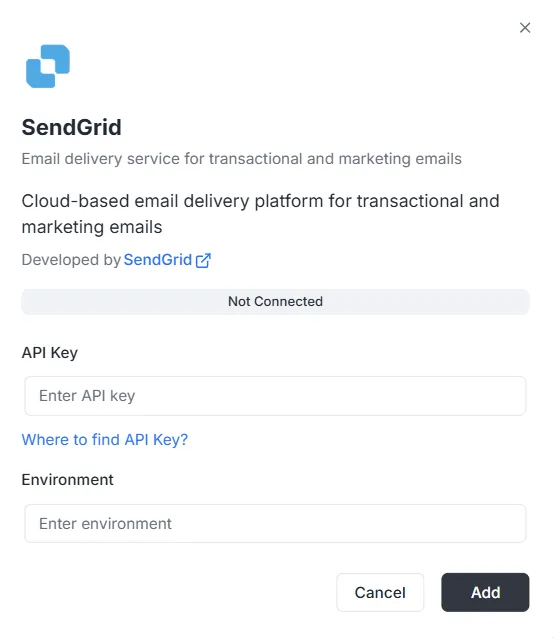
섹션 제목: “구성 단계”통합 목록에서 SendGrid를 선택하면 구성 모달이 열립니다. 연결을 설정하려면 다음 자격 증명을 입력해야 합니다.
1. API 키
섹션 제목: “1. API 키”SendGrid 계정에서 생성한 인증 토큰입니다.
- 입력: 비공개 SendGrid API 키를 텍스트 필드에 붙여넣습니다.
- 도움말: 키가 없으면 모달에 있는 「API 키는 어디에서 찾나요?」 링크를 클릭하여 생성 방법을 확인하세요.
2. 환경
섹션 제목: “2. 환경”이 통합에 사용할 환경 컨텍스트를 지정합니다.
- 입력: 환경 필드에 환경 식별자(예:
Production,Staging또는 특정 구성 태그)를 입력합니다.
연결 완료
섹션 제목: “연결 완료”필드를 모두 채운 후:
- 상태 표시줄을 확인합니다(현재 연결 안 됨으로 표시됨).
- 오른쪽 아래 검은색 추가 버튼을 클릭하여 자격 증명을 저장하고 통합을 활성화합니다.
SendGrid 통합 API 참조
섹션 제목: “SendGrid 통합 API 참조”SendGrid 구성
섹션 제목: “SendGrid 구성”SendGrid API 키 구성
섹션 제목: “SendGrid API 키 구성”특정 프로젝트와 환경에 대해 SendGrid API 키를 구성합니다.
Mutation:
mutation { sendgrid_configureSendGrid ( apiKey: "SG._api_key_here" )}이메일 보내기
섹션 제목: “이메일 보내기”간단한 이메일 보내기
섹션 제목: “간단한 이메일 보내기”한 명 또는 여러 수신자에게 이메일을 보냅니다.
Mutation:
mutation sendgrid_sendEmail { sendgrid_sendEmail ( email: { from: { email: "sender@archie.com", name: "Sender Name" }, subject: "Test Email", to: { email: "recipient@gmail.com", name: "Recipient Name" }, content: { type: "text/html", value: "<h1>Hello World</h1><p>This is a test email.</p>" } } ) { messageId success }}응답:
{ "data": { "sendgrid_sendEmail": { "messageId": "sent-1234567890", "success": true } }}참조(CC) 및 숨은 참조(BCC)로 이메일 보내기
섹션 제목: “참조(CC) 및 숨은 참조(BCC)로 이메일 보내기”Mutation:
mutation sendgrid_sendEmail { sendgrid_sendEmail ( email: { from: { email: "sender@example.com" name: "Sender Name" } to: [ { email: "recipient@example.com" name: "Recipient Name" } ] cc: [ { email: "cc@example.com" name: "CC Recipient" } ] bcc: [ { email: "bcc@example.com" } ] subject: "Email with CC and BCC" content: [ { type: "text/html" value: "<h1>Hello</h1><p>This email has CC and BCC recipients.</p>" } ] } ) { messageId success }}첨부 파일이 있는 이메일 보내기
섹션 제목: “첨부 파일이 있는 이메일 보내기”Mutation:
mutation sendgrid_sendEmail { sendgrid_sendEmail( email: { from: { email: "sender@example.com" name: "Sender Name" } to: [ { email: "recipient@example.com" name: "Recipient Name" } ] subject: "Email with Attachment" content: [ { type: "text/html" value: "<h1>Hello</h1><p>Please find attached file.</p>" } ] attachments: [ { content: "SGVsbG8gV29ybGQ=" type: "text/plain" filename: "document.txt" disposition: "attachment" } ] } ) { messageId success }}참고: 첨부 파일의 content 필드는 Base64로 인코딩되어야 합니다.
카테고리 및 태그가 있는 이메일 보내기
섹션 제목: “카테고리 및 태그가 있는 이메일 보내기”Mutation:
mutation sendgrid_sendEmail { sendgrid_sendEmail( email: { from: { email: "sender@example.com" name: "Sender Name" } to: [ { email: "recipient@example.com" name: "Recipient Name" } ] subject: "Categorized Email" content: [ { type: "text/html" value: "<h1>Hello</h1>" } ] categories: ["transactional", "notification"] tags: ["important", "urgent"] } ) { messageId success }}예약된 이메일 보내기
섹션 제목: “예약된 이메일 보내기”Mutation:
mutation sendgrid_sendEmail { sendgrid_sendEmail( email: { from: { email: "sender@example.com" name: "Sender Name" } to: [ { email: "recipient@example.com" name: "Recipient Name" } ] subject: "Scheduled Email" content: [ { type: "text/html" value: "<h1>Hello</h1>" } ] sendAt: "2025-12-25T10:00:00Z" } ) { messageId success }}사용자 정의 인수가 있는 이메일 보내기
섹션 제목: “사용자 정의 인수가 있는 이메일 보내기”Mutation:
mutation sendgrid_sendEmail { sendgrid_sendEmail( email: { from: { email: "sender@example.com" name: "Sender Name" } to: [ { email: "recipient@example.com" name: "Recipient Name" } ] subject: "Email with Custom Args" content: [ { type: "text/html" value: "<h1>Hello</h1>" } ] customArgs: { orderId: "12345" userId: "67890" campaignId: "abc123" } } ) { messageId success }}대량 이메일 보내기
섹션 제목: “대량 이메일 보내기”여러 이메일 보내기
섹션 제목: “여러 이메일 보내기”Mutation:
mutation sendgrid_sendBulkEmail { sendgrid_sendBulkEmail( emails: { emails: [ { from: { email: "sender@example.com" name: "Sender Name" } to: [ { email: "recipient1@example.com" name: "Recipient 1" } ] subject: "Bulk Email 1" content: [ { type: "text/html" value: "<h1>Email 1</h1>" } ] } { from: { email: "sender@example.com" name: "Sender Name" } to: [ { email: "recipient2@example.com" name: "Recipient 2" } ] subject: "Bulk Email 2" content: [ { type: "text/html" value: "<h1>Email 2</h1>" } ] } ] } ) { messageIds success }}응답:
{ "data": { "sendgrid_sendBulkEmail": { "messageIds": ["sent-1234567890", "sent-1234567891"], "success": true } }}템플릿으로 이메일 보내기
섹션 제목: “템플릿으로 이메일 보내기”동적 템플릿으로 이메일 보내기
섹션 제목: “동적 템플릿으로 이메일 보내기”Mutation:
mutation sendgrid_sendTemplate { sendgrid_sendTemplate( email: { from: { email: "sender@example.com" name: "Sender Name" } to: [ { email: "recipient@example.com" name: "Recipient Name" } ] templateId: "d-1234567890abcdef" substitutions: { name: "John Doe" orderNumber: "12345" totalAmount: "$99.99" } } ) { messageId success }}응답:
{ "data": { "sendgrid_sendTemplate": { "messageId": "sent-1234567890", "success": true } }}연락처 관리
섹션 제목: “연락처 관리”연락처 추가
섹션 제목: “연락처 추가”Mutation:
mutation sendgrid_addContact { sendgrid_addContact( contact: { email: "newcontact@example.com" firstName: "John" lastName: "Doe" customFields: { company: "Acme Corp" phone: "+1234567890" position: "Developer" } listIds: ["list-id-1", "list-id-2"] } )}응답:
{ "data": { "sendgrid_addContact": true }}연락처 업데이트
섹션 제목: “연락처 업데이트”Mutation:
mutation sendgrid_updateContact { sendgrid_updateContact( contact: { email: "existing@example.com" firstName: "Jane" lastName: "Smith" customFields: { company: "New Company" phone: "+0987654321" } } )}응답:
{ "data": { "sendgrid_updateContact": true }}연락처 삭제
섹션 제목: “연락처 삭제”Mutation:
mutation sendgrid_deleteContact { sendgrid_deleteContact( email: "contact@example.com" )}응답:
{ "data": { "sendgrid_deleteContact": true }}분석 및 통계
섹션 제목: “분석 및 통계”이메일 통계 조회
섹션 제목: “이메일 통계 조회”Query:
query sendgrid_getEmailStats { sendgrid_getEmailStats ( startDate: "2025-01-01" endDate: "2025-01-31" ) { opens clicks bounces spamReports delivered startDate endDate }}응답:
{ "data": { "sendgrid_getEmailStats": { "opens": 150, "clicks": 75, "bounces": 5, "spamReports": 2, "delivered": 1000, "startDate": "2025-01-01T00:00:00Z", "endDate": "2025-01-31T00:00:00Z" } }}이메일 유효성 검사
섹션 제목: “이메일 유효성 검사”Query:
query sendgrid_validateEmail { sendgrid_validateEmail ( email: "test@example.com" ) { valid score local domain reason suggestions }}응답(SendGrid Premium 사용 시):
{ "data": { "sendgrid_validateEmail": { "valid": true, "score": 0.95, "local": "test", "domain": "example.com", "reason": "", "suggestions": [] } }}응답(SendGrid Premium을 사용할 수 없을 때 — 기본 검증):
{ "data": { "sendgrid_validateEmail": { "valid": true, "score": 0.8, "local": "test", "domain": "example.com", "reason": "Basic validation (SendGrid premium validation not available)", "suggestions": [] } }}참고: SendGrid 이메일 유효성 검사 엔드포인트(/v3/validations/email)는 특별한 권한이 필요하며 모든 계정에서 사용할 수 없을 수 있습니다. API 키로 이 엔드포인트에 액세스할 수 없는 경우(403 오류) 시스템은 대체로 정규식 기반 기본 검증을 자동으로 사용합니다.
변수가 있는 전체 예제
섹션 제목: “변수가 있는 전체 예제”GraphQL 변수 예제
섹션 제목: “GraphQL 변수 예제”요청:
{ "query": "mutation SendEmail($email: EmailInput!) { sendgrid_sendEmail(email: $email) { messageId success } }", "variables": { "email": { "from": { "email": "sender@example.com", "name": "Sender Name" }, "to": [ { "email": "recipient@example.com", "name": "Recipient Name" } ], "subject": "Test Email", "content": [ { "type": "text/html", "value": "<h1>Hello World</h1>" } ] } }}오류 처리
섹션 제목: “오류 처리”오류 예제
섹션 제목: “오류 예제”요청:
{ "query": "mutation { sendgrid_sendEmail(email: { from: { email: \"invalid\" }, to: [], subject: \"Test\", content: [] }) { messageId success } }"}오류 응답:
{ "errors": [ { "message": "validation error: at least one recipient is required", "path": ["sendgrid_sendEmail"] } ], "data": null}일반적인 오류
섹션 제목: “일반적인 오류”-
프로젝트 ID 누락:
{"errors": [{"message": "project ID is required in context"}]} -
구성을 찾을 수 없음:
{"errors": [{"message": "sendgrid configuration not found for project: xxx, environment: master"}]} -
API 키가 잘못됨:
{"errors": [{"message": "sendgrid API error: status 401, body: ..."}]}
웹훅 엔드포인트
섹션 제목: “웹훅 엔드포인트”웹훅 엔드포인트는 다음에서 사용할 수 있습니다.
- HTTP:
POST http://localhost:8080/webhooks/sendgrid - Lambda:
POST /webhooks/sendgrid
SendGrid 구성
섹션 제목: “SendGrid 구성”- SendGrid 대시보드 > 설정 > 메일 설정 > 이벤트 웹훅으로 이동합니다.
- URL을 구성합니다:
https://your-domain.com/webhooks/sendgrid - 수신할 이벤트를 선택합니다.
- 환경 변수
WEBHOOK_VERIFICATION_KEY에 검증 키를 구성합니다.
지원되는 이벤트
섹션 제목: “지원되는 이벤트”processed: 이메일 처리됨delivered: 이메일 전달됨opened: 이메일 열림clicked: 링크 클릭됨bounce: 반송됨dropped: 삭제됨spamreport: 스팸으로 신고됨unsubscribe: 수신 거부