Stripe
Stripe는 인터넷 비즈니스를 위한 온라인 결제 처리 플랫폼입니다. Stripe를 연동하면 애플리케이션이 거래, 구독 및 금융 데이터를 안전하게 처리할 수 있습니다.
구성 단계
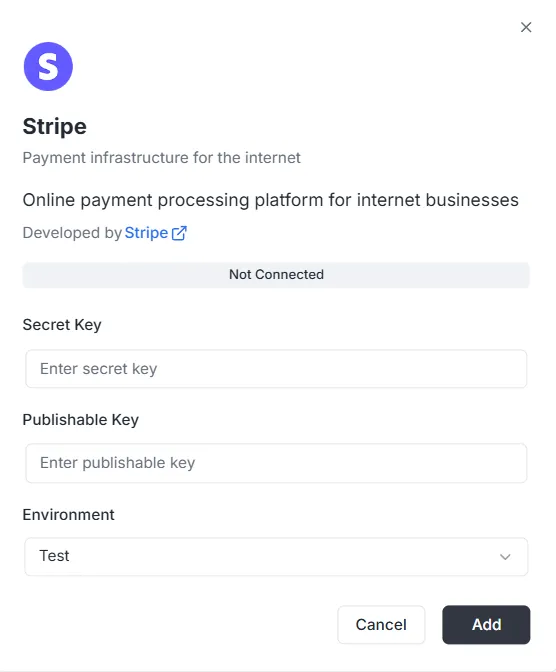
섹션 제목: “구성 단계”통합 목록에서 Stripe를 선택하면 구성 모달이 열립니다. 연결을 설정하려면 Stripe 대시보드에서 다음 자격 증명을 제공해야 합니다.
1. Secret Key
섹션 제목: “1. Secret Key”- 입력: 비공개 Stripe Secret Key(보통
sk_로 시작)를 Secret Key 필드에 입력합니다. 이 키는 백엔드가 보안 요청을 인증하는 데 사용됩니다.
2. Publishable Key
섹션 제목: “2. Publishable Key”- 입력: 공개 Stripe Publishable Key(보통
pk_로 시작)를 Publishable Key 필드에 입력합니다. 이 키는 프런트엔드 구현에 사용됩니다.
3. 환경
섹션 제목: “3. 환경”- 입력: 드롭다운에서 적절한 환경을 선택합니다(개발/샌드박스는 Test, 라이브 처리는 Production).
연결 완료
섹션 제목: “연결 완료”키와 환경을 구성한 후:
- 상태 표시줄에 연결 안 됨이 표시되는지 확인합니다.
- 오른쪽 아래 검은색 추가 버튼을 클릭하여 자격 증명을 저장하고 결제 통합을 활성화합니다.
Stripe 통합 API 참조
섹션 제목: “Stripe 통합 API 참조”구성 관리 {#configuration-management}
섹션 제목: “구성 관리 {#configuration-management}”configureStripe
섹션 제목: “configureStripe”프로젝트 및 환경에 대한 새 Stripe 구성을 만듭니다.
뮤테이션:
mutation ConfigureStripe ( $input: ConfigureStripeInput!) { configureStripe ( input: $input ) { id publishableKey webhookUrl }}입력:
input ConfigureStripeInput { secretKey: String! # Stripe secret key (sk_test_... or sk_live_...) publishableKey: String! # Stripe publishable key (pk_test_... or pk_live_...) environment: StripeEnvironment! # TEST or LIVE webhookSecret: String # Webhook signing secret (optional)}응답:
type ConfigureStripePayload { id: ID! # Configuration ID publishableKey: String! # Publishable key webhookUrl: String! # Generated webhook URL}예:
{ "input": { "secretKey": "sk_test_...", "publishableKey": "pk_test_...", "environment": "TEST", "webhookSecret": "whsec_..." }}참고:
- 비밀 키는 저장 전 AES-256-GCM으로 암호화됩니다
- 프로젝트/환경 조합당 하나의 구성만 허용됩니다
- 구성이 이미 있으면 오류를 반환합니다
updateStripeConfig
섹션 제목: “updateStripeConfig”기존 Stripe 구성을 업데이트합니다.
뮤테이션:
mutation UpdateStripeConfig ( $input: UpdateStripeConfigInput!) { updateStripeConfig ( input: $input ) { id publishableKey webhookUrl }}입력:
input UpdateStripeConfigInput { secretKey: String # Optional publishableKey: String # Optional environment: StripeEnvironment # Optional webhookSecret: String # Optional}응답:
type UpdateStripeConfigPayload { id: ID! publishableKey: String! webhookUrl: String!}참고:
- 모든 필드는 선택 사항입니다
- 제공된 필드만 업데이트됩니다
- 비밀 키가 제공되면 암호화됩니다
고객 관리 {#customer-management}
섹션 제목: “고객 관리 {#customer-management}”stripe_customer
섹션 제목: “stripe_customer”ID로 단일 고객을 조회합니다.
쿼리:
query stripe_customer{ stripe_customer( id: "cus_Ts..." ) { id name email phone description metadata object createdAt }}stripe_customers
섹션 제목: “stripe_customers”페이지 매김과 선택적 필터로 고객을 나열합니다.
쿼리:
query stripe_customers ( $first: Int, $after: String, $customerId: String) { stripe_customers ( first: $first, after: $after, customerId: $customerId ) { edges { node { id name email phone description createdAt } cursor } pageInfo { hasNextPage hasPreviousPage startCursor endCursor } }}매개변수:
first: 반환할 항목 수(기본값: 10)after: 페이지 매김용 커서customerId: 고객 ID로 필터(선택)
stripe_createCustomer
섹션 제목: “stripe_createCustomer”새 고객을 만듭니다.
뮤테이션:
mutation stripe_createCustomer { stripe_createCustomer ( input: { name: "Customer", email: "example@archie.com", phone: "+573001230001", description: "Description Example" metadata: { data1: "Example data1", data2: "Example data2" } } ) { id name email phone description metadata object createdAt }}stripe_updateCustomer
섹션 제목: “stripe_updateCustomer”기존 고객을 업데이트합니다.
뮤테이션:
mutation stripe_updateCustomer { stripe_updateCustomer( id: "cus_Ts...", input: { name: "Customer", email: "example@archie.com", phone: "+573001230001", description:"Description Example", metadata: { data1: "Example data1 updated", data2: "Example data2 updated" } } ) { id name email phone description metadata object createdAt }}참고:
- 모든 필드는 선택 사항입니다
- 제공된 필드만 업데이트됩니다
stripe_deleteCustomer
섹션 제목: “stripe_deleteCustomer”고객을 삭제합니다.
뮤테이션:
mutation stripe_deleteCustomer { stripe_deleteCustomer ( id: "cus_Ts...")}응답:
- 성공 시
true를 반환합니다 - 고객을 찾을 수 없으면 오류
Payment Intents {#payment-intents}
섹션 제목: “Payment Intents {#payment-intents}”stripe_paymentIntent
섹션 제목: “stripe_paymentIntent”ID로 단일 Payment Intent를 조회합니다.
쿼리:
query stripe_paymentIntent { stripe_paymentIntent ( id: "pi_3Su..." ) { id customerId paymentMethodId currency amount status metadata object clientSecret createdAt }}stripe_paymentIntents
섹션 제목: “stripe_paymentIntents”페이지 매김과 선택적 필터로 Payment Intent를 나열합니다.
쿼리:
query stripe_paymentIntents ( $first: Int, $after: String, $customerId: String) { stripe_paymentIntents ( first: $first, after: $after, customerId: $customerId ) { edges { node { id customerId paymentMethodId currency amount status metadata object clientSecret createdAt } cursor } pageInfo { hasPreviousPage hasNextPage startCursor endCursor } }}매개변수:
first: 반환할 항목 수(기본값: 10)after: 페이지 매김용 커서customerId: 고객 ID로 필터(선택)
stripe_createPaymentIntent
섹션 제목: “stripe_createPaymentIntent”새 Payment Intent를 만듭니다.
뮤테이션:
mutation stripe_createPaymentIntent { stripe_createPaymentIntent ( input: { amount: 12.35, currency: "usd", customerId: "cus_Ts...", paymentMethodId: "pm_1Su...", automaticPaymentMethods: true } ) { id customerId paymentMethodId currency amount status metadata object clientSecret createdAt }}참고:
- 프런트엔드 확인을 위해
clientSecret이 반환됩니다 - Stripe.js 통합에는
automaticPaymentMethods: true사용
stripe_updatePaymentIntent
섹션 제목: “stripe_updatePaymentIntent”확인 전에 Payment Intent를 업데이트합니다.
뮤테이션:
mutation stripe_updatePaymentIntent{ stripe_updatePaymentIntent( id: "pi_3S...", input: { amount: 36.92, currency: "usd", paymentMethodId: "pm_1Su..." metadata:{ data1: "Example data1" } } ) { id customerId paymentMethodId currency amount status metadata object clientSecret createdAt }}참고:
- 확인 전에만 업데이트할 수 있습니다
- 모든 필드는 선택 사항입니다
stripe_confirmPaymentIntent
섹션 제목: “stripe_confirmPaymentIntent”Payment Intent를 확인합니다.
뮤테이션:
mutation stripe_confirmPaymentIntent{ stripe_confirmPaymentIntent( id: "pi_3Su..." input: { paymentMethodId: "pm_1Su...", returnUrl: "http://localhost:3000/successful-payment" } ) { id customerId paymentMethodId currency amount status metadata object clientSecret createdAt }}참고:
- 결제를 완료하는 데 필요합니다
- 3D Secure가 필요할 수 있습니다
- 업데이트된 상태를 반환합니다(succeeded, requires_action 등)
stripe_cancelPaymentIntent
섹션 제목: “stripe_cancelPaymentIntent”Payment Intent를 취소합니다.
뮤테이션:
mutation stripe_cancelPaymentIntent { stripe_cancelPaymentIntent( id: "pi_3Su..." ) { id customerId paymentMethodId currency amount status metadata object clientSecret createdAt }}참고:
- succeeded 또는 canceled가 아닌 Payment Intent만 취소할 수 있습니다
- 상태가 “canceled”로 바뀝니다
구독 {#subscriptions}
섹션 제목: “구독 {#subscriptions}”stripe_subscription
섹션 제목: “stripe_subscription”ID로 단일 구독을 조회합니다.
쿼리:
query stripe_subscription { stripe_subscription(id: "sub_1Su...") { id customerId status currentPeriodStart currentPeriodEnd createdAt cancelAtPeriodEnd metadata object items { data { id priceId quantity } } }}stripe_subscriptions
섹션 제목: “stripe_subscriptions”페이지 매김과 선택적 필터로 구독을 나열합니다.
쿼리:
query stripe_subscriptions ( $first: Int, $after: String, $customerId: String) { stripe_subscriptions ( first: $first, after: $after, customerId: $customerId ) { edges { node { id customerId status currentPeriodStart currentPeriodEnd createdAt cancelAtPeriodEnd metadata object items { data { id priceId quantity } } } cursor } pageInfo { hasPreviousPage hasNextPage startCursor endCursor } }}매개변수:
first: 반환할 항목 수(기본값: 10)after: 페이지 매김용 커서customerId: 고객 ID로 필터(선택)status: 상태로 필터(선택)
stripe_createSubscription
섹션 제목: “stripe_createSubscription”새 구독을 만듭니다.
뮤테이션:
mutation stripe_createSubscription { stripe_createSubscription ( input: { customerId: "cus_TsQ...", items: { priceId: "price_1Su...", quantity: 1 }, metadata: { data1: "Example data1" }, trialPeriodDays: 0 } ) { id customerId status currentPeriodStart currentPeriodEnd createdAt cancelAtPeriodEnd metadata object items { data { id priceId quantity } } }}참고:
- 구독에 결제 수단이 필요하면
paymentBehavior가 “default_incomplete”일 수 있습니다 - 평가판 기간은 일 단위로 지정합니다
- 최신 청구서와 Payment Intent가 자동으로 확장됩니다
stripe_updateSubscription
섹션 제목: “stripe_updateSubscription”기존 구독을 업데이트합니다.
뮤테이션:
mutation stripe_updateSubscription { stripe_updateSubscription( id: "sub_1Sv..." input: { cancelAtPeriodEnd: false metadata: { data2: "Example data2" } } ) { id customerId status currentPeriodStart currentPeriodEnd createdAt cancelAtPeriodEnd metadata object items { data { id priceId quantity } } }}stripe_cancelSubscription
섹션 제목: “stripe_cancelSubscription”구독을 취소합니다.
뮤테이션:
mutation stripe_cancelSubscription { stripe_cancelSubscription ( cancelAtPeriodEnd: true, id: "sub_1Sv..." ) { id customerId status currentPeriodStart currentPeriodEnd createdAt cancelAtPeriodEnd metadata object items { data { id priceId quantity } } }}매개변수:
id: 구독 ID(필수)cancelAtPeriodEnd: true이면 기간 말에 취소, false이면 즉시 취소(기본값: false)
참고:
- 즉시 취소: 구독이 즉시 종료됩니다
- 기간 말 취소: 현재 기간이 끝날 때까지 유지됩니다
상품 및 가격 {#products-and-prices}
섹션 제목: “상품 및 가격 {#products-and-prices}”stripe_products
섹션 제목: “stripe_products”페이지 매김으로 상품을 나열합니다.
쿼리:
query stripe_products ( $first: Int, $after: String) { stripe_products ( first: $first, after: $after ) { edges { node { id name description active metadata object createdAt } cursor } pageInfo { hasPreviousPage hasNextPage startCursor endCursor } }}stripe_createProduct
섹션 제목: “stripe_createProduct”새 상품을 만듭니다.
뮤테이션:
mutation stripe_createProduct { stripe_createProduct ( input: { name: "Product 01", description: "Description product 01", metadata: { data1: "Example data1" } } ) { id name description active metadata object createdAt }}stripe_prices
섹션 제목: “stripe_prices”페이지 매김과 선택적 필터로 가격을 나열합니다.
쿼리:
query stripe_prices ( $first: Int, $after: String, $productId: String) { stripe_prices ( first: $first, after: $after, productId: $productId ) { edges { node { id productId active currency unitAmount object metadata createdAt recurring { interval intervalCount } } cursor } pageInfo { hasPreviousPage hasNextPage startCursor endCursor } }}매개변수:
first: 반환할 항목 수(기본값: 10)after: 페이지 매김용 커서productId: 제품 ID로 필터(선택)
stripe_createPrice
섹션 제목: “stripe_createPrice”새 가격을 만듭니다.
뮤테이션:
mutation stripe_createPrice { stripe_createPrice ( input: { productId: "prod_Tst...", unitAmount: 25.85, currency: "usd", recurring: { interval: "month", intervalCount: 1 }, metadata: { data1: "Example data1" } } ) { id productId currency unitAmount active object createdAt metadata recurring { interval intervalCount } }}참고:
- 일회성 가격은
recurring생략 interval는 “day”, “week”, “month”, “year” 중 하나여야 합니다
청구서 {#invoices}
섹션 제목: “청구서 {#invoices}”stripe_invoice
섹션 제목: “stripe_invoice”ID로 단일 청구서를 조회합니다.
쿼리:
query stripe_invoice { stripe_invoice ( id: "in_1Su..." ) { id customerId subscriptionId currency amountPaid amountDue status object metadata createdAt lineItems { data { id description currency amount quantity } } }}참고:
- 사용 가능할 때 API 확장으로 구독 ID가 채워집니다
stripe_invoices
섹션 제목: “stripe_invoices”페이지 매김과 선택적 필터로 청구서를 나열합니다.
쿼리:
query stripe_invoices ( $first: Int, $after: String, $customerId: String, $status: String) { stripe_invoices ( first: $first, after: $after, customerId: $customerId, status: $status ) { edges { node { id customerId subscriptionId currency amountPaid amountDue status object metadata createdAt lineItems { data { id description currency amount quantity } } } cursor } pageInfo { hasPreviousPage hasNextPage startCursor endCursor } }}매개변수:
first: 반환할 항목 수(기본값: 10)after: 페이지 매김용 커서customerId: 고객 ID로 필터(선택)status: 상태로 필터(선택)
stripe_payInvoice
섹션 제목: “stripe_payInvoice”청구서를 프로그래밍 방식으로 결제합니다.
뮤테이션:
mutation stripe_payInvoice { stripe_payInvoice ( id: "in_1Sv..." ) { id customerId subscriptionId currency amountPaid amountDue status object metadata createdAt lineItems { data { id description currency amount quantity } } }}참고:
- 고객의 기본 결제 수단으로 청구서 결제를 시도합니다
- 결제가 실패하면 오류
- 성공 시 청구서 상태가 “paid”로 업데이트됩니다
환불 {#refunds}
섹션 제목: “환불 {#refunds}”stripe_refunds
섹션 제목: “stripe_refunds”페이지 매김과 선택적 필터로 환불을 나열합니다.
쿼리:
query stripe_refunds ( $first: Int, $after: String, $paymentIntentId: String) { stripe_refunds ( first: $first, after: $after, paymentIntentId: $paymentIntentId ) { edges { node { id paymentIntentId reason status currency amount metadata object createdAt } cursor } pageInfo { hasPreviousPage hasNextPage startCursor endCursor } }}매개변수:
first: 반환할 항목 수(기본값: 10)after: 페이지 매김용 커서paymentIntentId: Payment Intent ID로 필터(선택)
stripe_createRefund
섹션 제목: “stripe_createRefund”Payment Intent에 대한 환불을 만듭니다.
뮤테이션:
mutation stripe_createRefund { stripe_createRefund ( input: { paymentIntentId: "pi_3Sv...", amount: 200, reason: "requested_by_customer" } ) { id reason paymentIntentId status currency amount object metadata createdAt }}참고:
- 전액 환불 시
amount생략 reason는 “duplicate”, “fraudulent”, “requested_by_customer” 중 하나- 환불 상태는 “pending”으로 시작한 뒤 “succeeded” 또는 “failed”로 바뀝니다
Checkout 세션 {#checkout-sessions}
섹션 제목: “Checkout 세션 {#checkout-sessions}”stripe_createCheckoutSession
섹션 제목: “stripe_createCheckoutSession”일회성 결제 또는 구독을 위한 Stripe Checkout 세션을 만듭니다. 고객을 Stripe 호스팅 결제 페이지로 보내는 URL을 반환합니다.
뮤테이션:
mutation CreateCheckoutSession($input: StripeCreateCheckoutSessionInput!) { stripe_createCheckoutSession(input: $input) { id url customerId customerEmail paymentIntentId subscriptionId mode status currency amountTotal metadata createdAt }}입력:
input StripeCreateCheckoutSessionInput {  customerId: String              # Existing Stripe customer ID (optional)  customerEmail: String            # Customer email for new customers (optional)  mode: String!                   # "payment" for one-time or "subscription" for recurring  successUrl: String!             # URL to redirect after successful payment  cancelUrl: String!              # URL to redirect if customer cancels  lineItems: [StripeCheckoutSessionLineItemInput!]!  # Items to purchase  paymentMethodTypes: [String!]    # Allowed payment methods (optional)  metadata: Map                    # Custom metadata (optional)}
input StripeCheckoutSessionLineItemInput {  priceId: String      # Stripe Price ID (for existing prices)  quantity: Int!        # Quantity of items  amount: Float         # Custom amount in dollars (for one-time payments)  currency: String      # Currency code (required if amount is provided)}
응답:
type StripeCheckoutSession { id: ID! # Session ID object: String! # "checkout.session" url: String! # Redirect URL for customer customerId: String # Customer ID (if customer exists) customerEmail: String # Customer email paymentIntentId: String # Payment Intent ID (for one-time payments) subscriptionId: String # 구독 ID(구독) mode: String! # "payment" or "subscription" status: String! # Session status currency: String # Currency code amountTotal: Float # Total amount in dollars metadata: Map # Custom metadata createdAt: Time! # Creation timestamp}예 – 일회성 결제:
{ "input": { "mode": "payment", "successUrl": "https://example.com/success", "cancelUrl": "https://example.com/cancel", "lineItems": [ { "priceId": "price_1234567890", "quantity": 1 } ] }}예 – 사용자 지정 금액 일회성 결제:
{ "input": { "mode": "payment", "customerEmail": "customer@example.com", "successUrl": "https://example.com/success", "cancelUrl": "https://example.com/cancel", "lineItems": [ { "amount": 29.99, "currency": "usd", "quantity": 1 } ] }}예 – 구독:
{ "input": { "mode": "subscription", "customerId": "cus_1234567890", "successUrl": "https://example.com/success", "cancelUrl": "https://example.com/cancel", "lineItems": [ { "priceId": "price_monthly_subscription", "quantity": 1 } ] }}참고:
url필드에 고객을 보낼 리디렉션 URL이 포함됩니다- 일회성 결제는
mode: "payment"와priceId또는amount+currency를 지정 - 구독은
mode: "subscription"과 반복 가격인priceId를 지정 customerId또는customerEmail중 하나를 지정해야 하며 둘 다는 안 됩니다paymentMethodTypes에는 “card”, “us_bank_account”, “link” 등을 포함할 수 있습니다- 완료되지 않으면 세션은 24시간 후 만료됩니다
청구 포털 세션 {#billing-portal-sessions}
섹션 제목: “청구 포털 세션 {#billing-portal-sessions}”stripe_createBillingPortalSession
섹션 제목: “stripe_createBillingPortalSession”고객이 Stripe 호스팅 포털에서 구독, 결제 수단 및 청구 정보를 관리할 수 있도록 Stripe Billing Portal 세션을 만듭니다.
뮤테이션:
mutation CreateBillingPortalSession($input: StripeCreateBillingPortalSessionInput!) { stripe_createBillingPortalSession(input: $input) { id url customerId returnUrl createdAt }}입력:
input StripeCreateBillingPortalSessionInput { customerId: String! # Stripe customer ID (required) returnUrl: String! # URL to redirect after customer exits portal configuration: String # Portal configuration ID (optional)}응답:
type StripeBillingPortalSession { id: ID! # Session ID object: String! # "billing_portal.session" url: String! # Redirect URL for customer customerId: String! # Customer ID returnUrl: String # Return URL createdAt: Time! # Creation timestamp}예:
{ "input": { "customerId": "cus_1234567890", "returnUrl": "https://example.com/account" }}참고:
url필드에 고객을 보낼 리디렉션 URL이 포함됩니다- 포털 세션은 단명이며 사용 후 만료됩니다
- 고객은 구독, 결제 수단, 청구서 및 청구 정보를 관리할 수 있습니다
- 포털 기능은 Stripe 대시보드에서 구성합니다
configuration이 없으면 기본 포털 구성이 사용됩니다- 포털은 지정된 고객의 데이터만 표시합니다
결제 수단 {#payment-methods}
섹션 제목: “결제 수단 {#payment-methods}”stripe_paymentMethods
섹션 제목: “stripe_paymentMethods”페이지 매김과 선택적 필터로 결제 수단을 나열합니다.
쿼리:
query stripe_paymentMethods ( $first: Int, $after: String, $customerId: String) { stripe_paymentMethods( first: $first, after: $after, customerId: $customerId ) { edges { node { id customerId type object metadata createdAt card { brand expMonth expYear last4 } } cursor } pageInfo { hasPreviousPage hasNextPage startCursor endCursor } }}매개변수:
first: 반환할 항목 수(기본값: 10)after: 페이지 매김용 커서customerId: 고객 ID로 필터(선택)
참고:
- 카드의 안전한 정보만 반환(마지막 4자리, 브랜드, 만료)
- 전체 카드 번호는 표시되지 않습니다
stripe_attachPaymentMethod
섹션 제목: “stripe_attachPaymentMethod”결제 수단을 고객에 연결합니다.
뮤테이션:
mutation stripe_attachPaymentMethod { stripe_attachPaymentMethod ( id: "pm_1Sv...", input: { customerId: "cus_Ts4..." } ) { id customerId type card { brand expMonth expYear last4 } metadata object createdAt }}참고:
- 결제 수단은 먼저 생성해야 합니다(보통 Stripe.js)
- 연결된 수단은 구독 및 결제에 사용할 수 있습니다
stripe_detachPaymentMethod
섹션 제목: “stripe_detachPaymentMethod”고객에서 결제 수단 연결을 해제합니다.
뮤테이션:
mutation stripe_detachPaymentMethod { stripe_detachPaymentMethod ( id: "pm_1Sv..." ) { id customerId type card { brand expYear expMonth last4 } metadata object createdAt }}참고:
- 분리된 수단은 결제에 더 이상 사용할 수 없습니다
customerId가 null인 결제 수단을 반환합니다
Webhook 이벤트 {#webhook-events}
섹션 제목: “Webhook 이벤트 {#webhook-events}”stripe_webhookEvents
섹션 제목: “stripe_webhookEvents”서비스가 수신한 Webhook 이벤트를 나열합니다.
쿼리:
query ListWebhookEvents ( $first: Int, $after: String) { stripe_webhookEvents ( first: $first, after: $after ) { edges { node { id type data processed createdAt } cursor } pageInfo { hasNextPage hasPreviousPage endCursor } }}응답:
type StripeWebhookEvent { id: ID! type: String! # Event type (e.g., "payment_intent.succeeded") data: String! # JSON string of event data processed: Boolean! # 이벤트가 이미 처리되었는지 createdAt: Time!}매개변수:
first: 반환할 항목 수(기본값: 10)after: 페이지 매김용 커서
참고:
- 이벤트는 webhook 엔드포인트에서 자동으로 수신됩니다
- 서명 검증 후 이벤트가 저장됩니다
data필드에 전체 이벤트 페이로드가 JSON 문자열로 들어 있습니다
페이지 매김 {#pagination}
섹션 제목: “페이지 매김 {#pagination}”모든 목록 쿼리는 Relay 연결 패턴을 사용한 커서 기반 페이지 매김을 지원합니다.
PageInfo
섹션 제목: “PageInfo”type PageInfo { hasNextPage: Boolean! hasPreviousPage: Boolean! startCursor: String endCursor: String}사용 예
섹션 제목: “사용 예”query ListCustomers ( $first: Int, $after: String) { stripe_customers ( first: $first, after: $after ) { edges { node { id email } cursor } pageInfo { hasNextPage endCursor } }}페이지 매김 흐름:
- 첫 요청:
first: 10, after: null - 응답의
pageInfo.endCursor를 다음 요청의after로 사용합니다 hasNextPage로 더 많은 페이지가 있는지 확인합니다
기본값:
first: 미지정 시 10after: 미지정 시 처음부터
오류 처리 {#error-handling}
섹션 제목: “오류 처리 {#error-handling}”모든 작업은 명확한 메시지와 함께 GraphQL 오류를 반환합니다. 오류는 Stripe API에서 매핑되어 이해하기 쉬운 정보를 제공합니다.
일반적인 오류 시나리오
섹션 제목: “일반적인 오류 시나리오”구성 오류:
400: Stripe 키 형식이 잘못됨404: 프로젝트 또는 구성을 찾을 수 없음400: 구성이 이미 존재함
고객 오류:
404: 고객을 찾을 수 없음400: 고객 데이터가 잘못됨
Payment Intent 오류:
404: Payment Intent를 찾을 수 없음400: 금액 또는 통화가 잘못됨402: 결제 실패(카드 거절, 잔액 부족 등)
구독 오류:
404: 구독을 찾을 수 없음400: 구독 매개변수가 잘못됨400: 취소된 구독은 업데이트할 수 없음
Stripe 오류 코드: 일반적인 코드는 이해하기 쉬운 메시지로 매핑됩니다.
card_declined: “카드가 거부되었습니다”insufficient_funds: “잔액 부족”invalid_number: “카드 번호가 잘못됨”expired_card: “카드가 만료됨”incorrect_cvc: “CVC 코드가 잘못됨”
오류 응답 형식
섹션 제목: “오류 응답 형식”{ "errors": [ { "message": "Customer not found", "extensions": { "code": "NOT_FOUND", "stripeErrorCode": "resource_missing" } } ], "data": null}데이터 유형 {#data-types}
섹션 제목: “데이터 유형 {#data-types}”StripeEnvironment
섹션 제목: “StripeEnvironment”enum StripeEnvironment { TEST # Modo prueba LIVE # 라이브 / 프로덕션 모드}Map 스칼라
섹션 제목: “Map 스칼라”스칼라 유형 Map은 다음과 같은 키-값 맵을 나타냅니다.
- 키는 문자열입니다
- 값은 문자열, 숫자, 불리언 또는 중첩 맵일 수 있습니다
- 메타데이터 필드에 사용됩니다
예:
{ "metadata": { "order_id": "12345", "user_id": "67890", "premium": true }}Time 스칼라
섹션 제목: “Time 스칼라”스칼라 유형 Time은 ISO 8601 형식의 타임스탬프를 나타냅니다.
예: "2025-11-16T00:28:48.081Z"