Stripe
Stripe, internet işletmeleri için tasarlanmış çevrimiçi bir ödeme işleme platformudur. Stripe entegrasyonu, uygulamanızın işlemleri, abonelikleri ve finansal verileri güvenli şekilde yönetmesini sağlar.
Yapılandırma adımları
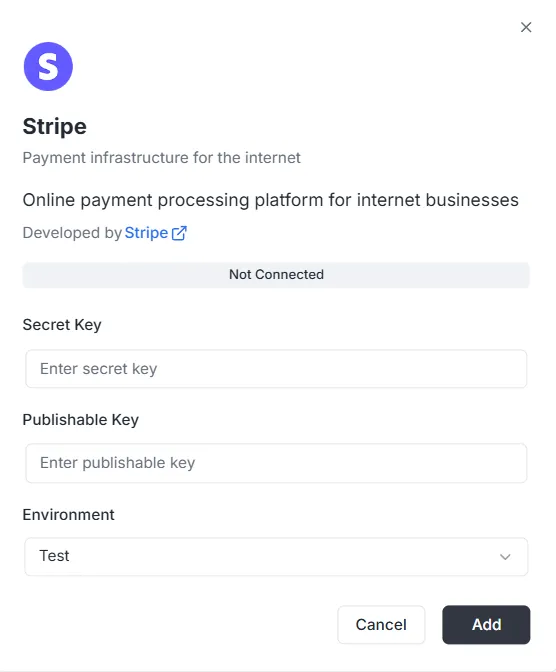
Section titled “Yapılandırma adımları”Entegrasyonlar listesinden Stripe seçildiğinde bir yapılandırma iletişim kutusu açılır. Bağlantıyı kurmak için Stripe panonuzdan aşağıdaki kimlik bilgilerini sağlamalısınız:
1. Secret Key
Section titled “1. Secret Key”- Girdi: Özel Stripe Secret Key’inizi (genellikle
sk_ile başlar) Secret Key alanına girin. Bu anahtar, arka ucun güvenli istekleri doğrulamasına izin verir.
2. Publishable Key
Section titled “2. Publishable Key”- Girdi: Genel Stripe Publishable Key’inizi (genellikle
pk_ile başlar) Publishable Key alanına girin. Bu anahtar ön yüz uygulamasında kullanılır.
3. Ortam
Section titled “3. Ortam”- Girdi: Açılır menüden uygun ortamı seçin (ör. geliştirme/kum havuzu için Test, canlı işlemler için Production).
Bağlantıyı tamamlama
Section titled “Bağlantıyı tamamlama”Anahtarlar ve ortam yapılandırıldıktan sonra:
- Durum çubuğunu kontrol edin (şu anda Bağlı değil gösterir).
- Kimlik bilgilerini kaydetmek ve ödeme entegrasyonunu etkinleştirmek için sağ alttaki siyah Ekle düğmesine tıklayın.
Stripe entegrasyon API referansı
Section titled “Stripe entegrasyon API referansı”- Yapılandırma yönetimi
- Müşteri yönetimi
- Payment Intents
- Abonelikler
- Ürünler ve fiyatlar
- Faturalar
- İadeler
- Checkout oturumları
- Faturalama portalı oturumları
- Ödeme yöntemleri
- Webhook olayları
- Sayfalama
- Hata işleme
Yapılandırma yönetimi {#configuration-management}
Section titled “Yapılandırma yönetimi {#configuration-management}”configureStripe
Section titled “configureStripe”Proje ve ortam için yeni bir Stripe yapılandırması oluşturur.
Mutation:
mutation ConfigureStripe ( $input: ConfigureStripeInput!) { configureStripe ( input: $input ) { id publishableKey webhookUrl }}Girdi:
input ConfigureStripeInput { secretKey: String! # Stripe secret key (sk_test_... veya sk_live_...) publishableKey: String! # Stripe publishable key (pk_test_... veya pk_live_...) environment: StripeEnvironment! # TEST veya LIVE webhookSecret: String # Webhook imza sırrı (isteğe bağlı)}Yanıt:
type ConfigureStripePayload { id: ID! # Yapılandırma kimliği publishableKey: String! # Publishable Key webhookUrl: String! # Üretilen webhook URL’si}Beispiel:
{ "input": { "secretKey": "sk_test_...", "publishableKey": "pk_test_...", "environment": "TEST", "webhookSecret": "whsec_..." }}Notlar:
- Secret Key depolanmadan önce AES-256-GCM ile şifrelenir
- Proje/ortam kombinasyonu başına yalnızca bir yapılandırma
- Yapılandırma zaten varsa hata
updateStripeConfig
Section titled “updateStripeConfig”Mevcut bir Stripe yapılandırmasını günceller.
Mutation:
mutation UpdateStripeConfig ( $input: UpdateStripeConfigInput!) { updateStripeConfig ( input: $input ) { id publishableKey webhookUrl }}Girdi:
input UpdateStripeConfigInput { secretKey: String # İsteğe bağlı publishableKey: String # İsteğe bağlı environment: StripeEnvironment # İsteğe bağlı webhookSecret: String # İsteğe bağlı}Yanıt:
type UpdateStripeConfigPayload { id: ID! publishableKey: String! webhookUrl: String!}Notlar:
- Tüm alanlar isteğe bağlıdır
- Yalnızca gönderilen alanlar güncellenir
- Secret Key belirtildiğinde şifrelenir
Müşteri yönetimi {#customer-management}
Section titled “Müşteri yönetimi {#customer-management}”stripe_customer
Section titled “stripe_customer”Kimliğe göre tek bir müşteri getirir.
Sorgu:
query stripe_customer{ stripe_customer( id: "cus_Ts..." ) { id name email phone description metadata object createdAt }}stripe_customers
Section titled “stripe_customers”Müşterileri sayfalama ve isteğe bağlı filtreyle listeler.
Sorgu:
query stripe_customers ( $first: Int, $after: String, $customerId: String) { stripe_customers ( first: $first, after: $after, customerId: $customerId ) { edges { node { id name email phone description createdAt } cursor } pageInfo { hasNextPage hasPreviousPage startCursor endCursor } }}Parametreler:
first: Döndürülecek kayıt sayısı (varsayılan: 10)after: Sayfalama için imleçcustomerId: Müşteri kimliğine göre filtrele (isteğe bağlı)
stripe_createCustomer
Section titled “stripe_createCustomer”Yeni bir müşteri oluşturur.
Mutation:
mutation stripe_createCustomer { stripe_createCustomer ( input: { name: "Customer", email: "example@archie.com", phone: "+573001230001", description: "Description Example" metadata: { data1: "Example data1", data2: "Example data2" } } ) { id name email phone description metadata object createdAt }}stripe_updateCustomer
Section titled “stripe_updateCustomer”Mevcut bir müşteriyi günceller.
Mutation:
mutation stripe_updateCustomer { stripe_updateCustomer( id: "cus_Ts...", input: { name: "Customer", email: "example@archie.com", phone: "+573001230001", description:"Description Example", metadata: { data1: "Example data1 updated", data2: "Example data2 updated" } } ) { id name email phone description metadata object createdAt }}Notlar:
- Tüm alanlar isteğe bağlıdır
- Yalnızca gönderilen alanlar güncellenir
stripe_deleteCustomer
Section titled “stripe_deleteCustomer”Bir müşteriyi siler.
Mutation:
mutation stripe_deleteCustomer { stripe_deleteCustomer ( id: "cus_Ts...")}Yanıt:
- Başarılı olursa
truedöndürür - Müşteri bulunamazsa hata
Payment Intents {#payment-intents}
Section titled “Payment Intents {#payment-intents}”stripe_paymentIntent
Section titled “stripe_paymentIntent”Kimliğe göre tek bir Payment Intent getirir.
Sorgu:
query stripe_paymentIntent { stripe_paymentIntent ( id: "pi_3Su..." ) { id customerId paymentMethodId currency amount status metadata object clientSecret createdAt }}stripe_paymentIntents
Section titled “stripe_paymentIntents”Payment Intent’leri sayfalama ve isteğe bağlı filtreyle listeler.
Sorgu:
query stripe_paymentIntents ( $first: Int, $after: String, $customerId: String) { stripe_paymentIntents ( first: $first, after: $after, customerId: $customerId ) { edges { node { id customerId paymentMethodId currency amount status metadata object clientSecret createdAt } cursor } pageInfo { hasPreviousPage hasNextPage startCursor endCursor } }}Parametreler:
first: Döndürülecek kayıt sayısı (varsayılan: 10)after: Sayfalama için imleçcustomerId: Müşteri kimliğine göre filtrele (isteğe bağlı)
stripe_createPaymentIntent
Section titled “stripe_createPaymentIntent”Yeni bir Payment Intent oluşturur.
Mutation:
mutation stripe_createPaymentIntent { stripe_createPaymentIntent ( input: { amount: 12.35, currency: "usd", customerId: "cus_Ts...", paymentMethodId: "pm_1Su...", automaticPaymentMethods: true } ) { id customerId paymentMethodId currency amount status metadata object clientSecret createdAt }}Notlar:
clientSecretön yüzde onay için döndürülür- Stripe.js entegrasyonu için
automaticPaymentMethods: truekullanın
stripe_updatePaymentIntent
Section titled “stripe_updatePaymentIntent”Onaydan önce bir Payment Intent’i günceller.
Mutation:
mutation stripe_updatePaymentIntent{ stripe_updatePaymentIntent( id: "pi_3S...", input: { amount: 36.92, currency: "usd", paymentMethodId: "pm_1Su..." metadata:{ data1: "Example data1" } } ) { id customerId paymentMethodId currency amount status metadata object clientSecret createdAt }}Notlar:
- Yalnızca onaydan önce değiştirilebilir
- Tüm alanlar isteğe bağlıdır
stripe_confirmPaymentIntent
Section titled “stripe_confirmPaymentIntent”Bir Payment Intent’i onaylar.
Mutation:
mutation stripe_confirmPaymentIntent{ stripe_confirmPaymentIntent( id: "pi_3Su..." input: { paymentMethodId: "pm_1Su...", returnUrl: "http://localhost:3000/successful-payment" } ) { id customerId paymentMethodId currency amount status metadata object clientSecret createdAt }}Notlar:
- Ödemeyi tamamlamak için gereklidir
- 3D Secure gerektirebilir
- Güncellenmiş durumu döndürür (succeeded, requires_action vb.)
stripe_cancelPaymentIntent
Section titled “stripe_cancelPaymentIntent”Bir Payment Intent’i iptal eder.
Mutation:
mutation stripe_cancelPaymentIntent { stripe_cancelPaymentIntent( id: "pi_3Su..." ) { id customerId paymentMethodId currency amount status metadata object clientSecret createdAt }}Notlar:
- Yalnızca amaç succeeded veya canceled olmadığı sürece mümkündür
- Durum „canceled“ olur
Abonelikler {#subscriptions}
Section titled “Abonelikler {#subscriptions}”stripe_subscription
Section titled “stripe_subscription”Kimliğe göre tek bir abonelik getirir.
Sorgu:
query stripe_subscription { stripe_subscription(id: "sub_1Su...") { id customerId status currentPeriodStart currentPeriodEnd createdAt cancelAtPeriodEnd metadata object items { data { id priceId quantity } } }}stripe_subscriptions
Section titled “stripe_subscriptions”Abonelikleri sayfalama ve isteğe bağlı filtreyle listeler.
Sorgu:
query stripe_subscriptions ( $first: Int, $after: String, $customerId: String) { stripe_subscriptions ( first: $first, after: $after, customerId: $customerId ) { edges { node { id customerId status currentPeriodStart currentPeriodEnd createdAt cancelAtPeriodEnd metadata object items { data { id priceId quantity } } } cursor } pageInfo { hasPreviousPage hasNextPage startCursor endCursor } }}Parametreler:
first: Döndürülecek kayıt sayısı (varsayılan: 10)after: Sayfalama için imleçcustomerId: Müşteri kimliğine göre filtrele (isteğe bağlı)status: Duruma göre filtrele (isteğe bağlı)
stripe_createSubscription
Section titled “stripe_createSubscription”Yeni bir abonelik oluşturur.
Mutation:
mutation stripe_createSubscription { stripe_createSubscription ( input: { customerId: "cus_TsQ...", items: { priceId: "price_1Su...", quantity: 1 }, metadata: { data1: "Example data1" }, trialPeriodDays: 0 } ) { id customerId status currentPeriodStart currentPeriodEnd createdAt cancelAtPeriodEnd metadata object items { data { id priceId quantity } } }}Notlar:
- Bir ödeme yöntemi gerekiyorsa
paymentBehavior„default_incomplete“ olabilir - Deneme süresi gün cinsinden belirtilir
- Son fatura ve Payment Intent otomatik olarak genişletilir
stripe_updateSubscription
Section titled “stripe_updateSubscription”Mevcut bir aboneliği günceller.
Mutation:
mutation stripe_updateSubscription { stripe_updateSubscription( id: "sub_1Sv..." input: { cancelAtPeriodEnd: false metadata: { data2: "Example data2" } } ) { id customerId status currentPeriodStart currentPeriodEnd createdAt cancelAtPeriodEnd metadata object items { data { id priceId quantity } } }}stripe_cancelSubscription
Section titled “stripe_cancelSubscription”Bir aboneliği iptal eder.
Mutation:
mutation stripe_cancelSubscription { stripe_cancelSubscription ( cancelAtPeriodEnd: true, id: "sub_1Sv..." ) { id customerId status currentPeriodStart currentPeriodEnd createdAt cancelAtPeriodEnd metadata object items { data { id priceId quantity } } }}Parametreler:
id: abonelik kimliği (zorunlu)cancelAtPeriodEnd: true ise dönem sonunda iptal; false ise anında iptal (varsayılan: false)
Notlar:
- Anında iptal: abonelik hemen sona erer
- Dönem sonunda iptal: mevcut dönemin sonuna kadar devam eder
Ürünler ve fiyatlar {#products-and-prices}
Section titled “Ürünler ve fiyatlar {#products-and-prices}”stripe_products
Section titled “stripe_products”Ürünleri sayfalama ile listeler.
Sorgu:
query stripe_products ( $first: Int, $after: String) { stripe_products ( first: $first, after: $after ) { edges { node { id name description active metadata object createdAt } cursor } pageInfo { hasPreviousPage hasNextPage startCursor endCursor } }}stripe_createProduct
Section titled “stripe_createProduct”Yeni bir ürün oluşturur.
Mutation:
mutation stripe_createProduct { stripe_createProduct ( input: { name: "Product 01", description: "Description product 01", metadata: { data1: "Example data1" } } ) { id name description active metadata object createdAt }}stripe_prices
Section titled “stripe_prices”Fiyatları sayfalama ve isteğe bağlı filtreyle listeler.
Sorgu:
query stripe_prices ( $first: Int, $after: String, $productId: String) { stripe_prices ( first: $first, after: $after, productId: $productId ) { edges { node { id productId active currency unitAmount object metadata createdAt recurring { interval intervalCount } } cursor } pageInfo { hasPreviousPage hasNextPage startCursor endCursor } }}Parametreler:
first: Döndürülecek kayıt sayısı (varsayılan: 10)after: Sayfalama için imleçproductId: Ürün kimliğine göre filtrele (isteğe bağlı)
stripe_createPrice
Section titled “stripe_createPrice”Yeni bir fiyat oluşturur.
Mutation:
mutation stripe_createPrice { stripe_createPrice ( input: { productId: "prod_Tst...", unitAmount: 25.85, currency: "usd", recurring: { interval: "month", intervalCount: 1 }, metadata: { data1: "Example data1" } } ) { id productId currency unitAmount active object createdAt metadata recurring { interval intervalCount } }}Notlar:
- Tek seferlik fiyatlar için
recurringatlayın intervalşunlardan biri olmalıdır: „day“, „week“, „month“, „year“
Faturalar {#invoices}
Section titled “Faturalar {#invoices}”stripe_invoice
Section titled “stripe_invoice”Kimliğe göre tek bir fatura getirir.
Sorgu:
query stripe_invoice { stripe_invoice ( id: "in_1Su..." ) { id customerId subscriptionId currency amountPaid amountDue status object metadata createdAt lineItems { data { id description currency amount quantity } } }}Notlar:
- Abonelik kimliği varsa API genişletmesi ile ayarlanır
stripe_invoices
Section titled “stripe_invoices”Faturaları sayfalama ve isteğe bağlı filtreyle listeler.
Sorgu:
query stripe_invoices ( $first: Int, $after: String, $customerId: String, $status: String) { stripe_invoices ( first: $first, after: $after, customerId: $customerId, status: $status ) { edges { node { id customerId subscriptionId currency amountPaid amountDue status object metadata createdAt lineItems { data { id description currency amount quantity } } } cursor } pageInfo { hasPreviousPage hasNextPage startCursor endCursor } }}Parametreler:
first: Döndürülecek kayıt sayısı (varsayılan: 10)after: Sayfalama için imleçcustomerId: Müşteri kimliğine göre filtrele (isteğe bağlı)status: Duruma göre filtrele (isteğe bağlı)
stripe_payInvoice
Section titled “stripe_payInvoice”Bir faturayı programatik olarak öder.
Mutation:
mutation stripe_payInvoice { stripe_payInvoice ( id: "in_1Sv..." ) { id customerId subscriptionId currency amountPaid amountDue status object metadata createdAt lineItems { data { id description currency amount quantity } } }}Notlar:
- Müşterinin varsayılan ödeme yöntemiyle ödemeyi dener
- Ödeme başarısız olursa hata
- Başarılı olursa fatura durumu „paid“ olarak ayarlanır
İadeler {#refunds}
Section titled “İadeler {#refunds}”stripe_refunds
Section titled “stripe_refunds”İadeleri sayfalama ve isteğe bağlı filtreyle listeler.
Sorgu:
query stripe_refunds ( $first: Int, $after: String, $paymentIntentId: String) { stripe_refunds ( first: $first, after: $after, paymentIntentId: $paymentIntentId ) { edges { node { id paymentIntentId reason status currency amount metadata object createdAt } cursor } pageInfo { hasPreviousPage hasNextPage startCursor endCursor } }}Parametreler:
first: Döndürülecek kayıt sayısı (varsayılan: 10)after: Sayfalama için imleçpaymentIntentId: Payment Intent kimliğine göre filtrele (isteğe bağlı)
stripe_createRefund
Section titled “stripe_createRefund”Bir Payment Intent için iade oluşturur.
Mutation:
mutation stripe_createRefund { stripe_createRefund ( input: { paymentIntentId: "pi_3Sv...", amount: 200, reason: "requested_by_customer" } ) { id reason paymentIntentId status currency amount object metadata createdAt }}Notlar:
- Tam iade için
amountalanını atlayın reasonşunlar olabilir: „duplicate“, „fraudulent“, „requested_by_customer“- Durum önce „pending“, ardından „succeeded“ veya „failed“ olur
Checkout oturumları {#checkout-sessions}
Section titled “Checkout oturumları {#checkout-sessions}”stripe_createCheckoutSession
Section titled “stripe_createCheckoutSession”Tek seferlik ödemeler veya abonelikler için bir Stripe Checkout oturumu oluşturur. Müşterileri Stripe’ın barındırılan ödeme sayfasına yönlendiren bir URL döndürür.
Mutation:
mutation CreateCheckoutSession($input: StripeCreateCheckoutSessionInput!) { stripe_createCheckoutSession(input: $input) { id url customerId customerEmail paymentIntentId subscriptionId mode status currency amountTotal metadata createdAt }}Girdi:
input StripeCreateCheckoutSessionInput {  customerId: String              # Mevcut Stripe müşteri kimliği (isteğe bağlı)  customerEmail: String            # Yeni müşteriler için e-posta (isteğe bağlı)  mode: String!                   # tek seferlik için „payment“ veya yinelenen için „subscription“  successUrl: String!             # başarılı ödeme sonrası yönlendirme  cancelUrl: String!              # iptal durumunda yönlendirme  lineItems: [StripeCheckoutSessionLineItemInput!]!  # satır kalemleri  paymentMethodTypes: [String!]    # izin verilen ödeme yöntemleri (isteğe bağlı)  metadata: Map                    # özel meta veriler (isteğe bağlı)}
input StripeCheckoutSessionLineItemInput {  priceId: String      # Stripe fiyat kimliği (mevcut fiyatlar)  quantity: Int!        # miktar  amount: Float         # özel tutar, dolar (tek seferlik ödemeler)  currency: String      # para birimi kodu (amount verildiğinde zorunlu)}
Yanıt:
type StripeCheckoutSession { id: ID! # oturum kimliği object: String! # „checkout.session“ url: String! # müşteri için yönlendirme URL’si customerId: String # müşteri kimliği (varsa) customerEmail: String # müşteri e-postası paymentIntentId: String # Payment Intent kimliği (tek seferlik ödemeler) subscriptionId: String # abonelik kimliği (abonelikler) mode: String! # „payment“ veya „subscription“ status: String! # oturum durumu currency: String # Währungscode amountTotal: Float # toplam tutar (dolar) metadata: Map # Benutzerdefinierte Metadaten createdAt: Time! # oluşturulma zamanı}Örnek – Tek seferlik ödeme:
{ "input": { "mode": "payment", "successUrl": "https://example.com/success", "cancelUrl": "https://example.com/cancel", "lineItems": [ { "priceId": "price_1234567890", "quantity": 1 } ] }}Örnek – Özel tutarlı tek seferlik ödeme:
{ "input": { "mode": "payment", "customerEmail": "customer@example.com", "successUrl": "https://example.com/success", "cancelUrl": "https://example.com/cancel", "lineItems": [ { "amount": 29.99, "currency": "usd", "quantity": 1 } ] }}Örnek – Abonelik:
{ "input": { "mode": "subscription", "customerId": "cus_1234567890", "successUrl": "https://example.com/success", "cancelUrl": "https://example.com/cancel", "lineItems": [ { "priceId": "price_monthly_subscription", "quantity": 1 } ] }}Notlar:
urlalanı müşteriler için yönlendirme URL’sini içerir- Tek seferlik ödemeler için:
mode: "payment"vepriceIdveyaamount+currency - Abonelikler için:
mode: "subscription"vepriceId(yinelenen bir fiyat olmalıdır) customerIdveyacustomerEmail— ikisi birden değilpaymentMethodTypesörneğin „card“, „us_bank_account“, „link“ içerebilir- Oturumlar tamamlanmadan 24 saat sonra sona erer
Faturalama portalı oturumları {#billing-portal-sessions}
Section titled “Faturalama portalı oturumları {#billing-portal-sessions}”stripe_createBillingPortalSession
Section titled “stripe_createBillingPortalSession”Müşterilerin barındırılan portal üzerinden abonelikleri, ödeme yöntemlerini ve fatura bilgilerini yönetmesi için bir Stripe Billing Portal oturumu oluşturur.
Mutation:
mutation CreateBillingPortalSession($input: StripeCreateBillingPortalSessionInput!) { stripe_createBillingPortalSession(input: $input) { id url customerId returnUrl createdAt }}Girdi:
input StripeCreateBillingPortalSessionInput { customerId: String! # Stripe müşteri kimliği (zorunlu) returnUrl: String! # portaldan çıkış sonrası yönlendirme configuration: String # portal yapılandırma kimliği (isteğe bağlı)}Yanıt:
type StripeBillingPortalSession { id: ID! # oturum kimliği object: String! # „billing_portal.session“ url: String! # müşteri için yönlendirme URL’si customerId: String! # Kunden-ID returnUrl: String # dönüş URL’si createdAt: Time! # oluşturulma zamanı}Beispiel:
{ "input": { "customerId": "cus_1234567890", "returnUrl": "https://example.com/account" }}Notlar:
urlalanı müşteriler için yönlendirme URL’sini içerir- Portal oturumu kısa ömürlüdür ve kullanımdan sonra sona erer
- Müşteriler abonelikleri, ödeme yöntemlerini, faturaları ve fatura bilgilerini yönetebilir
- Portal özellikleri Stripe panosunda yapılandırılır
configurationolmadan varsayılan portal yapılandırması kullanılır- Portal yalnızca belirtilen müşterinin verilerini gösterir
Ödeme yöntemleri {#payment-methods}
Section titled “Ödeme yöntemleri {#payment-methods}”stripe_paymentMethods
Section titled “stripe_paymentMethods”Ödeme yöntemlerini sayfalama ve isteğe bağlı filtreyle listeler.
Sorgu:
query stripe_paymentMethods ( $first: Int, $after: String, $customerId: String) { stripe_paymentMethods( first: $first, after: $after, customerId: $customerId ) { edges { node { id customerId type object metadata createdAt card { brand expMonth expYear last4 } } cursor } pageInfo { hasPreviousPage hasNextPage startCursor endCursor } }}Parametreler:
first: Döndürülecek kayıt sayısı (varsayılan: 10)after: Sayfalama için imleçcustomerId: Müşteri kimliğine göre filtrele (isteğe bağlı)
Notlar:
- Yalnızca güvenli kart verileri döndürülür (son 4 hane, marka, son kullanma)
- Tam kart numaraları asla gösterilmez
stripe_attachPaymentMethod
Section titled “stripe_attachPaymentMethod”Bir ödeme yöntemini müşteriye bağlar.
Mutation:
mutation stripe_attachPaymentMethod { stripe_attachPaymentMethod ( id: "pm_1Sv...", input: { customerId: "cus_Ts4..." } ) { id customerId type card { brand expMonth expYear last4 } metadata object createdAt }}Notlar:
- Ödeme yöntemi önce oluşturulmalıdır (genellikle Stripe.js ile)
- Eklenen ödeme yöntemleri abonelikler ve ödemeler için kullanılabilir
stripe_detachPaymentMethod
Section titled “stripe_detachPaymentMethod”Bir ödeme yöntemini müşteriden ayırır.
Mutation:
mutation stripe_detachPaymentMethod { stripe_detachPaymentMethod ( id: "pm_1Sv..." ) { id customerId type card { brand expYear expMonth last4 } metadata object createdAt }}Notlar:
- Ayrılmış ödeme yöntemleri artık ödemeler için kullanılamaz
- Ödeme yöntemini
customerIdnull olarak döndürür
Webhook olayları {#webhook-events}
Section titled “Webhook olayları {#webhook-events}”stripe_webhookEvents
Section titled “stripe_webhookEvents”Hizmet tarafından alınan webhook olaylarını listeler.
Sorgu:
query ListWebhookEvents ( $first: Int, $after: String) { stripe_webhookEvents ( first: $first, after: $after ) { edges { node { id type data processed createdAt } cursor } pageInfo { hasNextPage hasPreviousPage endCursor } }}Yanıt:
type StripeWebhookEvent { id: ID! type: String! # Olay türü (ör. „payment_intent.succeeded“) data: String! # Olay verilerinin JSON dizesi processed: Boolean! # Olayın işlenip işlenmediği createdAt: Time!}Parametreler:
first: Döndürülecek kayıt sayısı (varsayılan: 10)after: Sayfalama için imleç
Notlar:
- Olaylar webhook uç noktası üzerinden otomatik alınır
- Olaylar imza doğrulamasından sonra saklanır
dataalanı tam yükü JSON dizesi olarak içerir
Sayfalama {#pagination}
Section titled “Sayfalama {#pagination}”Tüm liste sorguları Relay Connection modeline göre imleç tabanlı sayfalamayı destekler.
PageInfo
Section titled “PageInfo”type PageInfo { hasNextPage: Boolean! hasPreviousPage: Boolean! startCursor: String endCursor: String}Kullanım örneği
Section titled “Kullanım örneği”query ListCustomers ( $first: Int, $after: String) { stripe_customers ( first: $first, after: $after ) { edges { node { id email } cursor } pageInfo { hasNextPage endCursor } }}Sayfalama akışı:
- İlk istek:
first: 10, after: null - Yanıttaki
pageInfo.endCursordeğerini bir sonraki istekteafterolarak kullanın - Daha fazla sayfa olup olmadığını görmek için
hasNextPagedeğerini kontrol edin
Varsayılanlar:
first: belirtilmezse varsayılan 10after: belirtilmezse baştan başlar
Hata işleme {#error-handling}
Section titled “Hata işleme {#error-handling}”Tüm işlemler anlaşılır mesajlarla GraphQL hataları döndürür. Hatalar Stripe API hatalarından eşlenir.
Yaygın hata senaryoları
Section titled “Yaygın hata senaryoları”Yapılandırma hataları:
400: Geçersiz Stripe anahtar biçimi404: Proje veya yapılandırma bulunamadı400: Yapılandırma zaten mevcut
Müşteri hataları:
404: Müşteri bulunamadı400: Geçersiz müşteri verileri
Payment Intent hataları:
404: Payment Intent bulunamadı400: Geçersiz tutar veya para birimi402: Ödeme başarısız (kart reddedildi, yetersiz bakiye vb.)
Abonelik hataları:
404: Abonelik bulunamadı400: Geçersiz abonelik parametreleri400: İptal edilmiş abonelik güncellenemez
Stripe hata kodları: Yaygın Stripe kodları anlaşılır mesajlara eşlenir:
card_declined: „Kartınız reddedildi“insufficient_funds: „Yetersiz bakiye“invalid_number: „Geçersiz kart numarası“expired_card: „Kartın süresi dolmuş“incorrect_cvc: „Yanlış CVC kodu“
Hata yanıt biçimi
Section titled “Hata yanıt biçimi”{ "errors": [ { "message": "Customer not found", "extensions": { "code": "NOT_FOUND", "stripeErrorCode": "resource_missing" } } ], "data": null}Veri türleri {#data-types}
Section titled “Veri türleri {#data-types}”StripeEnvironment
Section titled “StripeEnvironment”enum StripeEnvironment { TEST # Test modu LIVE # Canlı / üretim modu}Map skaler türü
Section titled “Map skaler türü”Map skaler türü şu anlama gelen bir anahtar-değer haritasıdır:
- Anahtarlar dizelerdir
- Değerler dizeler, sayılar, boolean’lar veya iç içe haritalar olabilir
- Meta veri alanları için kullanılır
Beispiel:
{ "metadata": { "order_id": "12345", "user_id": "67890", "premium": true }}Time skaler türü
Section titled “Time skaler türü”Time skaler türü ISO-8601 biçiminde zaman damgalarını temsil eder.
Örnek: "2025-11-16T00:28:48.081Z"