SendGrid
SendGrid 是用于发送事务性邮件和营销邮件的云端服务。启用本集成后,您的应用可以通过编程方式发送电子邮件(例如欢迎邮件、密码重置或通知)。
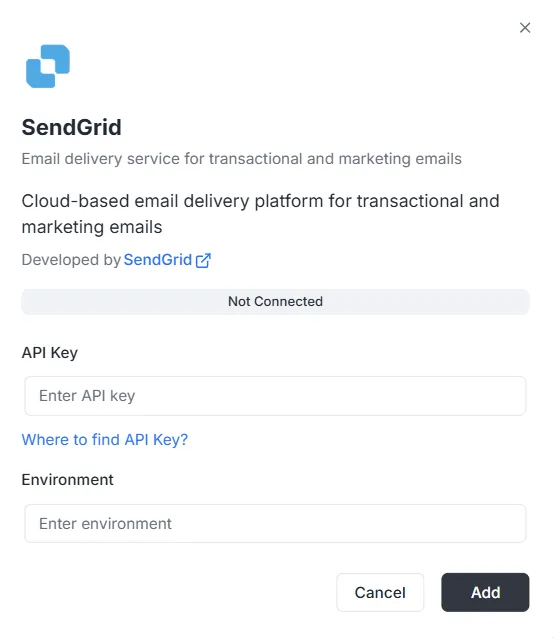
在集成列表中选择 SendGrid 后,将显示配置对话框。要建立连接,请输入以下凭据。
1. API 密钥
Section titled “1. API 密钥”这是在 SendGrid 账户中生成的身份验证令牌。
- 输入: 将您的 SendGrid 私有 API 密钥粘贴到文本框中。
- 帮助: 若尚无密钥,请点击对话框中的 「Where to find API Key?」 链接查看生成步骤。
指定此集成的环境上下文。
- 输入: 在 Environment 字段中输入环境标识符(例如
Production、Staging或特定配置标签)。
填写各字段后:
- 确认状态栏显示为 未连接。
- 点击右下角的黑色 添加 按钮以保存凭据并启用集成。
SendGrid 集成 API 参考
Section titled “SendGrid 集成 API 参考”SendGrid 配置 {#sendgrid-configuration}
Section titled “SendGrid 配置 {#sendgrid-configuration}”配置 SendGrid API 密钥 {#sendgrid-configure-api-key}
Section titled “配置 SendGrid API 密钥 {#sendgrid-configure-api-key}”为指定项目和环境配置 SendGrid API 密钥。
Mutation:
mutation { sendgrid_configureSendGrid ( apiKey: "SG._api_key_here" )}发送邮件 {#sending-emails}
Section titled “发送邮件 {#sending-emails}”发送简单邮件 {#send-simple-email}
Section titled “发送简单邮件 {#send-simple-email}”向一名或多名收件人发送邮件。
Mutation:
mutation sendgrid_sendEmail { sendgrid_sendEmail ( email: { from: { email: "sender@archie.com", name: "Sender Name" }, subject: "Test Email", to: { email: "recipient@gmail.com", name: "Recipient Name" }, content: { type: "text/html", value: "<h1>Hello World</h1><p>This is a test email.</p>" } } ) { messageId success }}Response:
{ "data": { "sendgrid_sendEmail": { "messageId": "sent-1234567890", "success": true } }}带抄送和密送的邮件 {#send-email-with-cc-and-bcc}
Section titled “带抄送和密送的邮件 {#send-email-with-cc-and-bcc}”Mutation:
mutation sendgrid_sendEmail { sendgrid_sendEmail ( email: { from: { email: "sender@example.com" name: "Sender Name" } to: [ { email: "recipient@example.com" name: "Recipient Name" } ] cc: [ { email: "cc@example.com" name: "CC Recipient" } ] bcc: [ { email: "bcc@example.com" } ] subject: "Email with CC and BCC" content: [ { type: "text/html" value: "<h1>Hello</h1><p>This email has CC and BCC recipients.</p>" } ] } ) { messageId success }}带附件的邮件 {#send-email-with-attachments}
Section titled “带附件的邮件 {#send-email-with-attachments}”Mutation:
mutation sendgrid_sendEmail { sendgrid_sendEmail( email: { from: { email: "sender@example.com" name: "Sender Name" } to: [ { email: "recipient@example.com" name: "Recipient Name" } ] subject: "Email with Attachment" content: [ { type: "text/html" value: "<h1>Hello</h1><p>Please find attached file.</p>" } ] attachments: [ { content: "SGVsbG8gV29ybGQ=" type: "text/plain" filename: "document.txt" disposition: "attachment" } ] } ) { messageId success }}注: 附件中的 content 字段必须为 Base64 编码。
带类别和标签的邮件 {#send-email-with-categories-and-tags}
Section titled “带类别和标签的邮件 {#send-email-with-categories-and-tags}”Mutation:
mutation sendgrid_sendEmail { sendgrid_sendEmail( email: { from: { email: "sender@example.com" name: "Sender Name" } to: [ { email: "recipient@example.com" name: "Recipient Name" } ] subject: "Categorized Email" content: [ { type: "text/html" value: "<h1>Hello</h1>" } ] categories: ["transactional", "notification"] tags: ["important", "urgent"] } ) { messageId success }}定时发送邮件 {#send-email-programmed}
Section titled “定时发送邮件 {#send-email-programmed}”Mutation:
mutation sendgrid_sendEmail { sendgrid_sendEmail( email: { from: { email: "sender@example.com" name: "Sender Name" } to: [ { email: "recipient@example.com" name: "Recipient Name" } ] subject: "Scheduled Email" content: [ { type: "text/html" value: "<h1>Hello</h1>" } ] sendAt: "2025-12-25T10:00:00Z" } ) { messageId success }}带自定义参数的邮件 {#send-email-with-custom-args}
Section titled “带自定义参数的邮件 {#send-email-with-custom-args}”Mutation:
mutation sendgrid_sendEmail { sendgrid_sendEmail( email: { from: { email: "sender@example.com" name: "Sender Name" } to: [ { email: "recipient@example.com" name: "Recipient Name" } ] subject: "Email with Custom Args" content: [ { type: "text/html" value: "<h1>Hello</h1>" } ] customArgs: { orderId: "12345" userId: "67890" campaignId: "abc123" } } ) { messageId success }}批量发送 {#send-bulk-emails}
Section titled “批量发送 {#send-bulk-emails}”发送多封邮件 {#send-multiple-emails}
Section titled “发送多封邮件 {#send-multiple-emails}”Mutation:
mutation sendgrid_sendBulkEmail { sendgrid_sendBulkEmail( emails: { emails: [ { from: { email: "sender@example.com" name: "Sender Name" } to: [ { email: "recipient1@example.com" name: "Recipient 1" } ] subject: "Bulk Email 1" content: [ { type: "text/html" value: "<h1>Email 1</h1>" } ] } { from: { email: "sender@example.com" name: "Sender Name" } to: [ { email: "recipient2@example.com" name: "Recipient 2" } ] subject: "Bulk Email 2" content: [ { type: "text/html" value: "<h1>Email 2</h1>" } ] } ] } ) { messageIds success }}Response:
{ "data": { "sendgrid_sendBulkEmail": { "messageIds": ["sent-1234567890", "sent-1234567891"], "success": true } }}使用模板发送 {#send-emails-with-templates}
Section titled “使用模板发送 {#send-emails-with-templates}”使用动态模板发送 {#send-email-using-dynamic-template}
Section titled “使用动态模板发送 {#send-email-using-dynamic-template}”Mutation:
mutation sendgrid_sendTemplate { sendgrid_sendTemplate( email: { from: { email: "sender@example.com" name: "Sender Name" } to: [ { email: "recipient@example.com" name: "Recipient Name" } ] templateId: "d-1234567890abcdef" substitutions: { name: "John Doe" orderNumber: "12345" totalAmount: "$99.99" } } ) { messageId success }}Response:
{ "data": { "sendgrid_sendTemplate": { "messageId": "sent-1234567890", "success": true } }}联系人管理 {#send-contact-management}
Section titled “联系人管理 {#send-contact-management}”添加联系人 {#send-add-contact}
Section titled “添加联系人 {#send-add-contact}”Mutation:
mutation sendgrid_addContact { sendgrid_addContact( contact: { email: "newcontact@example.com" firstName: "John" lastName: "Doe" customFields: { company: "Acme Corp" phone: "+1234567890" position: "Developer" } listIds: ["list-id-1", "list-id-2"] } )}Response:
{ "data": { "sendgrid_addContact": true }}更新联系人 {#send-update-contact}
Section titled “更新联系人 {#send-update-contact}”Mutation:
mutation sendgrid_updateContact { sendgrid_updateContact( contact: { email: "existing@example.com" firstName: "Jane" lastName: "Smith" customFields: { company: "New Company" phone: "+0987654321" } } )}Response:
{ "data": { "sendgrid_updateContact": true }}删除联系人 {#send-delete-contact}
Section titled “删除联系人 {#send-delete-contact}”Mutation:
mutation sendgrid_deleteContact { sendgrid_deleteContact( email: "contact@example.com" )}Response:
{ "data": { "sendgrid_deleteContact": true }}分析与统计 {#send-analytics-and-statistics}
Section titled “分析与统计 {#send-analytics-and-statistics}”获取邮件统计 {#send-get-email-stats}
Section titled “获取邮件统计 {#send-get-email-stats}”Query:
query sendgrid_getEmailStats { sendgrid_getEmailStats ( startDate: "2025-01-01" endDate: "2025-01-31" ) { opens clicks bounces spamReports delivered startDate endDate }}Response:
{ "data": { "sendgrid_getEmailStats": { "opens": 150, "clicks": 75, "bounces": 5, "spamReports": 2, "delivered": 1000, "startDate": "2025-01-01T00:00:00Z", "endDate": "2025-01-31T00:00:00Z" } }}验证电子邮件地址 {#send-validate-email}
Section titled “验证电子邮件地址 {#send-validate-email}”Query:
query sendgrid_validateEmail { sendgrid_validateEmail ( email: "test@example.com" ) { valid score local domain reason suggestions }}响应(使用 SendGrid Premium 时):
{ "data": { "sendgrid_validateEmail": { "valid": true, "score": 0.95, "local": "test", "domain": "example.com", "reason": "", "suggestions": [] } }}响应(基本验证 — 当 SendGrid Premium 不可用时):
{ "data": { "sendgrid_validateEmail": { "valid": true, "score": 0.8, "local": "test", "domain": "example.com", "reason": "Basic validation (SendGrid premium validation not available)", "suggestions": [] } }}注: SendGrid 的邮件验证端点(/v3/validations/email)需要特殊权限,并非所有账户都可用。若您的 API 密钥无法访问该端点(403 错误),系统将自动回退到基于正则表达式的基本验证。
使用变量的完整示例 {#complete-examples-with-variables}
Section titled “使用变量的完整示例 {#complete-examples-with-variables}”GraphQL 变量示例 {#example-with-graphql-variables}
Section titled “GraphQL 变量示例 {#example-with-graphql-variables}”Request:
{ "query": "mutation SendEmail($email: EmailInput!) { sendgrid_sendEmail(email: $email) { messageId success } }", "variables": { "email": { "from": { "email": "sender@example.com", "name": "Sender Name" }, "to": [ { "email": "recipient@example.com", "name": "Recipient Name" } ], "subject": "Test Email", "content": [ { "type": "text/html", "value": "<h1>Hello World</h1>" } ] } }}错误处理 {#error-handling}
Section titled “错误处理 {#error-handling}”错误示例 {#error-example}
Section titled “错误示例 {#error-example}”Request:
{ "query": "mutation { sendgrid_sendEmail(email: { from: { email: \"invalid\" }, to: [], subject: \"Test\", content: [] }) { messageId success } }"}错误响应:
{ "errors": [ { "message": "validation error: at least one recipient is required", "path": ["sendgrid_sendEmail"] } ], "data": null}常见错误 {#common-errors}
Section titled “常见错误 {#common-errors}”-
缺少项目 ID:
{"errors": [{"message": "project ID is required in context"}]} -
找不到配置:
{"errors": [{"message": "sendgrid configuration not found for project: xxx, environment: master"}]} -
API 密钥无效:
{"errors": [{"message": "sendgrid API error: status 401, body: ..."}]}
Webhooks {#webhooks}
Section titled “Webhooks {#webhooks}”Webhook 端点 {#webhooks-endpoint}
Section titled “Webhook 端点 {#webhooks-endpoint}”Webhook 端点地址如下:
- HTTP:
POST http://localhost:8080/webhooks/sendgrid - Lambda:
POST /webhooks/sendgrid
在 SendGrid 中配置 {#sendgrid-configuration-webhooks}
Section titled “在 SendGrid 中配置 {#sendgrid-configuration-webhooks}”- 在 SendGrid 控制台打开 Settings > Mail Settings > Event Webhook。
- 将 URL 设置为
https://your-domain.com/webhooks/sendgrid。 - 选择要接收的事件。
- 在环境变量
WEBHOOK_VERIFICATION_KEY中配置验证密钥。
支持的事件 {#supported-events}
Section titled “支持的事件 {#supported-events}”processed:已处理delivered:已送达opened:已打开clicked:链接已点击bounce:退信dropped:已丢弃spamreport:垃圾邮件举报unsubscribe:退订