Stripe
Stripe 是面向互联网企业的在线支付处理平台。集成 Stripe 后,您的应用可以安全地处理交易、订阅与财务数据。
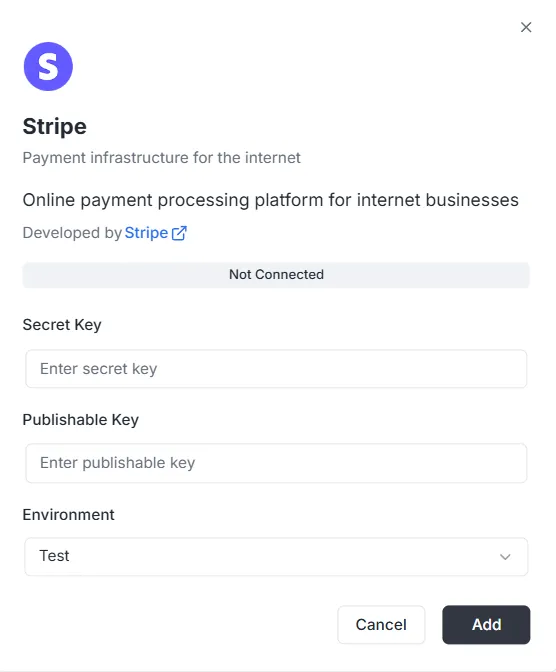
在集成列表中选择 Stripe 后,将显示配置对话框。您需要在 Stripe 控制台提供以下凭据以建立连接。
1. 密钥(Secret Key)
Section titled “1. 密钥(Secret Key)”- 输入: 将私有 Stripe Secret Key(通常以
sk_开头)填入 Secret Key 字段。该密钥供后端验证安全请求。
2. 可发布密钥(Publishable Key)
Section titled “2. 可发布密钥(Publishable Key)”- 输入: 将公开 Stripe Publishable Key(通常以
pk_开头)填入 Publishable Key 字段。该密钥用于前端实现。
- 输入: 在下拉菜单中选择合适的环境(例如开发/沙盒使用 Test,正式收款使用 Production)。
配置好密钥与环境后:
- 确认状态栏显示 未连接。
- 点击右下角的黑色 添加 按钮保存凭据并启用支付集成。
Stripe 集成 API 参考
Section titled “Stripe 集成 API 参考”配置管理 {#configuration-management}
Section titled “配置管理 {#configuration-management}”configureStripe
Section titled “configureStripe”为项目和环境创建新的 Stripe 配置。
变更:
mutation ConfigureStripe ( $input: ConfigureStripeInput!) { configureStripe ( input: $input ) { id publishableKey webhookUrl }}输入:
input ConfigureStripeInput { secretKey: String! # Stripe secret key (sk_test_... or sk_live_...) publishableKey: String! # Stripe publishable key (pk_test_... or pk_live_...) environment: StripeEnvironment! # TEST or LIVE webhookSecret: String # Webhook signing secret (optional)}响应:
type ConfigureStripePayload { id: ID! # Configuration ID publishableKey: String! # Publishable key webhookUrl: String! # Generated webhook URL}示例:
{ "input": { "secretKey": "sk_test_...", "publishableKey": "pk_test_...", "environment": "TEST", "webhookSecret": "whsec_..." }}说明:
- 密钥在存储前使用 AES-256-GCM 加密
- 每个项目/环境组合仅允许一个配置
- 若配置已存在则返回错误
updateStripeConfig
Section titled “updateStripeConfig”更新现有的 Stripe 配置。
变更:
mutation UpdateStripeConfig ( $input: UpdateStripeConfigInput!) { updateStripeConfig ( input: $input ) { id publishableKey webhookUrl }}输入:
input UpdateStripeConfigInput { secretKey: String # Optional publishableKey: String # Optional environment: StripeEnvironment # Optional webhookSecret: String # Optional}响应:
type UpdateStripeConfigPayload { id: ID! publishableKey: String! webhookUrl: String!}说明:
- 所有字段均为可选
- 仅更新已提供的字段
- 若提供密钥则会加密
客户管理 {#customer-management}
Section titled “客户管理 {#customer-management}”stripe_customer
Section titled “stripe_customer”按 ID 检索单个客户。
查询:
query stripe_customer{ stripe_customer( id: "cus_Ts..." ) { id name email phone description metadata object createdAt }}stripe_customers
Section titled “stripe_customers”分页列出客户,并支持可选筛选。
查询:
query stripe_customers ( $first: Int, $after: String, $customerId: String) { stripe_customers ( first: $first, after: $after, customerId: $customerId ) { edges { node { id name email phone description createdAt } cursor } pageInfo { hasNextPage hasPreviousPage startCursor endCursor } }}参数:
first: 返回条数(默认:10)after: 分页游标customerId: 按客户 ID 筛选(可选)
stripe_createCustomer
Section titled “stripe_createCustomer”创建新客户。
变更:
mutation stripe_createCustomer { stripe_createCustomer ( input: { name: "Customer", email: "example@archie.com", phone: "+573001230001", description: "Description Example" metadata: { data1: "Example data1", data2: "Example data2" } } ) { id name email phone description metadata object createdAt }}stripe_updateCustomer
Section titled “stripe_updateCustomer”更新现有客户。
变更:
mutation stripe_updateCustomer { stripe_updateCustomer( id: "cus_Ts...", input: { name: "Customer", email: "example@archie.com", phone: "+573001230001", description:"Description Example", metadata: { data1: "Example data1 updated", data2: "Example data2 updated" } } ) { id name email phone description metadata object createdAt }}说明:
- 所有字段均为可选
- 仅更新已提供的字段
stripe_deleteCustomer
Section titled “stripe_deleteCustomer”删除客户。
变更:
mutation stripe_deleteCustomer { stripe_deleteCustomer ( id: "cus_Ts...")}响应:
- 成功时返回
true - 未找到客户则报错
Payment Intents {#payment-intents}
Section titled “Payment Intents {#payment-intents}”stripe_paymentIntent
Section titled “stripe_paymentIntent”按 ID 检索单个 Payment Intent。
查询:
query stripe_paymentIntent { stripe_paymentIntent ( id: "pi_3Su..." ) { id customerId paymentMethodId currency amount status metadata object clientSecret createdAt }}stripe_paymentIntents
Section titled “stripe_paymentIntents”分页列出 Payment Intent,并支持可选筛选。
查询:
query stripe_paymentIntents ( $first: Int, $after: String, $customerId: String) { stripe_paymentIntents ( first: $first, after: $after, customerId: $customerId ) { edges { node { id customerId paymentMethodId currency amount status metadata object clientSecret createdAt } cursor } pageInfo { hasPreviousPage hasNextPage startCursor endCursor } }}参数:
first: 返回条数(默认:10)after: 分页游标customerId: 按客户 ID 筛选(可选)
stripe_createPaymentIntent
Section titled “stripe_createPaymentIntent”创建新的 Payment Intent。
变更:
mutation stripe_createPaymentIntent { stripe_createPaymentIntent ( input: { amount: 12.35, currency: "usd", customerId: "cus_Ts...", paymentMethodId: "pm_1Su...", automaticPaymentMethods: true } ) { id customerId paymentMethodId currency amount status metadata object clientSecret createdAt }}说明:
- 返回
clientSecret供前端确认 - Stripe.js 集成请使用
automaticPaymentMethods: true
stripe_updatePaymentIntent
Section titled “stripe_updatePaymentIntent”在确认前更新 Payment Intent。
变更:
mutation stripe_updatePaymentIntent{ stripe_updatePaymentIntent( id: "pi_3S...", input: { amount: 36.92, currency: "usd", paymentMethodId: "pm_1Su..." metadata:{ data1: "Example data1" } } ) { id customerId paymentMethodId currency amount status metadata object clientSecret createdAt }}说明:
- 仅在确认前可更新
- 所有字段均为可选
stripe_confirmPaymentIntent
Section titled “stripe_confirmPaymentIntent”确认 Payment Intent。
变更:
mutation stripe_confirmPaymentIntent{ stripe_confirmPaymentIntent( id: "pi_3Su..." input: { paymentMethodId: "pm_1Su...", returnUrl: "http://localhost:3000/successful-payment" } ) { id customerId paymentMethodId currency amount status metadata object clientSecret createdAt }}说明:
- 完成付款所必需
- 可能需要 3D Secure 验证
- 返回更新后的状态(succeeded、requires_action 等)
stripe_cancelPaymentIntent
Section titled “stripe_cancelPaymentIntent”取消 Payment Intent。
变更:
mutation stripe_cancelPaymentIntent { stripe_cancelPaymentIntent( id: "pi_3Su..." ) { id customerId paymentMethodId currency amount status metadata object clientSecret createdAt }}说明:
- 仅可取消既非 succeeded 也非 canceled 的 Payment Intent
- 状态变为 “canceled”
订阅 {#subscriptions}
Section titled “订阅 {#subscriptions}”stripe_subscription
Section titled “stripe_subscription”按 ID 检索单个订阅。
查询:
query stripe_subscription { stripe_subscription(id: "sub_1Su...") { id customerId status currentPeriodStart currentPeriodEnd createdAt cancelAtPeriodEnd metadata object items { data { id priceId quantity } } }}stripe_subscriptions
Section titled “stripe_subscriptions”分页列出订阅,并支持可选筛选。
查询:
query stripe_subscriptions ( $first: Int, $after: String, $customerId: String) { stripe_subscriptions ( first: $first, after: $after, customerId: $customerId ) { edges { node { id customerId status currentPeriodStart currentPeriodEnd createdAt cancelAtPeriodEnd metadata object items { data { id priceId quantity } } } cursor } pageInfo { hasPreviousPage hasNextPage startCursor endCursor } }}参数:
first: 返回条数(默认:10)after: 分页游标customerId: 按客户 ID 筛选(可选)status: 按状态筛选(可选)
stripe_createSubscription
Section titled “stripe_createSubscription”创建新订阅。
变更:
mutation stripe_createSubscription { stripe_createSubscription ( input: { customerId: "cus_TsQ...", items: { priceId: "price_1Su...", quantity: 1 }, metadata: { data1: "Example data1" }, trialPeriodDays: 0 } ) { id customerId status currentPeriodStart currentPeriodEnd createdAt cancelAtPeriodEnd metadata object items { data { id priceId quantity } } }}说明:
- 若订阅需要支付方式,
paymentBehavior可能为 “default_incomplete” - 试用期以天数表示
- 最新发票与 Payment Intent 会自动展开
stripe_updateSubscription
Section titled “stripe_updateSubscription”更新现有订阅。
变更:
mutation stripe_updateSubscription { stripe_updateSubscription( id: "sub_1Sv..." input: { cancelAtPeriodEnd: false metadata: { data2: "Example data2" } } ) { id customerId status currentPeriodStart currentPeriodEnd createdAt cancelAtPeriodEnd metadata object items { data { id priceId quantity } } }}stripe_cancelSubscription
Section titled “stripe_cancelSubscription”取消订阅。
变更:
mutation stripe_cancelSubscription { stripe_cancelSubscription ( cancelAtPeriodEnd: true, id: "sub_1Sv..." ) { id customerId status currentPeriodStart currentPeriodEnd createdAt cancelAtPeriodEnd metadata object items { data { id priceId quantity } } }}参数:
id: 订阅 ID(必填)cancelAtPeriodEnd:为 true 时在周期结束时取消,为 false 时立即取消(默认:false)
说明:
- 立即取消:订阅立即结束
- 期末取消:订阅持续到当前周期结束
产品与价格 {#products-and-prices}
Section titled “产品与价格 {#products-and-prices}”stripe_products
Section titled “stripe_products”分页列出商品。
查询:
query stripe_products ( $first: Int, $after: String) { stripe_products ( first: $first, after: $after ) { edges { node { id name description active metadata object createdAt } cursor } pageInfo { hasPreviousPage hasNextPage startCursor endCursor } }}stripe_createProduct
Section titled “stripe_createProduct”创建新商品。
变更:
mutation stripe_createProduct { stripe_createProduct ( input: { name: "Product 01", description: "Description product 01", metadata: { data1: "Example data1" } } ) { id name description active metadata object createdAt }}stripe_prices
Section titled “stripe_prices”分页列出价格,并支持可选筛选。
查询:
query stripe_prices ( $first: Int, $after: String, $productId: String) { stripe_prices ( first: $first, after: $after, productId: $productId ) { edges { node { id productId active currency unitAmount object metadata createdAt recurring { interval intervalCount } } cursor } pageInfo { hasPreviousPage hasNextPage startCursor endCursor } }}参数:
first: 返回条数(默认:10)after: 分页游标productId: 按产品 ID 筛选(可选)
stripe_createPrice
Section titled “stripe_createPrice”创建新价格。
变更:
mutation stripe_createPrice { stripe_createPrice ( input: { productId: "prod_Tst...", unitAmount: 25.85, currency: "usd", recurring: { interval: "month", intervalCount: 1 }, metadata: { data1: "Example data1" } } ) { id productId currency unitAmount active object createdAt metadata recurring { interval intervalCount } }}说明:
- 一次性价格可省略
recurring interval须为 “day”、“week”、“month”、“year” 之一
发票 {#invoices}
Section titled “发票 {#invoices}”stripe_invoice
Section titled “stripe_invoice”按 ID 检索单张发票。
查询:
query stripe_invoice { stripe_invoice ( id: "in_1Su..." ) { id customerId subscriptionId currency amountPaid amountDue status object metadata createdAt lineItems { data { id description currency amount quantity } } }}说明:
- 可用时通过 API 扩展填充订阅 ID
stripe_invoices
Section titled “stripe_invoices”分页列出发票,并支持可选筛选。
查询:
query stripe_invoices ( $first: Int, $after: String, $customerId: String, $status: String) { stripe_invoices ( first: $first, after: $after, customerId: $customerId, status: $status ) { edges { node { id customerId subscriptionId currency amountPaid amountDue status object metadata createdAt lineItems { data { id description currency amount quantity } } } cursor } pageInfo { hasPreviousPage hasNextPage startCursor endCursor } }}参数:
first: 返回条数(默认:10)after: 分页游标customerId: 按客户 ID 筛选(可选)status: 按状态筛选(可选)
stripe_payInvoice
Section titled “stripe_payInvoice”以编程方式支付发票。
变更:
mutation stripe_payInvoice { stripe_payInvoice ( id: "in_1Sv..." ) { id customerId subscriptionId currency amountPaid amountDue status object metadata createdAt lineItems { data { id description currency amount quantity } } }}说明:
- 尝试使用客户默认支付方式支付发票
- 支付失败则报错
- 成功时将发票状态更新为 “paid”
退款 {#refunds}
Section titled “退款 {#refunds}”stripe_refunds
Section titled “stripe_refunds”分页列出退款,并支持可选筛选。
查询:
query stripe_refunds ( $first: Int, $after: String, $paymentIntentId: String) { stripe_refunds ( first: $first, after: $after, paymentIntentId: $paymentIntentId ) { edges { node { id paymentIntentId reason status currency amount metadata object createdAt } cursor } pageInfo { hasPreviousPage hasNextPage startCursor endCursor } }}参数:
first: 返回条数(默认:10)after: 分页游标paymentIntentId: 按 Payment Intent ID 筛选(可选)
stripe_createRefund
Section titled “stripe_createRefund”为 Payment Intent 创建退款。
变更:
mutation stripe_createRefund { stripe_createRefund ( input: { paymentIntentId: "pi_3Sv...", amount: 200, reason: "requested_by_customer" } ) { id reason paymentIntentId status currency amount object metadata createdAt }}说明:
- 全额退款可省略
amount reason可为 “duplicate”、“fraudulent”、“requested_by_customer”- 退款状态从 “pending” 开始,然后变为 “succeeded” 或 “failed”
Checkout 会话 {#checkout-sessions}
Section titled “Checkout 会话 {#checkout-sessions}”stripe_createCheckoutSession
Section titled “stripe_createCheckoutSession”创建用于一次性付款或订阅的 Stripe Checkout 会话。返回将客户重定向到 Stripe 托管支付页面的 URL。
变更:
mutation CreateCheckoutSession($input: StripeCreateCheckoutSessionInput!) { stripe_createCheckoutSession(input: $input) { id url customerId customerEmail paymentIntentId subscriptionId mode status currency amountTotal metadata createdAt }}输入:
input StripeCreateCheckoutSessionInput {  customerId: String              # Existing Stripe customer ID (optional)  customerEmail: String            # Customer email for new customers (optional)  mode: String!                   # "payment" for one-time or "subscription" for recurring  successUrl: String!             # URL to redirect after successful payment  cancelUrl: String!              # URL to redirect if customer cancels  lineItems: [StripeCheckoutSessionLineItemInput!]!  # Items to purchase  paymentMethodTypes: [String!]    # Allowed payment methods (optional)  metadata: Map                    # Custom metadata (optional)}
input StripeCheckoutSessionLineItemInput {  priceId: String      # Stripe Price ID (for existing prices)  quantity: Int!        # Quantity of items  amount: Float         # Custom amount in dollars (for one-time payments)  currency: String      # Currency code (required if amount is provided)}
响应:
type StripeCheckoutSession { id: ID! # Session ID object: String! # "checkout.session" url: String! # Redirect URL for customer customerId: String # Customer ID (if customer exists) customerEmail: String # Customer email paymentIntentId: String # Payment Intent ID (for one-time payments) subscriptionId: String # 订阅 ID(订阅) mode: String! # "payment" or "subscription" status: String! # Session status currency: String # Currency code amountTotal: Float # Total amount in dollars metadata: Map # Custom metadata createdAt: Time! # Creation timestamp}示例 – 一次性付款:
{ "input": { "mode": "payment", "successUrl": "https://example.com/success", "cancelUrl": "https://example.com/cancel", "lineItems": [ { "priceId": "price_1234567890", "quantity": 1 } ] }}示例 – 自定义金额一次性付款:
{ "input": { "mode": "payment", "customerEmail": "customer@example.com", "successUrl": "https://example.com/success", "cancelUrl": "https://example.com/cancel", "lineItems": [ { "amount": 29.99, "currency": "usd", "quantity": 1 } ] }}示例 – 订阅:
{ "input": { "mode": "subscription", "customerId": "cus_1234567890", "successUrl": "https://example.com/success", "cancelUrl": "https://example.com/cancel", "lineItems": [ { "priceId": "price_monthly_subscription", "quantity": 1 } ] }}说明:
url字段包含重定向客户的 URL- 一次性付款请使用
mode: "payment"并填写priceId或amount+currency - 订阅请使用
mode: "subscription"并填写priceId(须为定期价格) - 须指定
customerId或customerEmail之一,不可同时 paymentMethodTypes可包含:“card”、“us_bank_account”、“link” 等- 若未完成,会话在 24 小时后过期
账单门户会话 {#billing-portal-sessions}
Section titled “账单门户会话 {#billing-portal-sessions}”stripe_createBillingPortalSession
Section titled “stripe_createBillingPortalSession”创建 Stripe 账单门户会话,供客户在 Stripe 托管门户中管理订阅、支付方式和账单信息。
变更:
mutation CreateBillingPortalSession($input: StripeCreateBillingPortalSessionInput!) { stripe_createBillingPortalSession(input: $input) { id url customerId returnUrl createdAt }}输入:
input StripeCreateBillingPortalSessionInput { customerId: String! # Stripe customer ID (required) returnUrl: String! # URL to redirect after customer exits portal configuration: String # Portal configuration ID (optional)}响应:
type StripeBillingPortalSession { id: ID! # Session ID object: String! # "billing_portal.session" url: String! # Redirect URL for customer customerId: String! # Customer ID returnUrl: String # Return URL createdAt: Time! # Creation timestamp}示例:
{ "input": { "customerId": "cus_1234567890", "returnUrl": "https://example.com/account" }}说明:
url字段包含重定向客户的 URL- 门户会话为短期,使用后即失效
- 客户可管理订阅、支付方式、发票和账单信息
- 门户功能在 Stripe 控制台配置
- 未提供
configuration时使用默认门户配置 - 门户仅显示指定客户的数据
支付方式 {#payment-methods}
Section titled “支付方式 {#payment-methods}”stripe_paymentMethods
Section titled “stripe_paymentMethods”分页列出支付方式,并支持可选筛选。
查询:
query stripe_paymentMethods ( $first: Int, $after: String, $customerId: String) { stripe_paymentMethods( first: $first, after: $after, customerId: $customerId ) { edges { node { id customerId type object metadata createdAt card { brand expMonth expYear last4 } } cursor } pageInfo { hasPreviousPage hasNextPage startCursor endCursor } }}参数:
first: 返回条数(默认:10)after: 分页游标customerId: 按客户 ID 筛选(可选)
说明:
- 仅返回卡片安全信息(末四位、品牌、到期日)
- 从不显示完整卡号
stripe_attachPaymentMethod
Section titled “stripe_attachPaymentMethod”将支付方式附加到客户。
变更:
mutation stripe_attachPaymentMethod { stripe_attachPaymentMethod ( id: "pm_1Sv...", input: { customerId: "cus_Ts4..." } ) { id customerId type card { brand expMonth expYear last4 } metadata object createdAt }}说明:
- 支付方式需先创建(通常用 Stripe.js)
- 已附加的方式可用于订阅和付款
stripe_detachPaymentMethod
Section titled “stripe_detachPaymentMethod”从客户分离支付方式。
变更:
mutation stripe_detachPaymentMethod { stripe_detachPaymentMethod ( id: "pm_1Sv..." ) { id customerId type card { brand expYear expMonth last4 } metadata object createdAt }}说明:
- 解除后的方式不可再用于付款
- 返回
customerId为 null 的支付方式
Webhook 事件 {#webhook-events}
Section titled “Webhook 事件 {#webhook-events}”stripe_webhookEvents
Section titled “stripe_webhookEvents”列出服务收到的 Webhook 事件。
查询:
query ListWebhookEvents ( $first: Int, $after: String) { stripe_webhookEvents ( first: $first, after: $after ) { edges { node { id type data processed createdAt } cursor } pageInfo { hasNextPage hasPreviousPage endCursor } }}响应:
type StripeWebhookEvent { id: ID! type: String! # Event type (e.g., "payment_intent.succeeded") data: String! # JSON string of event data processed: Boolean! # 事件是否已处理 createdAt: Time!}参数:
first: 返回条数(默认:10)after: 分页游标
说明:
- 事件在 webhook 端点自动接收
- 验证签名后存储事件
data字段包含完整事件负载的 JSON 字符串
分页 {#pagination}
Section titled “分页 {#pagination}”所有列表查询均支持基于 Relay 连接模式的游标分页。
PageInfo
Section titled “PageInfo”type PageInfo { hasNextPage: Boolean! hasPreviousPage: Boolean! startCursor: String endCursor: String}query ListCustomers ( $first: Int, $after: String) { stripe_customers ( first: $first, after: $after ) { edges { node { id email } cursor } pageInfo { hasNextPage endCursor } }}分页流程:
- 首次请求:
first: 10, after: null - 将响应中的
pageInfo.endCursor作为下次请求的after - 检查
hasNextPage是否还有下一页
默认值:
first:未指定则为 10after:未指定则从开头开始
错误处理 {#error-handling}
Section titled “错误处理 {#error-handling}”所有操作都会返回带有清晰消息的 GraphQL 错误。错误由 Stripe API 映射而来,便于理解。
常见错误场景
Section titled “常见错误场景”配置错误:
400:Stripe 密钥格式无效404:未找到项目或配置400:配置已存在
客户错误:
404:未找到客户400:客户数据无效
Payment Intent 错误:
404:未找到 Payment Intent400:金额或币种无效402:支付失败(卡被拒、余额不足等)
订阅错误:
404:未找到订阅400:订阅参数无效400:无法更新已取消的订阅
Stripe 错误代码: 常用代码会映射为清晰的提示信息。
card_declined:“您的卡片被拒绝”insufficient_funds:“余额不足”invalid_number:“卡号无效”expired_card:“卡片已过期”incorrect_cvc:“CVC 码不正确”
错误响应格式
Section titled “错误响应格式”{ "errors": [ { "message": "Customer not found", "extensions": { "code": "NOT_FOUND", "stripeErrorCode": "resource_missing" } } ], "data": null}数据类型 {#data-types}
Section titled “数据类型 {#data-types}”StripeEnvironment
Section titled “StripeEnvironment”enum StripeEnvironment { TEST # Modo prueba LIVE # 正式 / 生产模式}Map 标量
Section titled “Map 标量”标量类型 Map 表示键值映射,其中:
- 键为字符串
- 值可为字符串、数字、布尔或嵌套映射
- 用于元数据字段
示例:
{ "metadata": { "order_id": "12345", "user_id": "67890", "premium": true }}Time 标量
Section titled “Time 标量”标量类型 Time 表示 ISO 8601 格式的时间戳。
示例: "2025-11-16T00:28:48.081Z"