SendGrid
SendGrid è un servizio cloud per l’invio di e-mail transazionali e di marketing. Collegando questa integrazione, l’applicazione può inviare e-mail in modo programmatico (ad es. e-mail di benvenuto, reimpostazione password o notifiche).
Passaggi di configurazione
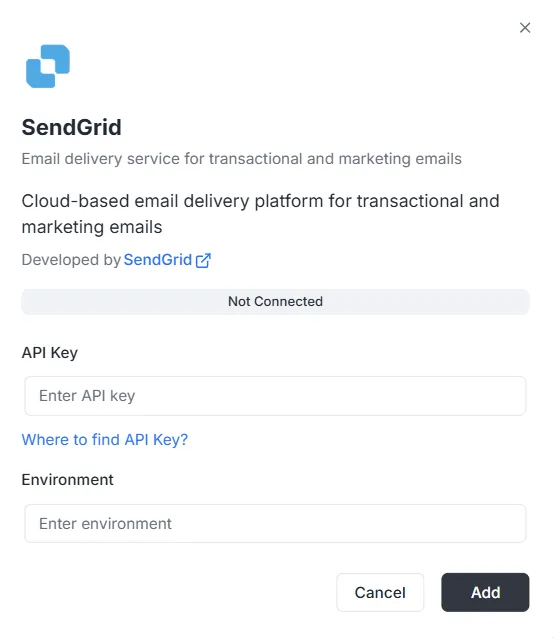
Sezione intitolata “Passaggi di configurazione”Dopo aver selezionato SendGrid dall’elenco delle integrazioni, si apre una finestra di configurazione. È necessario fornire le seguenti credenziali per stabilire la connessione:
1. Chiave API
Sezione intitolata “1. Chiave API”È il token di autenticazione generato nel tuo account SendGrid.
- Input: Incolla la chiave API privata SendGrid nel campo di testo.
- Guida: Se non ne hai una, fai clic sul link «Where to find API Key?» nella finestra per le istruzioni su come generarla.
2. Ambiente
Sezione intitolata “2. Ambiente”Specifica il contesto di ambiente per questa integrazione.
- Input: Inserisci l’identificatore di ambiente (ad es.
Production,Stagingo un tag di configurazione specifico) nel campo Environment.
Completare la connessione
Sezione intitolata “Completare la connessione”Una volta compilati i campi:
- Controlla la barra di stato (attualmente Non connesso).
- Fai clic sul pulsante nero Aggiungi in basso a destra per salvare le credenziali e attivare l’integrazione.
Riferimento API integrazione SendGrid
Sezione intitolata “Riferimento API integrazione SendGrid”Configurazione SendGrid
Sezione intitolata “Configurazione SendGrid”Configurare la chiave API SendGrid
Sezione intitolata “Configurare la chiave API SendGrid”Configura la chiave API SendGrid per un progetto e un ambiente specifici.
Mutation:
mutation { sendgrid_configureSendGrid ( apiKey: "SG._api_key_here" )}Invio e-mail
Sezione intitolata “Invio e-mail”Invia e-mail semplice
Sezione intitolata “Invia e-mail semplice”Invia un’e-mail a uno o più destinatari.
Mutation:
mutation sendgrid_sendEmail { sendgrid_sendEmail ( email: { from: { email: "sender@archie.com", name: "Sender Name" }, subject: "Test Email", to: { email: "recipient@gmail.com", name: "Recipient Name" }, content: { type: "text/html", value: "<h1>Hello World</h1><p>This is a test email.</p>" } } ) { messageId success }}Risposta:
{ "data": { "sendgrid_sendEmail": { "messageId": "sent-1234567890", "success": true } }}Invia e-mail con CC e Ccn
Sezione intitolata “Invia e-mail con CC e Ccn”Mutation:
mutation sendgrid_sendEmail { sendgrid_sendEmail ( email: { from: { email: "sender@example.com" name: "Sender Name" } to: [ { email: "recipient@example.com" name: "Recipient Name" } ] cc: [ { email: "cc@example.com" name: "CC Recipient" } ] bcc: [ { email: "bcc@example.com" } ] subject: "Email with CC and BCC" content: [ { type: "text/html" value: "<h1>Hello</h1><p>This email has CC and BCC recipients.</p>" } ] } ) { messageId success }}Invia e-mail con allegati
Sezione intitolata “Invia e-mail con allegati”Mutation:
mutation sendgrid_sendEmail { sendgrid_sendEmail( email: { from: { email: "sender@example.com" name: "Sender Name" } to: [ { email: "recipient@example.com" name: "Recipient Name" } ] subject: "Email with Attachment" content: [ { type: "text/html" value: "<h1>Hello</h1><p>Please find attached file.</p>" } ] attachments: [ { content: "SGVsbG8gV29ybGQ=" type: "text/plain" filename: "document.txt" disposition: "attachment" } ] } ) { messageId success }}Nota: Il campo content degli allegati deve essere codificato in Base64.
Invia e-mail con categorie e tag
Sezione intitolata “Invia e-mail con categorie e tag”Mutation:
mutation sendgrid_sendEmail { sendgrid_sendEmail( email: { from: { email: "sender@example.com" name: "Sender Name" } to: [ { email: "recipient@example.com" name: "Recipient Name" } ] subject: "Categorized Email" content: [ { type: "text/html" value: "<h1>Hello</h1>" } ] categories: ["transactional", "notification"] tags: ["important", "urgent"] } ) { messageId success }}Invia e-mail programmata
Sezione intitolata “Invia e-mail programmata”Mutation:
mutation sendgrid_sendEmail { sendgrid_sendEmail( email: { from: { email: "sender@example.com" name: "Sender Name" } to: [ { email: "recipient@example.com" name: "Recipient Name" } ] subject: "Scheduled Email" content: [ { type: "text/html" value: "<h1>Hello</h1>" } ] sendAt: "2025-12-25T10:00:00Z" } ) { messageId success }}Invia e-mail con argomenti personalizzati
Sezione intitolata “Invia e-mail con argomenti personalizzati”Mutation:
mutation sendgrid_sendEmail { sendgrid_sendEmail( email: { from: { email: "sender@example.com" name: "Sender Name" } to: [ { email: "recipient@example.com" name: "Recipient Name" } ] subject: "Email with Custom Args" content: [ { type: "text/html" value: "<h1>Hello</h1>" } ] customArgs: { orderId: "12345" userId: "67890" campaignId: "abc123" } } ) { messageId success }}Invio e-mail di massa
Sezione intitolata “Invio e-mail di massa”Invia più e-mail
Sezione intitolata “Invia più e-mail”Mutation:
mutation sendgrid_sendBulkEmail { sendgrid_sendBulkEmail( emails: { emails: [ { from: { email: "sender@example.com" name: "Sender Name" } to: [ { email: "recipient1@example.com" name: "Recipient 1" } ] subject: "Bulk Email 1" content: [ { type: "text/html" value: "<h1>Email 1</h1>" } ] } { from: { email: "sender@example.com" name: "Sender Name" } to: [ { email: "recipient2@example.com" name: "Recipient 2" } ] subject: "Bulk Email 2" content: [ { type: "text/html" value: "<h1>Email 2</h1>" } ] } ] } ) { messageIds success }}Risposta:
{ "data": { "sendgrid_sendBulkEmail": { "messageIds": ["sent-1234567890", "sent-1234567891"], "success": true } }}Invio e-mail con modelli
Sezione intitolata “Invio e-mail con modelli”Invia e-mail con modello dinamico
Sezione intitolata “Invia e-mail con modello dinamico”Mutation:
mutation sendgrid_sendTemplate { sendgrid_sendTemplate( email: { from: { email: "sender@example.com" name: "Sender Name" } to: [ { email: "recipient@example.com" name: "Recipient Name" } ] templateId: "d-1234567890abcdef" substitutions: { name: "John Doe" orderNumber: "12345" totalAmount: "$99.99" } } ) { messageId success }}Risposta:
{ "data": { "sendgrid_sendTemplate": { "messageId": "sent-1234567890", "success": true } }}Gestione contatti (invio)
Sezione intitolata “Gestione contatti (invio)”Aggiungi contatto
Sezione intitolata “Aggiungi contatto”Mutation:
mutation sendgrid_addContact { sendgrid_addContact( contact: { email: "newcontact@example.com" firstName: "John" lastName: "Doe" customFields: { company: "Acme Corp" phone: "+1234567890" position: "Developer" } listIds: ["list-id-1", "list-id-2"] } )}Risposta:
{ "data": { "sendgrid_addContact": true }}Aggiorna contatto
Sezione intitolata “Aggiorna contatto”Mutation:
mutation sendgrid_updateContact { sendgrid_updateContact( contact: { email: "existing@example.com" firstName: "Jane" lastName: "Smith" customFields: { company: "New Company" phone: "+0987654321" } } )}Risposta:
{ "data": { "sendgrid_updateContact": true }}Elimina contatto
Sezione intitolata “Elimina contatto”Mutation:
mutation sendgrid_deleteContact { sendgrid_deleteContact( email: "contact@example.com" )}Risposta:
{ "data": { "sendgrid_deleteContact": true }}Analisi e statistiche (invio)
Sezione intitolata “Analisi e statistiche (invio)”Ottieni statistiche e-mail
Sezione intitolata “Ottieni statistiche e-mail”Query:
query sendgrid_getEmailStats { sendgrid_getEmailStats ( startDate: "2025-01-01" endDate: "2025-01-31" ) { opens clicks bounces spamReports delivered startDate endDate }}Risposta:
{ "data": { "sendgrid_getEmailStats": { "opens": 150, "clicks": 75, "bounces": 5, "spamReports": 2, "delivered": 1000, "startDate": "2025-01-01T00:00:00Z", "endDate": "2025-01-31T00:00:00Z" } }}Valida indirizzo e-mail
Sezione intitolata “Valida indirizzo e-mail”Query:
query sendgrid_validateEmail { sendgrid_validateEmail ( email: "test@example.com" ) { valid score local domain reason suggestions }}Risposta (con SendGrid Premium):
{ "data": { "sendgrid_validateEmail": { "valid": true, "score": 0.95, "local": "test", "domain": "example.com", "reason": "", "suggestions": [] } }}Risposta (validazione di base – quando SendGrid Premium non è disponibile):
{ "data": { "sendgrid_validateEmail": { "valid": true, "score": 0.8, "local": "test", "domain": "example.com", "reason": "Basic validation (SendGrid premium validation not available)", "suggestions": [] } }}Nota: L’endpoint di validazione e-mail SendGrid (/v3/validations/email) richiede autorizzazioni speciali e potrebbe non essere disponibile su tutti gli account. Se la chiave API non ha accesso a questo endpoint (errore 403), il sistema userà automaticamente una validazione di base basata su regex come fallback.
Esempi completi con variabili
Sezione intitolata “Esempi completi con variabili”Esempio con variabili GraphQL
Sezione intitolata “Esempio con variabili GraphQL”Richiesta:
{ "query": "mutation SendEmail($email: EmailInput!) { sendgrid_sendEmail(email: $email) { messageId success } }", "variables": { "email": { "from": { "email": "sender@example.com", "name": "Sender Name" }, "to": [ { "email": "recipient@example.com", "name": "Recipient Name" } ], "subject": "Test Email", "content": [ { "type": "text/html", "value": "<h1>Hello World</h1>" } ] } }}Gestione degli errori
Sezione intitolata “Gestione degli errori”Esempio di errore
Sezione intitolata “Esempio di errore”Richiesta:
{ "query": "mutation { sendgrid_sendEmail(email: { from: { email: \"invalid\" }, to: [], subject: \"Test\", content: [] }) { messageId success } }"}Risposta di errore:
{ "errors": [ { "message": "validation error: at least one recipient is required", "path": ["sendgrid_sendEmail"] } ], "data": null}Errori comuni
Sezione intitolata “Errori comuni”-
ID progetto mancante:
{"errors": [{"message": "project ID is required in context"}]} -
Configurazione non trovata:
{"errors": [{"message": "sendgrid configuration not found for project: xxx, environment: master"}]} -
Chiave API non valida:
{"errors": [{"message": "sendgrid API error: status 401, body: ..."}]}
Webhooks
Sezione intitolata “Webhooks”Endpoint webhook
Sezione intitolata “Endpoint webhook”L’endpoint webhook è disponibile a:
- HTTP:
POST http://localhost:8080/webhooks/sendgrid - Lambda:
POST /webhooks/sendgrid
Configurazione SendGrid
Sezione intitolata “Configurazione SendGrid”- Vai su SendGrid Dashboard > Settings > Mail Settings > Event Webhook
- Configura l’URL:
https://tu-dominio.com/webhooks/sendgrid - Seleziona gli eventi che vuoi ricevere
- Configura la chiave di verifica nella variabile d’ambiente
WEBHOOK_VERIFICATION_KEY
Eventi supportati
Sezione intitolata “Eventi supportati”processed: E-mail elaboratadelivered: E-mail consegnataopened: E-mail apertaclicked: Link cliccatobounce: E-mail respinta (bounce)dropped: E-mail scartataspamreport: Segnalata come spamunsubscribe: Disiscrizione