SendGrid
SendGrid ist ein Cloud-Dienst für den Versand von Transaktions- und Marketing-E-Mails. Mit dieser Integration kann Ihre Anwendung E-Mails programmgesteuert senden (z. B. Willkommensmails, Passwort-Zurücksetzen oder Benachrichtigungen).
Konfigurationsschritte
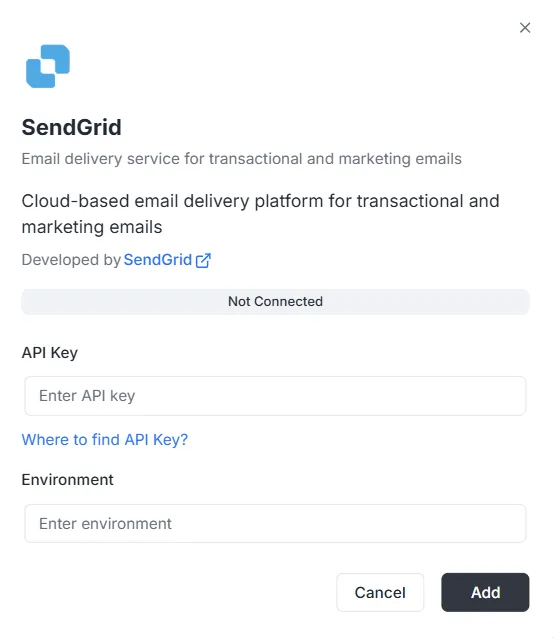
Abschnitt betitelt „Konfigurationsschritte“Nachdem Sie SendGrid in der Integrationsliste ausgewählt haben, öffnet sich ein Konfigurationsdialog. Sie müssen die folgenden Zugangsdaten angeben, um die Verbindung herzustellen:
1. API-Schlüssel
Abschnitt betitelt „1. API-Schlüssel“Dies ist das in Ihrem SendGrid-Konto erzeugte Authentifizierungstoken.
- Eingabe: Fügen Sie Ihren privaten SendGrid-API-Schlüssel in das Textfeld ein.
- Hilfe: Wenn Sie noch keinen haben, klicken Sie im Dialog auf den Link „Where to find API Key?“ und folgen Sie der Anleitung zur Erstellung.
2. Umgebung
Abschnitt betitelt „2. Umgebung“Legen Sie den Umgebungskontext für diese Integration fest.
- Eingabe: Tragen Sie die Umgebungskennung (z. B.
Production,Stagingoder ein bestimmtes Konfigurations-Tag) in das Feld Environment ein.
Verbindung abschließen
Abschnitt betitelt „Verbindung abschließen“Sobald die Felder ausgefüllt sind:
- Prüfen Sie die Statusleiste (aktuell Nicht verbunden).
- Klicken Sie unten rechts auf den schwarzen Button Hinzufügen, um die Anmeldedaten zu speichern und die Integration zu aktivieren.
SendGrid-Integrations-API-Referenz
Abschnitt betitelt „SendGrid-Integrations-API-Referenz“SendGrid-Konfiguration
Abschnitt betitelt „SendGrid-Konfiguration“SendGrid-API-Schlüssel konfigurieren
Abschnitt betitelt „SendGrid-API-Schlüssel konfigurieren“Konfigurieren Sie den SendGrid-API-Schlüssel für ein bestimmtes Projekt und eine Umgebung.
Mutation:
mutation { sendgrid_configureSendGrid ( apiKey: "SG._api_key_here" )}E-Mails senden
Abschnitt betitelt „E-Mails senden“Einfache E-Mail senden
Abschnitt betitelt „Einfache E-Mail senden“Sendet eine E-Mail an einen oder mehrere Empfänger.
Mutation:
mutation sendgrid_sendEmail { sendgrid_sendEmail ( email: { from: { email: "sender@archie.com", name: "Sender Name" }, subject: "Test Email", to: { email: "recipient@gmail.com", name: "Recipient Name" }, content: { type: "text/html", value: "<h1>Hello World</h1><p>This is a test email.</p>" } } ) { messageId success }}Antwort:
{ "data": { "sendgrid_sendEmail": { "messageId": "sent-1234567890", "success": true } }}E-Mail mit CC und BCC senden
Abschnitt betitelt „E-Mail mit CC und BCC senden“Mutation:
mutation sendgrid_sendEmail { sendgrid_sendEmail ( email: { from: { email: "sender@example.com" name: "Sender Name" } to: [ { email: "recipient@example.com" name: "Recipient Name" } ] cc: [ { email: "cc@example.com" name: "CC Recipient" } ] bcc: [ { email: "bcc@example.com" } ] subject: "Email with CC and BCC" content: [ { type: "text/html" value: "<h1>Hello</h1><p>This email has CC and BCC recipients.</p>" } ] } ) { messageId success }}E-Mail mit Anhängen senden
Abschnitt betitelt „E-Mail mit Anhängen senden“Mutation:
mutation sendgrid_sendEmail { sendgrid_sendEmail( email: { from: { email: "sender@example.com" name: "Sender Name" } to: [ { email: "recipient@example.com" name: "Recipient Name" } ] subject: "Email with Attachment" content: [ { type: "text/html" value: "<h1>Hello</h1><p>Please find attached file.</p>" } ] attachments: [ { content: "SGVsbG8gV29ybGQ=" type: "text/plain" filename: "document.txt" disposition: "attachment" } ] } ) { messageId success }}Hinweis: Das Feld content bei Anhängen muss Base64-kodiert sein.
E-Mail mit Kategorien und Tags senden
Abschnitt betitelt „E-Mail mit Kategorien und Tags senden“Mutation:
mutation sendgrid_sendEmail { sendgrid_sendEmail( email: { from: { email: "sender@example.com" name: "Sender Name" } to: [ { email: "recipient@example.com" name: "Recipient Name" } ] subject: "Categorized Email" content: [ { type: "text/html" value: "<h1>Hello</h1>" } ] categories: ["transactional", "notification"] tags: ["important", "urgent"] } ) { messageId success }}Geplante E-Mail senden
Abschnitt betitelt „Geplante E-Mail senden“Mutation:
mutation sendgrid_sendEmail { sendgrid_sendEmail( email: { from: { email: "sender@example.com" name: "Sender Name" } to: [ { email: "recipient@example.com" name: "Recipient Name" } ] subject: "Scheduled Email" content: [ { type: "text/html" value: "<h1>Hello</h1>" } ] sendAt: "2025-12-25T10:00:00Z" } ) { messageId success }}E-Mail mit benutzerdefinierten Argumenten senden
Abschnitt betitelt „E-Mail mit benutzerdefinierten Argumenten senden“Mutation:
mutation sendgrid_sendEmail { sendgrid_sendEmail( email: { from: { email: "sender@example.com" name: "Sender Name" } to: [ { email: "recipient@example.com" name: "Recipient Name" } ] subject: "Email with Custom Args" content: [ { type: "text/html" value: "<h1>Hello</h1>" } ] customArgs: { orderId: "12345" userId: "67890" campaignId: "abc123" } } ) { messageId success }}Massen-E-Mails senden
Abschnitt betitelt „Massen-E-Mails senden“Mehrere E-Mails senden
Abschnitt betitelt „Mehrere E-Mails senden“Mutation:
mutation sendgrid_sendBulkEmail { sendgrid_sendBulkEmail( emails: { emails: [ { from: { email: "sender@example.com" name: "Sender Name" } to: [ { email: "recipient1@example.com" name: "Recipient 1" } ] subject: "Bulk Email 1" content: [ { type: "text/html" value: "<h1>Email 1</h1>" } ] } { from: { email: "sender@example.com" name: "Sender Name" } to: [ { email: "recipient2@example.com" name: "Recipient 2" } ] subject: "Bulk Email 2" content: [ { type: "text/html" value: "<h1>Email 2</h1>" } ] } ] } ) { messageIds success }}Antwort:
{ "data": { "sendgrid_sendBulkEmail": { "messageIds": ["sent-1234567890", "sent-1234567891"], "success": true } }}E-Mails mit Vorlagen senden
Abschnitt betitelt „E-Mails mit Vorlagen senden“E-Mail mit dynamischer Vorlage senden
Abschnitt betitelt „E-Mail mit dynamischer Vorlage senden“Mutation:
mutation sendgrid_sendTemplate { sendgrid_sendTemplate( email: { from: { email: "sender@example.com" name: "Sender Name" } to: [ { email: "recipient@example.com" name: "Recipient Name" } ] templateId: "d-1234567890abcdef" substitutions: { name: "John Doe" orderNumber: "12345" totalAmount: "$99.99" } } ) { messageId success }}Antwort:
{ "data": { "sendgrid_sendTemplate": { "messageId": "sent-1234567890", "success": true } }}Kontaktverwaltung (Senden)
Abschnitt betitelt „Kontaktverwaltung (Senden)“Kontakt hinzufügen
Abschnitt betitelt „Kontakt hinzufügen“Mutation:
mutation sendgrid_addContact { sendgrid_addContact( contact: { email: "newcontact@example.com" firstName: "John" lastName: "Doe" customFields: { company: "Acme Corp" phone: "+1234567890" position: "Developer" } listIds: ["list-id-1", "list-id-2"] } )}Antwort:
{ "data": { "sendgrid_addContact": true }}Kontakt aktualisieren
Abschnitt betitelt „Kontakt aktualisieren“Mutation:
mutation sendgrid_updateContact { sendgrid_updateContact( contact: { email: "existing@example.com" firstName: "Jane" lastName: "Smith" customFields: { company: "New Company" phone: "+0987654321" } } )}Antwort:
{ "data": { "sendgrid_updateContact": true }}Kontakt löschen
Abschnitt betitelt „Kontakt löschen“Mutation:
mutation sendgrid_deleteContact { sendgrid_deleteContact( email: "contact@example.com" )}Antwort:
{ "data": { "sendgrid_deleteContact": true }}Analysen und Statistiken (Senden)
Abschnitt betitelt „Analysen und Statistiken (Senden)“E-Mail-Statistiken abrufen
Abschnitt betitelt „E-Mail-Statistiken abrufen“Abfrage:
query sendgrid_getEmailStats { sendgrid_getEmailStats ( startDate: "2025-01-01" endDate: "2025-01-31" ) { opens clicks bounces spamReports delivered startDate endDate }}Antwort:
{ "data": { "sendgrid_getEmailStats": { "opens": 150, "clicks": 75, "bounces": 5, "spamReports": 2, "delivered": 1000, "startDate": "2025-01-01T00:00:00Z", "endDate": "2025-01-31T00:00:00Z" } }}E-Mail validieren
Abschnitt betitelt „E-Mail validieren“Abfrage:
query sendgrid_validateEmail { sendgrid_validateEmail ( email: "test@example.com" ) { valid score local domain reason suggestions }}Antwort (mit SendGrid Premium):
{ "data": { "sendgrid_validateEmail": { "valid": true, "score": 0.95, "local": "test", "domain": "example.com", "reason": "", "suggestions": [] } }}Antwort (Basisvalidierung – wenn SendGrid Premium nicht verfügbar ist):
{ "data": { "sendgrid_validateEmail": { "valid": true, "score": 0.8, "local": "test", "domain": "example.com", "reason": "Basic validation (SendGrid premium validation not available)", "suggestions": [] } }}Hinweis: Der SendGrid-Endpunkt zur E-Mail-Validierung (/v3/validations/email) erfordert besondere Berechtigungen und ist möglicherweise nicht in allen Konten verfügbar. Wenn Ihr API-Schlüssel keinen Zugriff auf diesen Endpunkt hat (Fehler 403), verwendet das System automatisch eine einfache Regex-basierte Validierung als Fallback.
Vollständige Beispiele mit Variablen
Abschnitt betitelt „Vollständige Beispiele mit Variablen“Beispiel mit GraphQL-Variablen
Abschnitt betitelt „Beispiel mit GraphQL-Variablen“Anfrage:
{ "query": "mutation SendEmail($email: EmailInput!) { sendgrid_sendEmail(email: $email) { messageId success } }", "variables": { "email": { "from": { "email": "sender@example.com", "name": "Sender Name" }, "to": [ { "email": "recipient@example.com", "name": "Recipient Name" } ], "subject": "Test Email", "content": [ { "type": "text/html", "value": "<h1>Hello World</h1>" } ] } }}Fehlerbehandlung
Abschnitt betitelt „Fehlerbehandlung“Fehlerbeispiel
Abschnitt betitelt „Fehlerbeispiel“Anfrage:
{ "query": "mutation { sendgrid_sendEmail(email: { from: { email: \"invalid\" }, to: [], subject: \"Test\", content: [] }) { messageId success } }"}Fehlerantwort:
{ "errors": [ { "message": "validation error: at least one recipient is required", "path": ["sendgrid_sendEmail"] } ], "data": null}Häufige Fehler
Abschnitt betitelt „Häufige Fehler“-
Projekt-ID fehlt:
{"errors": [{"message": "project ID is required in context"}]} -
Konfiguration nicht gefunden:
{"errors": [{"message": "sendgrid configuration not found for project: xxx, environment: master"}]} -
Ungültiger API-Schlüssel:
{"errors": [{"message": "sendgrid API error: status 401, body: ..."}]}
Webhooks
Abschnitt betitelt „Webhooks“Webhook-Endpunkt
Abschnitt betitelt „Webhook-Endpunkt“Der Webhook-Endpunkt ist verfügbar unter:
- HTTP:
POST http://localhost:8080/webhooks/sendgrid - Lambda:
POST /webhooks/sendgrid
SendGrid-Konfiguration
Abschnitt betitelt „SendGrid-Konfiguration“- Öffnen Sie SendGrid Dashboard > Settings > Mail Settings > Event Webhook
- Konfigurieren Sie die URL:
https://tu-dominio.com/webhooks/sendgrid - Wählen Sie die Ereignisse aus, die Sie empfangen möchten
- Konfigurieren Sie den Verifizierungsschlüssel in der Umgebungsvariable
WEBHOOK_VERIFICATION_KEY
Unterstützte Ereignisse
Abschnitt betitelt „Unterstützte Ereignisse“processed: E-Mail verarbeitetdelivered: E-Mail zugestelltopened: E-Mail geöffnetclicked: Link angeklicktbounce: E-Mail zurückgewiesen (Bounce)dropped: E-Mail verworfenspamreport: Als Spam gemeldetunsubscribe: Abmeldung