SendGrid
SendGrid es un servicio en la nube para el envío de correos transaccionales y de marketing. Conectar esta integración permite que su aplicación envíe correos de forma programática (por ejemplo, bienvenidas, restablecimiento de contraseña o notificaciones).
Pasos de configuración
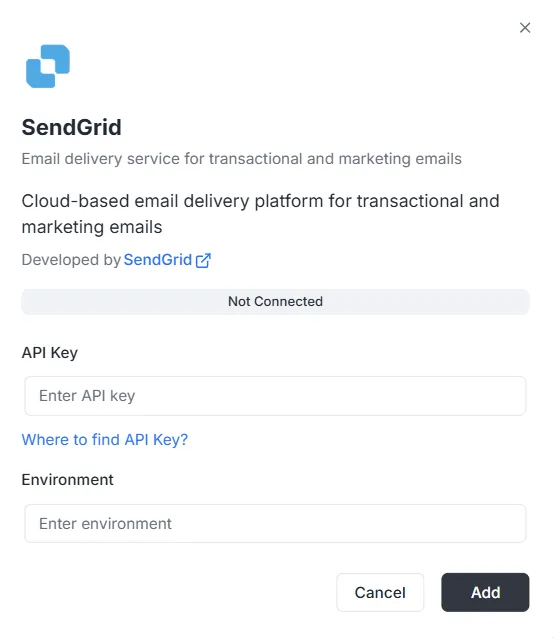
Sección titulada «Pasos de configuración»Tras seleccionar SendGrid en la lista de integraciones, aparecerá un modal de configuración. Debe proporcionar las siguientes credenciales para establecer la conexión:
1. Clave API
Sección titulada «1. Clave API»Es el token de autenticación generado en su cuenta de SendGrid.
- Entrada: Pegue su clave API privada de SendGrid en el campo de texto.
- Ayuda: Si no tiene una, pulse el enlace «Where to find API Key?» del modal para ver cómo generarla.
2. Entorno
Sección titulada «2. Entorno»Indique el contexto de entorno de esta integración.
- Entrada: Introduzca el identificador de entorno (por ejemplo,
Production,Stagingo una etiqueta concreta) en el campo Environment.
Finalizar la conexión
Sección titulada «Finalizar la conexión»Una vez rellenados los campos:
- Revise la barra de estado (actualmente Not Connected).
- Pulse el botón negro Add abajo a la derecha para guardar las credenciales y activar la integración.
Referencia de la API de integración de SendGrid
Sección titulada «Referencia de la API de integración de SendGrid»Configuración de SendGrid
Sección titulada «Configuración de SendGrid»Configurar API Key de SendGrid
Sección titulada «Configurar API Key de SendGrid»Configura la API key de SendGrid para un proyecto y ambiente específico.
Mutación:
mutation { sendgrid_configureSendGrid ( apiKey: "SG._api_key_here" )}Envío de correos
Sección titulada «Envío de correos»Envío simple
Sección titulada «Envío simple»Envía un correo a uno o varios destinatarios.
Mutación:
mutation sendgrid_sendEmail { sendgrid_sendEmail ( email: { from: { email: "sender@archie.com", name: "Sender Name" }, subject: "Test Email", to: { email: "recipient@gmail.com", name: "Recipient Name" }, content: { type: "text/html", value: "<h1>Hello World</h1><p>This is a test email.</p>" } } ) { messageId success }}Respuesta:
{ "data": { "sendgrid_sendEmail": { "messageId": "sent-1234567890", "success": true } }}Correo con CC y CCO
Sección titulada «Correo con CC y CCO»Mutación:
mutation sendgrid_sendEmail { sendgrid_sendEmail ( email: { from: { email: "sender@example.com" name: "Sender Name" } to: [ { email: "recipient@example.com" name: "Recipient Name" } ] cc: [ { email: "cc@example.com" name: "CC Recipient" } ] bcc: [ { email: "bcc@example.com" } ] subject: "Email with CC and BCC" content: [ { type: "text/html" value: "<h1>Hello</h1><p>This email has CC and BCC recipients.</p>" } ] } ) { messageId success }}Correo con adjuntos
Sección titulada «Correo con adjuntos»Mutación:
mutation sendgrid_sendEmail { sendgrid_sendEmail( email: { from: { email: "sender@example.com" name: "Sender Name" } to: [ { email: "recipient@example.com" name: "Recipient Name" } ] subject: "Email with Attachment" content: [ { type: "text/html" value: "<h1>Hello</h1><p>Please find attached file.</p>" } ] attachments: [ { content: "SGVsbG8gV29ybGQ=" type: "text/plain" filename: "document.txt" disposition: "attachment" } ] } ) { messageId success }}Nota: El campo content de los adjuntos debe estar codificado en Base64.
Correo con categorías y etiquetas
Sección titulada «Correo con categorías y etiquetas»Mutación:
mutation sendgrid_sendEmail { sendgrid_sendEmail( email: { from: { email: "sender@example.com" name: "Sender Name" } to: [ { email: "recipient@example.com" name: "Recipient Name" } ] subject: "Categorized Email" content: [ { type: "text/html" value: "<h1>Hello</h1>" } ] categories: ["transactional", "notification"] tags: ["important", "urgent"] } ) { messageId success }}Correo programado
Sección titulada «Correo programado»Mutación:
mutation sendgrid_sendEmail { sendgrid_sendEmail( email: { from: { email: "sender@example.com" name: "Sender Name" } to: [ { email: "recipient@example.com" name: "Recipient Name" } ] subject: "Scheduled Email" content: [ { type: "text/html" value: "<h1>Hello</h1>" } ] sendAt: "2025-12-25T10:00:00Z" } ) { messageId success }}Correo con argumentos personalizados
Sección titulada «Correo con argumentos personalizados»Mutación:
mutation sendgrid_sendEmail { sendgrid_sendEmail( email: { from: { email: "sender@example.com" name: "Sender Name" } to: [ { email: "recipient@example.com" name: "Recipient Name" } ] subject: "Email with Custom Args" content: [ { type: "text/html" value: "<h1>Hello</h1>" } ] customArgs: { orderId: "12345" userId: "67890" campaignId: "abc123" } } ) { messageId success }}Envío masivo
Sección titulada «Envío masivo»Varios correos
Sección titulada «Varios correos»Mutación:
mutation sendgrid_sendBulkEmail { sendgrid_sendBulkEmail( emails: { emails: [ { from: { email: "sender@example.com" name: "Sender Name" } to: [ { email: "recipient1@example.com" name: "Recipient 1" } ] subject: "Bulk Email 1" content: [ { type: "text/html" value: "<h1>Email 1</h1>" } ] } { from: { email: "sender@example.com" name: "Sender Name" } to: [ { email: "recipient2@example.com" name: "Recipient 2" } ] subject: "Bulk Email 2" content: [ { type: "text/html" value: "<h1>Email 2</h1>" } ] } ] } ) { messageIds success }}Respuesta:
{ "data": { "sendgrid_sendBulkEmail": { "messageIds": ["sent-1234567890", "sent-1234567891"], "success": true } }}Correos con plantillas
Sección titulada «Correos con plantillas»Correo con plantilla dinámica
Sección titulada «Correo con plantilla dinámica»Mutación:
mutation sendgrid_sendTemplate { sendgrid_sendTemplate( email: { from: { email: "sender@example.com" name: "Sender Name" } to: [ { email: "recipient@example.com" name: "Recipient Name" } ] templateId: "d-1234567890abcdef" substitutions: { name: "John Doe" orderNumber: "12345" totalAmount: "$99.99" } } ) { messageId success }}Respuesta:
{ "data": { "sendgrid_sendTemplate": { "messageId": "sent-1234567890", "success": true } }}Gestión de contactos
Sección titulada «Gestión de contactos»Añadir contacto
Sección titulada «Añadir contacto»Mutación:
mutation sendgrid_addContact { sendgrid_addContact( contact: { email: "newcontact@example.com" firstName: "John" lastName: "Doe" customFields: { company: "Acme Corp" phone: "+1234567890" position: "Developer" } listIds: ["list-id-1", "list-id-2"] } )}Respuesta:
{ "data": { "sendgrid_addContact": true }}Actualizar contacto
Sección titulada «Actualizar contacto»Mutación:
mutation sendgrid_updateContact { sendgrid_updateContact( contact: { email: "existing@example.com" firstName: "Jane" lastName: "Smith" customFields: { company: "New Company" phone: "+0987654321" } } )}Respuesta:
{ "data": { "sendgrid_updateContact": true }}Eliminar contacto
Sección titulada «Eliminar contacto»Mutación:
mutation sendgrid_deleteContact { sendgrid_deleteContact( email: "contact@example.com" )}Respuesta:
{ "data": { "sendgrid_deleteContact": true }}Analíticas y estadísticas
Sección titulada «Analíticas y estadísticas»Estadísticas de correo
Sección titulada «Estadísticas de correo»Consulta:
query sendgrid_getEmailStats { sendgrid_getEmailStats ( startDate: "2025-01-01" endDate: "2025-01-31" ) { opens clicks bounces spamReports delivered startDate endDate }}Respuesta:
{ "data": { "sendgrid_getEmailStats": { "opens": 150, "clicks": 75, "bounces": 5, "spamReports": 2, "delivered": 1000, "startDate": "2025-01-01T00:00:00Z", "endDate": "2025-01-31T00:00:00Z" } }}Validar correo
Sección titulada «Validar correo»Consulta:
query sendgrid_validateEmail { sendgrid_validateEmail ( email: "test@example.com" ) { valid score local domain reason suggestions }}Respuesta (con SendGrid Premium):
{ "data": { "sendgrid_validateEmail": { "valid": true, "score": 0.95, "local": "test", "domain": "example.com", "reason": "", "suggestions": [] } }}Respuesta (validación básica cuando SendGrid Premium no está disponible):
{ "data": { "sendgrid_validateEmail": { "valid": true, "score": 0.8, "local": "test", "domain": "example.com", "reason": "Basic validation (SendGrid premium validation not available)", "suggestions": [] } }}Nota: El endpoint de validación de correo de SendGrid (/v3/validations/email) requiere permisos especiales y puede no estar disponible en todas las cuentas. Si su clave API no tiene acceso a este endpoint (error 403), el sistema usará automáticamente una validación básica con expresiones regulares como respaldo.
Ejemplos completos con variables
Sección titulada «Ejemplos completos con variables»Ejemplo con variables GraphQL
Sección titulada «Ejemplo con variables GraphQL»Solicitud:
{ "query": "mutation SendEmail($email: EmailInput!) { sendgrid_sendEmail(email: $email) { messageId success } }", "variables": { "email": { "from": { "email": "sender@example.com", "name": "Sender Name" }, "to": [ { "email": "recipient@example.com", "name": "Recipient Name" } ], "subject": "Test Email", "content": [ { "type": "text/html", "value": "<h1>Hello World</h1>" } ] } }}Manejo de errores
Sección titulada «Manejo de errores»Ejemplo de error
Sección titulada «Ejemplo de error»Solicitud:
{ "query": "mutation { sendgrid_sendEmail(email: { from: { email: \"invalid\" }, to: [], subject: \"Test\", content: [] }) { messageId success } }"}Respuesta de error:
{ "errors": [ { "message": "validation error: at least one recipient is required", "path": ["sendgrid_sendEmail"] } ], "data": null}Errores frecuentes
Sección titulada «Errores frecuentes»-
Falta el ID de proyecto:
{"errors": [{"message": "project ID is required in context"}]} -
Configuración no encontrada:
{"errors": [{"message": "sendgrid configuration not found for project: xxx, environment: master"}]} -
Clave API no válida:
{"errors": [{"message": "sendgrid API error: status 401, body: ..."}]}
Webhooks
Sección titulada «Webhooks»Endpoint de webhooks
Sección titulada «Endpoint de webhooks»El endpoint de webhooks está disponible en:
- HTTP:
POST http://localhost:8080/webhooks/sendgrid - Lambda:
POST /webhooks/sendgrid
Configuración en SendGrid
Sección titulada «Configuración en SendGrid»- Vaya a SendGrid Dashboard > Settings > Mail Settings > Event Webhook
- Configure la URL:
https://tu-dominio.com/webhooks/sendgrid - Seleccione los eventos que desea recibir
- Configure la clave de verificación en la variable de entorno
WEBHOOK_VERIFICATION_KEY
Eventos admitidos
Sección titulada «Eventos admitidos»processed: Correo procesadodelivered: Correo entregadoopened: Correo abiertoclicked: Enlace pulsadobounce: Rebotedropped: Descartadospamreport: Marcado como spamunsubscribe: Baja