Stripe
Stripe は、インターネットビジネス向けのオンライン決済処理プラットフォームです。Stripe を連携すると、アプリが取引、サブスクリプション、財務データを安全に扱えるようになります。
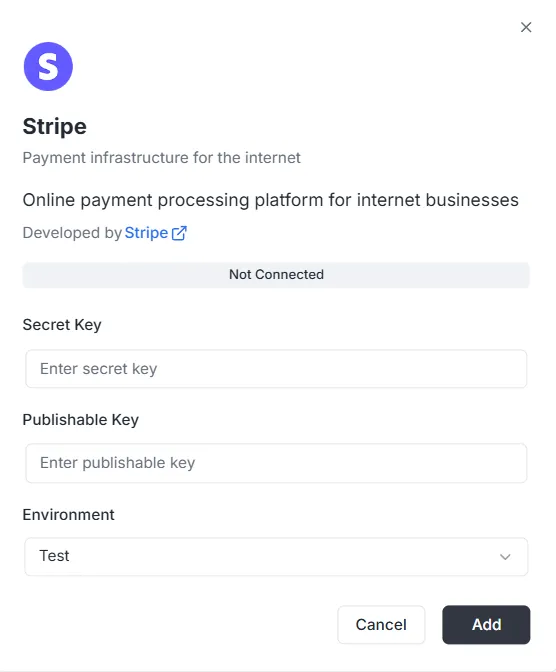
連携一覧から Stripe を選択すると、設定モーダルが表示されます。接続を確立するには、Stripe ダッシュボードから次の認証情報を入力してください。
1. シークレットキー
Section titled “1. シークレットキー”- 入力: 秘密の Stripe Secret Key(通常は
sk_で始まります)を Secret Key フィールドに入力します。このキーはバックエンドが安全なリクエストを認証するために使われます。
2. 公開可能キー
Section titled “2. 公開可能キー”- 入力: 公開の Stripe Publishable Key(通常は
pk_で始まります)を Publishable Key フィールドに入力します。このキーはフロントエンド実装に使用されます。
- 入力: ドロップダウンから適切な環境を選択します(開発・サンドボックスでは Test、本番処理では Production)。
キーと環境を設定したら:
- ステータスバーが 未接続 と表示されていることを確認します。
- 右下の黒い 追加 ボタンをクリックし、認証情報を保存して決済連携を有効にします。
Stripe 連携 API リファレンス
Section titled “Stripe 連携 API リファレンス”- 構成管理
- 顧客管理
- Payment Intents
- サブスクリプション
- 商品と価格
- 請求書
- 返金
- Checkout セッション
- 請求ポータルセッション
- 支払い方法
- Webhook イベント
- ページネーション
- エラーハンドリング
構成管理 {#configuration-management}
Section titled “構成管理 {#configuration-management}”configureStripe
Section titled “configureStripe”プロジェクトと環境向けに新しい Stripe 構成を作成します。
ミューテーション:
mutation ConfigureStripe ( $input: ConfigureStripeInput!) { configureStripe ( input: $input ) { id publishableKey webhookUrl }}入力:
input ConfigureStripeInput { secretKey: String! # Stripe secret key (sk_test_... or sk_live_...) publishableKey: String! # Stripe publishable key (pk_test_... or pk_live_...) environment: StripeEnvironment! # TEST or LIVE webhookSecret: String # Webhook signing secret (optional)}レスポンス:
type ConfigureStripePayload { id: ID! # Configuration ID publishableKey: String! # Publishable key webhookUrl: String! # Generated webhook URL}例:
{ "input": { "secretKey": "sk_test_...", "publishableKey": "pk_test_...", "environment": "TEST", "webhookSecret": "whsec_..." }}備考:
- シークレットキーは保存前に AES-256-GCM で暗号化されます
- プロジェクト/環境の組み合わせごとに 1 つの構成のみ
- 構成が既に存在する場合はエラーを返します
updateStripeConfig
Section titled “updateStripeConfig”既存の Stripe 構成を更新します。
ミューテーション:
mutation UpdateStripeConfig ( $input: UpdateStripeConfigInput!) { updateStripeConfig ( input: $input ) { id publishableKey webhookUrl }}入力:
input UpdateStripeConfigInput { secretKey: String # Optional publishableKey: String # Optional environment: StripeEnvironment # Optional webhookSecret: String # Optional}レスポンス:
type UpdateStripeConfigPayload { id: ID! publishableKey: String! webhookUrl: String!}備考:
- すべてのフィールドは任意です
- 送信されたフィールドのみが更新されます
- シークレットキーが指定された場合は暗号化されます
顧客管理 {#customer-management}
Section titled “顧客管理 {#customer-management}”stripe_customer
Section titled “stripe_customer”ID により 1 件の顧客を取得します。
クエリ:
query stripe_customer{ stripe_customer( id: "cus_Ts..." ) { id name email phone description metadata object createdAt }}stripe_customers
Section titled “stripe_customers”顧客をページネーションと任意のフィルターで一覧します。
クエリ:
query stripe_customers ( $first: Int, $after: String, $customerId: String) { stripe_customers ( first: $first, after: $after, customerId: $customerId ) { edges { node { id name email phone description createdAt } cursor } pageInfo { hasNextPage hasPreviousPage startCursor endCursor } }}パラメーター:
first: 返す件数(既定: 10)after: ページネーション用カーソルcustomerId: 顧客 ID でフィルター(任意)
stripe_createCustomer
Section titled “stripe_createCustomer”新しい顧客を作成します。
ミューテーション:
mutation stripe_createCustomer { stripe_createCustomer ( input: { name: "Customer", email: "example@archie.com", phone: "+573001230001", description: "Description Example" metadata: { data1: "Example data1", data2: "Example data2" } } ) { id name email phone description metadata object createdAt }}stripe_updateCustomer
Section titled “stripe_updateCustomer”既存の顧客を更新します。
ミューテーション:
mutation stripe_updateCustomer { stripe_updateCustomer( id: "cus_Ts...", input: { name: "Customer", email: "example@archie.com", phone: "+573001230001", description:"Description Example", metadata: { data1: "Example data1 updated", data2: "Example data2 updated" } } ) { id name email phone description metadata object createdAt }}備考:
- すべてのフィールドは任意です
- 送信されたフィールドのみが更新されます
stripe_deleteCustomer
Section titled “stripe_deleteCustomer”顧客を削除します。
ミューテーション:
mutation stripe_deleteCustomer { stripe_deleteCustomer ( id: "cus_Ts...")}レスポンス:
- 成功時は
trueを返します - 顧客が見つからない場合はエラー
Payment Intents {#payment-intents}
Section titled “Payment Intents {#payment-intents}”stripe_paymentIntent
Section titled “stripe_paymentIntent”ID により 1 件の Payment Intent を取得します。
クエリ:
query stripe_paymentIntent { stripe_paymentIntent ( id: "pi_3Su..." ) { id customerId paymentMethodId currency amount status metadata object clientSecret createdAt }}stripe_paymentIntents
Section titled “stripe_paymentIntents”Payment Intent をページネーションと任意のフィルターで一覧します。
クエリ:
query stripe_paymentIntents ( $first: Int, $after: String, $customerId: String) { stripe_paymentIntents ( first: $first, after: $after, customerId: $customerId ) { edges { node { id customerId paymentMethodId currency amount status metadata object clientSecret createdAt } cursor } pageInfo { hasPreviousPage hasNextPage startCursor endCursor } }}パラメーター:
first: 返す件数(既定: 10)after: ページネーション用カーソルcustomerId: 顧客 ID でフィルター(任意)
stripe_createPaymentIntent
Section titled “stripe_createPaymentIntent”新しい Payment Intent を作成します。
ミューテーション:
mutation stripe_createPaymentIntent { stripe_createPaymentIntent ( input: { amount: 12.35, currency: "usd", customerId: "cus_Ts...", paymentMethodId: "pm_1Su...", automaticPaymentMethods: true } ) { id customerId paymentMethodId currency amount status metadata object clientSecret createdAt }}備考:
- フロントエンドでの確認用に
clientSecretが返されます - Stripe.js 連携には
automaticPaymentMethods: trueを使用
stripe_updatePaymentIntent
Section titled “stripe_updatePaymentIntent”確認前に Payment Intent を更新します。
ミューテーション:
mutation stripe_updatePaymentIntent{ stripe_updatePaymentIntent( id: "pi_3S...", input: { amount: 36.92, currency: "usd", paymentMethodId: "pm_1Su..." metadata:{ data1: "Example data1" } } ) { id customerId paymentMethodId currency amount status metadata object clientSecret createdAt }}備考:
- 確認前にのみ更新できます
- すべてのフィールドは任意です
stripe_confirmPaymentIntent
Section titled “stripe_confirmPaymentIntent”Payment Intent を確定します。
ミューテーション:
mutation stripe_confirmPaymentIntent{ stripe_confirmPaymentIntent( id: "pi_3Su..." input: { paymentMethodId: "pm_1Su...", returnUrl: "http://localhost:3000/successful-payment" } ) { id customerId paymentMethodId currency amount status metadata object clientSecret createdAt }}備考:
- 支払いを完了するために必要です
- 3D Secure が必要になる場合があります
- 更新された状態を返します(succeeded、requires_action など)
stripe_cancelPaymentIntent
Section titled “stripe_cancelPaymentIntent”Payment Intent をキャンセルします。
ミューテーション:
mutation stripe_cancelPaymentIntent { stripe_cancelPaymentIntent( id: "pi_3Su..." ) { id customerId paymentMethodId currency amount status metadata object clientSecret createdAt }}備考:
- succeeded または canceled 以外の Payment Intent のみキャンセル可能
- 状態が “canceled” になります
サブスクリプション {#subscriptions}
Section titled “サブスクリプション {#subscriptions}”stripe_subscription
Section titled “stripe_subscription”ID により 1 件のサブスクリプションを取得します。
クエリ:
query stripe_subscription { stripe_subscription(id: "sub_1Su...") { id customerId status currentPeriodStart currentPeriodEnd createdAt cancelAtPeriodEnd metadata object items { data { id priceId quantity } } }}stripe_subscriptions
Section titled “stripe_subscriptions”サブスクリプションをページネーションと任意のフィルターで一覧します。
クエリ:
query stripe_subscriptions ( $first: Int, $after: String, $customerId: String) { stripe_subscriptions ( first: $first, after: $after, customerId: $customerId ) { edges { node { id customerId status currentPeriodStart currentPeriodEnd createdAt cancelAtPeriodEnd metadata object items { data { id priceId quantity } } } cursor } pageInfo { hasPreviousPage hasNextPage startCursor endCursor } }}パラメーター:
first: 返す件数(既定: 10)after: ページネーション用カーソルcustomerId: 顧客 ID でフィルター(任意)status: 状態でフィルター(任意)
stripe_createSubscription
Section titled “stripe_createSubscription”新しいサブスクリプションを作成します。
ミューテーション:
mutation stripe_createSubscription { stripe_createSubscription ( input: { customerId: "cus_TsQ...", items: { priceId: "price_1Su...", quantity: 1 }, metadata: { data1: "Example data1" }, trialPeriodDays: 0 } ) { id customerId status currentPeriodStart currentPeriodEnd createdAt cancelAtPeriodEnd metadata object items { data { id priceId quantity } } }}備考:
- サブスクリプションに支払い方法が必要な場合、
paymentBehaviorは “default_incomplete” になることがあります - 試用期間は日数で指定します
- 最新の請求書と Payment Intent は自動的に展開されます
stripe_updateSubscription
Section titled “stripe_updateSubscription”既存のサブスクリプションを更新します。
ミューテーション:
mutation stripe_updateSubscription { stripe_updateSubscription( id: "sub_1Sv..." input: { cancelAtPeriodEnd: false metadata: { data2: "Example data2" } } ) { id customerId status currentPeriodStart currentPeriodEnd createdAt cancelAtPeriodEnd metadata object items { data { id priceId quantity } } }}stripe_cancelSubscription
Section titled “stripe_cancelSubscription”サブスクリプションを解約します。
ミューテーション:
mutation stripe_cancelSubscription { stripe_cancelSubscription ( cancelAtPeriodEnd: true, id: "sub_1Sv..." ) { id customerId status currentPeriodStart currentPeriodEnd createdAt cancelAtPeriodEnd metadata object items { data { id priceId quantity } } }}パラメーター:
id: サブスクリプション ID(必須)cancelAtPeriodEnd: true の場合は期間末に解約、false の場合は即時解約(既定: false)
備考:
- 即時解約: サブスクリプションは直ちに終了
- 期間末解約: 現在の期間の終わりまで継続
商品と価格 {#products-and-prices}
Section titled “商品と価格 {#products-and-prices}”stripe_products
Section titled “stripe_products”商品をページネーションで一覧します。
クエリ:
query stripe_products ( $first: Int, $after: String) { stripe_products ( first: $first, after: $after ) { edges { node { id name description active metadata object createdAt } cursor } pageInfo { hasPreviousPage hasNextPage startCursor endCursor } }}stripe_createProduct
Section titled “stripe_createProduct”新しい商品を作成します。
ミューテーション:
mutation stripe_createProduct { stripe_createProduct ( input: { name: "Product 01", description: "Description product 01", metadata: { data1: "Example data1" } } ) { id name description active metadata object createdAt }}stripe_prices
Section titled “stripe_prices”価格をページネーションと任意のフィルターで一覧します。
クエリ:
query stripe_prices ( $first: Int, $after: String, $productId: String) { stripe_prices ( first: $first, after: $after, productId: $productId ) { edges { node { id productId active currency unitAmount object metadata createdAt recurring { interval intervalCount } } cursor } pageInfo { hasPreviousPage hasNextPage startCursor endCursor } }}パラメーター:
first: 返す件数(既定: 10)after: ページネーション用カーソルproductId: 商品 ID でフィルター(任意)
stripe_createPrice
Section titled “stripe_createPrice”新しい価格を作成します。
ミューテーション:
mutation stripe_createPrice { stripe_createPrice ( input: { productId: "prod_Tst...", unitAmount: 25.85, currency: "usd", recurring: { interval: "month", intervalCount: 1 }, metadata: { data1: "Example data1" } } ) { id productId currency unitAmount active object createdAt metadata recurring { interval intervalCount } }}備考:
- 一回払い価格では
recurringを省略 intervalは “day”、“week”、“month”、“year” のいずれか
請求書 {#invoices}
Section titled “請求書 {#invoices}”stripe_invoice
Section titled “stripe_invoice”ID により 1 件の請求書を取得します。
クエリ:
query stripe_invoice { stripe_invoice ( id: "in_1Su..." ) { id customerId subscriptionId currency amountPaid amountDue status object metadata createdAt lineItems { data { id description currency amount quantity } } }}備考:
- 利用可能な場合、API 拡張でサブスクリプション ID が設定されます
stripe_invoices
Section titled “stripe_invoices”請求書をページネーションと任意のフィルターで一覧します。
クエリ:
query stripe_invoices ( $first: Int, $after: String, $customerId: String, $status: String) { stripe_invoices ( first: $first, after: $after, customerId: $customerId, status: $status ) { edges { node { id customerId subscriptionId currency amountPaid amountDue status object metadata createdAt lineItems { data { id description currency amount quantity } } } cursor } pageInfo { hasPreviousPage hasNextPage startCursor endCursor } }}パラメーター:
first: 返す件数(既定: 10)after: ページネーション用カーソルcustomerId: 顧客 ID でフィルター(任意)status: 状態でフィルター(任意)
stripe_payInvoice
Section titled “stripe_payInvoice”請求書をプログラムで支払います。
ミューテーション:
mutation stripe_payInvoice { stripe_payInvoice ( id: "in_1Sv..." ) { id customerId subscriptionId currency amountPaid amountDue status object metadata createdAt lineItems { data { id description currency amount quantity } } }}備考:
- 顧客の既定の支払い方法で請求書の支払いを試みます
- 支払いが失敗した場合はエラー
- 成功すると請求書の状態が “paid” に更新されます
返金 {#refunds}
Section titled “返金 {#refunds}”stripe_refunds
Section titled “stripe_refunds”返金をページネーションと任意のフィルターで一覧します。
クエリ:
query stripe_refunds ( $first: Int, $after: String, $paymentIntentId: String) { stripe_refunds ( first: $first, after: $after, paymentIntentId: $paymentIntentId ) { edges { node { id paymentIntentId reason status currency amount metadata object createdAt } cursor } pageInfo { hasPreviousPage hasNextPage startCursor endCursor } }}パラメーター:
first: 返す件数(既定: 10)after: ページネーション用カーソルpaymentIntentId: Payment Intent ID でフィルター(任意)
stripe_createRefund
Section titled “stripe_createRefund”Payment Intent に対する返金を作成します。
ミューテーション:
mutation stripe_createRefund { stripe_createRefund ( input: { paymentIntentId: "pi_3Sv...", amount: 200, reason: "requested_by_customer" } ) { id reason paymentIntentId status currency amount object metadata createdAt }}備考:
- 全額返金では
amountを省略 reasonは “duplicate”、“fraudulent”、“requested_by_customer” のいずれか- 返金の状態は “pending” から始まり、“succeeded” または “failed” になります
Checkout セッション {#checkout-sessions}
Section titled “Checkout セッション {#checkout-sessions}”stripe_createCheckoutSession
Section titled “stripe_createCheckoutSession”一回払いまたはサブスクリプション用の Stripe Checkout セッションを作成します。顧客を Stripe のホスト型支払いページへリダイレクトする URL を返します。
ミューテーション:
mutation CreateCheckoutSession($input: StripeCreateCheckoutSessionInput!) { stripe_createCheckoutSession(input: $input) { id url customerId customerEmail paymentIntentId subscriptionId mode status currency amountTotal metadata createdAt }}入力:
input StripeCreateCheckoutSessionInput {  customerId: String              # Existing Stripe customer ID (optional)  customerEmail: String            # Customer email for new customers (optional)  mode: String!                   # "payment" for one-time or "subscription" for recurring  successUrl: String!             # URL to redirect after successful payment  cancelUrl: String!              # URL to redirect if customer cancels  lineItems: [StripeCheckoutSessionLineItemInput!]!  # Items to purchase  paymentMethodTypes: [String!]    # Allowed payment methods (optional)  metadata: Map                    # Custom metadata (optional)}
input StripeCheckoutSessionLineItemInput {  priceId: String      # Stripe Price ID (for existing prices)  quantity: Int!        # Quantity of items  amount: Float         # Custom amount in dollars (for one-time payments)  currency: String      # Currency code (required if amount is provided)}
レスポンス:
type StripeCheckoutSession { id: ID! # Session ID object: String! # "checkout.session" url: String! # Redirect URL for customer customerId: String # Customer ID (if customer exists) customerEmail: String # Customer email paymentIntentId: String # Payment Intent ID (for one-time payments) subscriptionId: String # サブスクリプション ID(サブスクリプション) mode: String! # "payment" or "subscription" status: String! # Session status currency: String # Currency code amountTotal: Float # Total amount in dollars metadata: Map # Custom metadata createdAt: Time! # Creation timestamp}例 – 一回払い:
{ "input": { "mode": "payment", "successUrl": "https://example.com/success", "cancelUrl": "https://example.com/cancel", "lineItems": [ { "priceId": "price_1234567890", "quantity": 1 } ] }}例 – カスタム金額の一回払い:
{ "input": { "mode": "payment", "customerEmail": "customer@example.com", "successUrl": "https://example.com/success", "cancelUrl": "https://example.com/cancel", "lineItems": [ { "amount": 29.99, "currency": "usd", "quantity": 1 } ] }}例 – サブスクリプション:
{ "input": { "mode": "subscription", "customerId": "cus_1234567890", "successUrl": "https://example.com/success", "cancelUrl": "https://example.com/cancel", "lineItems": [ { "priceId": "price_monthly_subscription", "quantity": 1 } ] }}備考:
urlフィールドには顧客を送るリダイレクト URL が含まれます- 一回払いでは
mode: "payment"とpriceId、またはamount+currencyを指定 - サブスクリプションでは
mode: "subscription"とpriceId(定期価格である必要があります)を指定 customerIdまたはcustomerEmailのいずれかを指定(両方は不可)paymentMethodTypesには “card”、“us_bank_account”、“link” などを含められます- 完了しない場合、セッションは 24 時間で期限切れになります
請求ポータルセッション {#billing-portal-sessions}
Section titled “請求ポータルセッション {#billing-portal-sessions}”stripe_createBillingPortalSession
Section titled “stripe_createBillingPortalSession”顧客が Stripe のホスト型ポータルでサブスクリプション、支払い方法、請求情報を管理できるよう、Stripe Billing Portal のセッションを作成します。
ミューテーション:
mutation CreateBillingPortalSession($input: StripeCreateBillingPortalSessionInput!) { stripe_createBillingPortalSession(input: $input) { id url customerId returnUrl createdAt }}入力:
input StripeCreateBillingPortalSessionInput { customerId: String! # Stripe customer ID (required) returnUrl: String! # URL to redirect after customer exits portal configuration: String # Portal configuration ID (optional)}レスポンス:
type StripeBillingPortalSession { id: ID! # Session ID object: String! # "billing_portal.session" url: String! # Redirect URL for customer customerId: String! # Customer ID returnUrl: String # Return URL createdAt: Time! # Creation timestamp}例:
{ "input": { "customerId": "cus_1234567890", "returnUrl": "https://example.com/account" }}備考:
urlフィールドには顧客を送るリダイレクト URL が含まれます- ポータルセッションは短命で、使用後に失効します
- 顧客はサブスクリプション、支払い方法、請求書、請求情報を管理できます
- ポータル機能は Stripe ダッシュボードで設定します
configurationがない場合は既定のポータル構成が使われます- ポータルは指定した顧客のデータのみ表示します
支払い方法 {#payment-methods}
Section titled “支払い方法 {#payment-methods}”stripe_paymentMethods
Section titled “stripe_paymentMethods”支払い方法をページネーションと任意のフィルターで一覧します。
クエリ:
query stripe_paymentMethods ( $first: Int, $after: String, $customerId: String) { stripe_paymentMethods( first: $first, after: $after, customerId: $customerId ) { edges { node { id customerId type object metadata createdAt card { brand expMonth expYear last4 } } cursor } pageInfo { hasPreviousPage hasNextPage startCursor endCursor } }}パラメーター:
first: 返す件数(既定: 10)after: ページネーション用カーソルcustomerId: 顧客 ID でフィルター(任意)
備考:
- カードの安全な情報(下 4 桁、ブランド、有効期限)のみ返します
- 完全なカード番号は表示されません
stripe_attachPaymentMethod
Section titled “stripe_attachPaymentMethod”支払い方法を顧客に紐付けます。
ミューテーション:
mutation stripe_attachPaymentMethod { stripe_attachPaymentMethod ( id: "pm_1Sv...", input: { customerId: "cus_Ts4..." } ) { id customerId type card { brand expMonth expYear last4 } metadata object createdAt }}備考:
- 支払い方法は事前に作成する必要があります(通常は Stripe.js)
- 紐付けた方法はサブスクリプションと支払いに利用できます
stripe_detachPaymentMethod
Section titled “stripe_detachPaymentMethod”顧客から支払い方法の紐付けを解除します。
ミューテーション:
mutation stripe_detachPaymentMethod { stripe_detachPaymentMethod ( id: "pm_1Sv..." ) { id customerId type card { brand expYear expMonth last4 } metadata object createdAt }}備考:
- 解除した方法は支払いに使えません
customerIdが null の支払い方法を返します
Webhook イベント {#webhook-events}
Section titled “Webhook イベント {#webhook-events}”stripe_webhookEvents
Section titled “stripe_webhookEvents”サービスが受信した Webhook イベントを一覧します。
クエリ:
query ListWebhookEvents ( $first: Int, $after: String) { stripe_webhookEvents ( first: $first, after: $after ) { edges { node { id type data processed createdAt } cursor } pageInfo { hasNextPage hasPreviousPage endCursor } }}レスポンス:
type StripeWebhookEvent { id: ID! type: String! # Event type (e.g., "payment_intent.succeeded") data: String! # JSON string of event data processed: Boolean! # イベントが既に処理済みか createdAt: Time!}パラメーター:
first: 返す件数(既定: 10)after: ページネーション用カーソル
備考:
- イベントは Webhook エンドポイントで自動的に受信されます
- 署名を検証した後にイベントが保存されます
dataフィールドにはイベントの完全なペイロードが JSON 文字列で入ります
ページネーション {#pagination}
Section titled “ページネーション {#pagination}”すべての一覧クエリは Relay コネクションパターンによるカーソルベースのページネーションをサポートします。
PageInfo
Section titled “PageInfo”type PageInfo { hasNextPage: Boolean! hasPreviousPage: Boolean! startCursor: String endCursor: String}query ListCustomers ( $first: Int, $after: String) { stripe_customers ( first: $first, after: $after ) { edges { node { id email } cursor } pageInfo { hasNextPage endCursor } }}ページネーションの流れ:
- 初回リクエスト:
first: 10, after: null - 応答の
pageInfo.endCursorを次のリクエストのafterに使います - さらにページがあるか
hasNextPageを確認します
既定値:
first: 未指定なら 10after: 未指定なら先頭から
エラーハンドリング {#error-handling}
Section titled “エラーハンドリング {#error-handling}”すべての操作は明確なメッセージ付きの GraphQL エラーを返します。エラーは Stripe API からマッピングされ、理解しやすい情報が得られます。
よくあるエラーシナリオ
Section titled “よくあるエラーシナリオ”構成エラー:
400: Stripe キーの形式が無効404: プロジェクトまたは構成が見つかりません400: 構成は既に存在します
顧客エラー:
404: 顧客が見つかりません400: 顧客データが無効です
Payment Intent エラー:
404: Payment Intent が見つかりません400: 金額または通貨が無効です402: 支払い失敗(カード拒否、残高不足など)
サブスクリプションエラー:
404: サブスクリプションが見つかりません400: サブスクリプションのパラメータが無効です400: 解約済みのサブスクリプションは更新できません
Stripe エラーコード: よく使うコードは分かりやすいメッセージにマッピングされます。
card_declined: 「カードが拒否されました」insufficient_funds: 「残高不足」invalid_number: 「カード番号が無効です」expired_card: 「カードの有効期限が切れています」incorrect_cvc: 「CVC コードが正しくありません」
エラー応答の形式
Section titled “エラー応答の形式”{ "errors": [ { "message": "Customer not found", "extensions": { "code": "NOT_FOUND", "stripeErrorCode": "resource_missing" } } ], "data": null}データ型 {#data-types}
Section titled “データ型 {#data-types}”StripeEnvironment
Section titled “StripeEnvironment”enum StripeEnvironment { TEST # Modo prueba LIVE # 本番 / ライブモード}Map スカラー
Section titled “Map スカラー”スカラー型 Map は次のようなキーと値のマップを表します。
- キーは文字列です
- 値は文字列、数値、ブール値、または入れ子のマップにできます
- メタデータフィールドで使用されます
例:
{ "metadata": { "order_id": "12345", "user_id": "67890", "premium": true }}Time スカラー
Section titled “Time スカラー”スカラー型 Time は ISO 8601 形式のタイムスタンプを表します。
例: "2025-11-16T00:28:48.081Z"