SendGrid
SendGrid は、トランザクションメールおよびマーケティングメールの配信を行うクラウドサービスです。本連携を有効にすると、アプリケーションからプログラムでメールを送信できます(ウェルカムメール、パスワードリセット、通知など)。
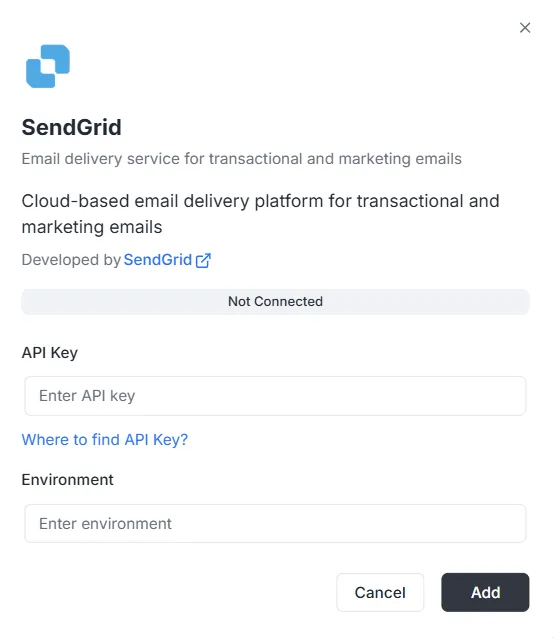
連携一覧から SendGrid を選択すると、設定モーダルが表示されます。接続を確立するには、次の認証情報を入力してください。
1. API キー
Section titled “1. API キー”SendGrid アカウントで発行される認証トークンです。
- 入力: SendGrid のプライベート API キーをテキスト欄に貼り付けます。
- ヘルプ: キーをお持ちでない場合は、モーダル内の 「Where to find API Key?」 リンクから発行手順をご確認ください。
本連携の環境コンテキストを指定します。
- 入力: Environment 欄に環境識別子(例:
Production、Staging、または構成タグ)を入力します。
各項目を入力したら:
- ステータスバーが Not Connected になっていることを確認します。
- 右下の黒い Add ボタンをクリックし、認証情報を保存して連携を有効にします。
SendGrid 連携 API リファレンス
Section titled “SendGrid 連携 API リファレンス”SendGrid の設定 {#sendgrid-configuration}
Section titled “SendGrid の設定 {#sendgrid-configuration}”SendGrid API キーの設定 {#sendgrid-configure-api-key}
Section titled “SendGrid API キーの設定 {#sendgrid-configure-api-key}”プロジェクトと環境に対して SendGrid の API キーを設定します。
Mutation:
mutation { sendgrid_configureSendGrid ( apiKey: "SG._api_key_here" )}メールの送信 {#sending-emails}
Section titled “メールの送信 {#sending-emails}”シンプルなメールの送信 {#send-simple-email}
Section titled “シンプルなメールの送信 {#send-simple-email}”1 名または複数名の宛先へメールを送信します。
Mutation:
mutation sendgrid_sendEmail { sendgrid_sendEmail ( email: { from: { email: "sender@archie.com", name: "Sender Name" }, subject: "Test Email", to: { email: "recipient@gmail.com", name: "Recipient Name" }, content: { type: "text/html", value: "<h1>Hello World</h1><p>This is a test email.</p>" } } ) { messageId success }}Response:
{ "data": { "sendgrid_sendEmail": { "messageId": "sent-1234567890", "success": true } }}CC / BCC 付きメール {#send-email-with-cc-and-bcc}
Section titled “CC / BCC 付きメール {#send-email-with-cc-and-bcc}”Mutation:
mutation sendgrid_sendEmail { sendgrid_sendEmail ( email: { from: { email: "sender@example.com" name: "Sender Name" } to: [ { email: "recipient@example.com" name: "Recipient Name" } ] cc: [ { email: "cc@example.com" name: "CC Recipient" } ] bcc: [ { email: "bcc@example.com" } ] subject: "Email with CC and BCC" content: [ { type: "text/html" value: "<h1>Hello</h1><p>This email has CC and BCC recipients.</p>" } ] } ) { messageId success }}添付ファイル付きメール {#send-email-with-attachments}
Section titled “添付ファイル付きメール {#send-email-with-attachments}”Mutation:
mutation sendgrid_sendEmail { sendgrid_sendEmail( email: { from: { email: "sender@example.com" name: "Sender Name" } to: [ { email: "recipient@example.com" name: "Recipient Name" } ] subject: "Email with Attachment" content: [ { type: "text/html" value: "<h1>Hello</h1><p>Please find attached file.</p>" } ] attachments: [ { content: "SGVsbG8gV29ybGQ=" type: "text/plain" filename: "document.txt" disposition: "attachment" } ] } ) { messageId success }}注: 添付の content は Base64 エンコードされている必要があります。
カテゴリとタグ付きメール {#send-email-with-categories-and-tags}
Section titled “カテゴリとタグ付きメール {#send-email-with-categories-and-tags}”Mutation:
mutation sendgrid_sendEmail { sendgrid_sendEmail( email: { from: { email: "sender@example.com" name: "Sender Name" } to: [ { email: "recipient@example.com" name: "Recipient Name" } ] subject: "Categorized Email" content: [ { type: "text/html" value: "<h1>Hello</h1>" } ] categories: ["transactional", "notification"] tags: ["important", "urgent"] } ) { messageId success }}予約送信メール {#send-email-programmed}
Section titled “予約送信メール {#send-email-programmed}”Mutation:
mutation sendgrid_sendEmail { sendgrid_sendEmail( email: { from: { email: "sender@example.com" name: "Sender Name" } to: [ { email: "recipient@example.com" name: "Recipient Name" } ] subject: "Scheduled Email" content: [ { type: "text/html" value: "<h1>Hello</h1>" } ] sendAt: "2025-12-25T10:00:00Z" } ) { messageId success }}カスタム引数付きメール {#send-email-with-custom-args}
Section titled “カスタム引数付きメール {#send-email-with-custom-args}”Mutation:
mutation sendgrid_sendEmail { sendgrid_sendEmail( email: { from: { email: "sender@example.com" name: "Sender Name" } to: [ { email: "recipient@example.com" name: "Recipient Name" } ] subject: "Email with Custom Args" content: [ { type: "text/html" value: "<h1>Hello</h1>" } ] customArgs: { orderId: "12345" userId: "67890" campaignId: "abc123" } } ) { messageId success }}一括送信 {#send-bulk-emails}
Section titled “一括送信 {#send-bulk-emails}”複数メールの送信 {#send-multiple-emails}
Section titled “複数メールの送信 {#send-multiple-emails}”Mutation:
mutation sendgrid_sendBulkEmail { sendgrid_sendBulkEmail( emails: { emails: [ { from: { email: "sender@example.com" name: "Sender Name" } to: [ { email: "recipient1@example.com" name: "Recipient 1" } ] subject: "Bulk Email 1" content: [ { type: "text/html" value: "<h1>Email 1</h1>" } ] } { from: { email: "sender@example.com" name: "Sender Name" } to: [ { email: "recipient2@example.com" name: "Recipient 2" } ] subject: "Bulk Email 2" content: [ { type: "text/html" value: "<h1>Email 2</h1>" } ] } ] } ) { messageIds success }}Response:
{ "data": { "sendgrid_sendBulkEmail": { "messageIds": ["sent-1234567890", "sent-1234567891"], "success": true } }}テンプレートを使った送信 {#send-emails-with-templates}
Section titled “テンプレートを使った送信 {#send-emails-with-templates}”動的テンプレートでの送信 {#send-email-using-dynamic-template}
Section titled “動的テンプレートでの送信 {#send-email-using-dynamic-template}”Mutation:
mutation sendgrid_sendTemplate { sendgrid_sendTemplate( email: { from: { email: "sender@example.com" name: "Sender Name" } to: [ { email: "recipient@example.com" name: "Recipient Name" } ] templateId: "d-1234567890abcdef" substitutions: { name: "John Doe" orderNumber: "12345" totalAmount: "$99.99" } } ) { messageId success }}Response:
{ "data": { "sendgrid_sendTemplate": { "messageId": "sent-1234567890", "success": true } }}コンタクト管理 {#send-contact-management}
Section titled “コンタクト管理 {#send-contact-management}”コンタクトの追加 {#send-add-contact}
Section titled “コンタクトの追加 {#send-add-contact}”Mutation:
mutation sendgrid_addContact { sendgrid_addContact( contact: { email: "newcontact@example.com" firstName: "John" lastName: "Doe" customFields: { company: "Acme Corp" phone: "+1234567890" position: "Developer" } listIds: ["list-id-1", "list-id-2"] } )}Response:
{ "data": { "sendgrid_addContact": true }}コンタクトの更新 {#send-update-contact}
Section titled “コンタクトの更新 {#send-update-contact}”Mutation:
mutation sendgrid_updateContact { sendgrid_updateContact( contact: { email: "existing@example.com" firstName: "Jane" lastName: "Smith" customFields: { company: "New Company" phone: "+0987654321" } } )}Response:
{ "data": { "sendgrid_updateContact": true }}コンタクトの削除 {#send-delete-contact}
Section titled “コンタクトの削除 {#send-delete-contact}”Mutation:
mutation sendgrid_deleteContact { sendgrid_deleteContact( email: "contact@example.com" )}Response:
{ "data": { "sendgrid_deleteContact": true }}分析と統計 {#send-analytics-and-statistics}
Section titled “分析と統計 {#send-analytics-and-statistics}”メール統計の取得 {#send-get-email-stats}
Section titled “メール統計の取得 {#send-get-email-stats}”Query:
query sendgrid_getEmailStats { sendgrid_getEmailStats ( startDate: "2025-01-01" endDate: "2025-01-31" ) { opens clicks bounces spamReports delivered startDate endDate }}Response:
{ "data": { "sendgrid_getEmailStats": { "opens": 150, "clicks": 75, "bounces": 5, "spamReports": 2, "delivered": 1000, "startDate": "2025-01-01T00:00:00Z", "endDate": "2025-01-31T00:00:00Z" } }}メールアドレスの検証 {#send-validate-email}
Section titled “メールアドレスの検証 {#send-validate-email}”Query:
query sendgrid_validateEmail { sendgrid_validateEmail ( email: "test@example.com" ) { valid score local domain reason suggestions }}Response(SendGrid Premium 利用時):
{ "data": { "sendgrid_validateEmail": { "valid": true, "score": 0.95, "local": "test", "domain": "example.com", "reason": "", "suggestions": [] } }}Response(基本検証 — SendGrid Premium が利用できない場合):
{ "data": { "sendgrid_validateEmail": { "valid": true, "score": 0.8, "local": "test", "domain": "example.com", "reason": "Basic validation (SendGrid premium validation not available)", "suggestions": [] } }}注: SendGrid のメール検証エンドポイント(/v3/validations/email)は特別な権限が必要で、すべてのアカウントで利用できるとは限りません。API キーがこのエンドポイントにアクセスできない場合(403 エラー)、システムは正規表現に基づく基本検証に自動的にフォールバックします。
変数を使った完全な例 {#complete-examples-with-variables}
Section titled “変数を使った完全な例 {#complete-examples-with-variables}”GraphQL 変数の例 {#example-with-graphql-variables}
Section titled “GraphQL 変数の例 {#example-with-graphql-variables}”Request:
{ "query": "mutation SendEmail($email: EmailInput!) { sendgrid_sendEmail(email: $email) { messageId success } }", "variables": { "email": { "from": { "email": "sender@example.com", "name": "Sender Name" }, "to": [ { "email": "recipient@example.com", "name": "Recipient Name" } ], "subject": "Test Email", "content": [ { "type": "text/html", "value": "<h1>Hello World</h1>" } ] } }}エラー処理 {#error-handling}
Section titled “エラー処理 {#error-handling}”エラー例 {#error-example}
Section titled “エラー例 {#error-example}”Request:
{ "query": "mutation { sendgrid_sendEmail(email: { from: { email: \"invalid\" }, to: [], subject: \"Test\", content: [] }) { messageId success } }"}Response Error:
{ "errors": [ { "message": "validation error: at least one recipient is required", "path": ["sendgrid_sendEmail"] } ], "data": null}よくあるエラー {#common-errors}
Section titled “よくあるエラー {#common-errors}”-
プロジェクト ID がありません:
{"errors": [{"message": "project ID is required in context"}]} -
設定が見つかりません:
{"errors": [{"message": "sendgrid configuration not found for project: xxx, environment: master"}]} -
API キーが無効です:
{"errors": [{"message": "sendgrid API error: status 401, body: ..."}]}
Webhooks {#webhooks}
Section titled “Webhooks {#webhooks}”Webhook エンドポイント {#webhooks-endpoint}
Section titled “Webhook エンドポイント {#webhooks-endpoint}”Webhook エンドポイントは次のとおりです。
- HTTP:
POST http://localhost:8080/webhooks/sendgrid - Lambda:
POST /webhooks/sendgrid
SendGrid での設定 {#sendgrid-configuration-webhooks}
Section titled “SendGrid での設定 {#sendgrid-configuration-webhooks}”- SendGrid ダッシュボードで Settings > Mail Settings > Event Webhook を開きます。
- URL を
https://your-domain.com/webhooks/sendgridに設定します。 - 受信したいイベントを選択します。
- 環境変数
WEBHOOK_VERIFICATION_KEYに検証キーを設定します。
サポートされるイベント {#supported-events}
Section titled “サポートされるイベント {#supported-events}”processed: 処理済みdelivered: 配信済みopened: 開封clicked: リンククリックbounce: バウンスdropped: ドロップspamreport: スパム報告unsubscribe: 配信停止